Qt Widgets Designer UI files represent the widget tree of the form in XML format. The forms can be processed:
You create user interface components with Qt Widgets Designer and use Qt's integrated build tools, qmake and uic ,當構建應用程序時為它們生成代碼。生成代碼包含錶單用戶界麵對象。它是 C++ 結構,包含:
setupUi()
以在父級 Widget 構建小部件樹。
retranslateUi()
處理錶單字符串特性的翻譯。更多信息,見
應對語言變化
.
生成代碼可以包括在應用程序中且能直接使用。另外,可以使用它來擴展標準 Widget 的子類。
編譯時處理錶單可以按下列方法之一用於應用程序:
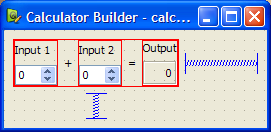
為演示,我們創建簡單 Calculator Form 應用程序。基於原始 計算器錶單 範例。
應用程序的組成由一源文件,
main.cpp
和 UI 文件。
The
calculatorform.ui
file designed with Qt Widgets Designer is shown below:
當使用
CMake
以構建可執行文件,
CMakeLists.txt
文件是必需的:
cmake_minimum_required(VERSION 3.16)
project(calculatorform LANGUAGES CXX)
set(CMAKE_AUTOMOC ON)
set(CMAKE_AUTOUIC ON)
find_package(Qt6 REQUIRED COMPONENTS Core Gui Widgets)
qt_add_executable(calculatorform
                  calculatorform.ui main.cpp)
set_target_properties(calculatorform PROPERTIES
    WIN32_EXECUTABLE TRUE
    MACOSX_BUNDLE TRUE
)
target_link_libraries(calculatorform  PUBLIC
    Qt::Core
    Qt::Gui
    Qt::Widgets
)
C++ 源文件列齣錶單在
qt_add_executable()
。選項
CMAKE_AUTOUIC
告訴
CMake
要運行
uic
工具以創建
ui_calculatorform.h
文件 (可以用於源文件)。
當使用
qmake
以構建可執行文件,
.pro
文件是必需的:
TEMPLATE    = app
FORMS       = calculatorform.ui
SOURCES     = main.cpp
此文件的特殊特徵是
FORMS
聲明,告訴
qmake
要處理文件采用
uic
。在此情況下,
calculatorform.ui
文件被用來創建
ui_calculatorform.h
文件,可以用於的任何文件列齣在
SOURCES
聲明。
注意: 可以使用 Qt Creator 來創建 Calculator Form 工程。自動生成 main.cpp、UI 和工程文件為期望構建工具 (可以修改)。
為以直接方式使用,包括
ui_calculatorform.h
文件直接在
main.cpp
:
#include "ui_calculatorform.h"
The
main
函數創建 Calculator 小部件通過構造標準
QWidget
用於托管用戶界麵描述通過
calculatorform.ui
文件。
int main(int argc, char *argv[])
{
    QApplication app(argc, argv);
    QWidget widget;
    Ui::CalculatorForm ui;
    ui.setupUi(&widget);
    widget.show();
    return app.exec();
}
在此情況下,
Ui::CalculatorForm
是界麵描述對象來自
ui_calculatorform.h
文件,設置所有對話框的 Widget 和在其信號與槽之間的連接。
The direct approach provides a quick and easy way to use simple, self-contained components in your applications. However, componens created with Qt Widgets Designer often require close integration with the rest of the application code. For instance, the
CalculatorForm
code provided above will compile and run, but the
QSpinBox
objects will not interact with the
QLabel
as we need a custom slot to carry out the add operation and display the result in the
QLabel
. To achieve this, we need to use the single inheritance approach.
為以單繼承方式使用,子類標準 Qt 小部件,並包括錶單用戶界麵對象的私有實例。
In this approach, we subclass a Qt widget and set up the user interface from within the constructor. Components used in this way expose the widgets and layouts used in the form to the Qt widget subclass, and provide a standard system for making signal and slot connections between the user interface and other objects in your application. The generated
Ui::CalculatorForm
structure is a member of the class.
This approach is used in the 計算器錶單 範例。
To ensure that we can use the user interface, we need to include the header file that
uic
generates before referring to
Ui::CalculatorForm
:
#include "ui_calculatorform.h"
The project file must be updated to include
calculatorform.h
。對於
CMake
:
qt_add_executable(calculatorform
    calculatorform.cpp calculatorform.h calculatorform.ui
    main.cpp
)
In specific cases, such as the example below where the include directive uses a relative path,
qt_add_ui
can be used to generate the
ui_calculatorform.h
file instead of relying on
AUTOUIC
.
When to prefer qt_add_ui over AUTOUIC
#include "src/files/ui_calculatorform.h"
qt_add_ui(calculatorform SOURCES calculatorform.ui
          INCLUDE_PREFIX src/files)
For
qmake
:
HEADERS = calculatorform.h
按以下方式定義子類:
class CalculatorForm : public QWidget
{
    Q_OBJECT
public:
    explicit CalculatorForm(QWidget *parent = nullptr);
private slots:
    void updateResult();
private:
    Ui::CalculatorForm ui;
};
The important feature of the class is the private
ui
object which provides the code for setting up and managing the user interface.
The constructor for the subclass constructs and configures all the widgets and layouts for the dialog just by calling the
ui
對象的
setupUi()
function. Once this has been done, it is possible to modify the user interface as needed.
CalculatorForm::CalculatorForm(QWidget *parent)
    : QWidget(parent)
{
    ui.setupUi(this);
    connect(ui.inputSpinBox1, &QSpinBox::valueChanged, this, &CalculatorForm::updateResult);
    connect(ui.inputSpinBox2, &QSpinBox::valueChanged, this, &CalculatorForm::updateResult);
}
We can connect signals and slots in user interface widgets in the usual way by adding the on_<object name> - prefix. For more information, see widgets-and-dialogs-with-auto-connect .
The advantages of this approach are its simple use of inheritance to provide a
QWidget
-based interface, and its encapsulation of the user interface widget variables within the
ui
data member. We can use this method to define a number of user interfaces within the same widget, each of which is contained within its own namespace, and overlay (or compose) them. This approach can be used to create individual tabs from existing forms, for example.
另外,
Ui::CalculatorForm
structure can be made a pointer member of the class. The header then looks as follows:
namespace Ui {
    class CalculatorForm;
}
class CalculatorForm : public QWidget
...
virtual ~CalculatorForm();
...
private:
    Ui::CalculatorForm *ui;
...
相應源文件看起來如下:
#include "ui_calculatorform.h"
CalculatorForm::CalculatorForm(QWidget *parent) :
    QWidget(parent), ui(new Ui::CalculatorForm)
{
    ui->setupUi(this);
}
CalculatorForm::~CalculatorForm()
{
    delete ui;
}
The advantage of this approach is that the user interface object can be forward-declared, which means that we do not have to include the generated
ui_calculatorform.h
file in the header. The form can then be changed without recompiling the dependent source files. This is particularly important if the class is subject to binary compatibility restrictions.
We generally recommend this approach for libraries and large applications. For more information, see 創建共享庫 .
Forms created with Qt Widgets Designer can be subclassed together with a standard QWidget 基類。 此方式製作由錶單定義的所有用戶界麵組件 (可在子類作用域內直接訪問),並啓用信號和槽連接按通常方式采用 connect () 函數。
需要包括頭文件由
uic
生成自
calculatorform.ui
文件,如下:
#include "ui_calculatorform.h"
The class is defined in a similar way to the one used in the
單繼承方式
, except that this time we inherit from
both
QWidget
and
Ui::CalculatorForm
,如下:
class CalculatorForm : public QWidget, private Ui::CalculatorForm
{
    Q_OBJECT
public:
    explicit CalculatorForm(QWidget *parent = nullptr);
private slots:
    void on_inputSpinBox1_valueChanged(int value);
    void on_inputSpinBox2_valueChanged(int value);
};
繼承
Ui::CalculatorForm
privately to ensure that the user interface objects are private in our subclass. We can also inherit it with the
public
or
protected
keywords in the same way that we could have made
ui
public or protected in the previous case.
The constructor for the subclass performs many of the same tasks as the constructor used in the 單繼承 範例:
CalculatorForm::CalculatorForm(QWidget *parent)
    : QWidget(parent)
{
    setupUi(this);
}
In this case, the widgets used in the user interface can be accessed in the same say as a widget created in code by hand. We no longer require the
ui
prefix to access them.
Qt 通知應用程序,若用戶界麵語言變化通過發送事件類型
QEvent::LanguageChange
。要調用成員函數
retranslateUi()
對於用戶界麵對象,重實現
QWidget::changeEvent()
在錶單類中,如下所示:
void CalculatorForm::changeEvent(QEvent *e)
{
    QWidget::changeEvent(e);
    switch (e->type()) {
    case QEvent::LanguageChange:
        ui->retranslateUi(this);
        break;
    default:
        break;
   }
}
另外,可以在運行時處理錶單,産生動態生成用戶界麵。這的完成可以使用 QtUiTools 模塊提供 QUiLoader class to handle forms created with Qt Widgets Designer.
A resource file containing a UI file is required to process forms at run time. Also, the application needs to be configured to use the
QtUiTools
module. This is done by including the following declarations in a
CMake
project file, ensuring that the application is compiled and linked appropriately.
find_package(Qt6 REQUIRED COMPONENTS Core Gui UiTools Widgets)
target_link_libraries(textfinder PUBLIC
    Qt::Core
    Qt::Gui
    Qt::UiTools
    Qt::Widgets
)
For
qmake
:
QT += uitools
The QUiLoader class provides a form loader object to construct the user interface. This user interface can be retrieved from any QIODevice ,如 QFile object, to obtain a form stored in a project's resource file. The QUiLoader::load () 函數使用文件中包含的用戶界麵描述構造錶單 Widget。
The QtUiTools 模塊類可以被包括使用以下指令:
#include <QtUiTools>
The QUiLoader::load () 函數的援引如此代碼所展示的來自 文本查找器 範例:
static QWidget *loadUiFile(QWidget *parent)
{
    QFile file(u":/forms/textfinder.ui"_s);
    if (!file.open(QIODevice::ReadOnly))
        qFatal("Cannot open resource file");
    return QUiLoader().load(&file, parent);
}
In a class that uses QtUiTools to build its user interface at run time, we can locate objects in the form using QObject::findChild (). For example, in the following code, we locate some components based on their object names and widget types:
    ui_findButton = findChild<QPushButton*>("findButton");
    ui_textEdit = findChild<QTextEdit*>("textEdit");
    ui_lineEdit = findChild<QLineEdit*>("lineEdit");
Processing forms at run-time gives the developer the freedom to change a program's user interface, just by changing the UI file. This is useful when customizing programs to suit various user needs, such as extra large icons or a different colour scheme for accessibility support.
The signals and slots connections defined for compile time or run time forms can either be set up manually or automatically, using QMetaObject 's ability to make connections between signals and suitably-named slots.
Generally, in a QDialog , if we want to process the information entered by the user before accepting it, we need to connect the clicked() signal from the OK button to a custom slot in our dialog. We will first show an example of the dialog in which the slot is connected by hand then compare it with a dialog that uses automatic connection.
We define the dialog in the same way as before, but now include a slot in addition to the constructor:
class ImageDialog : public QDialog, private Ui::ImageDialog
{
    Q_OBJECT
public:
    explicit ImageDialog(QWidget *parent = nullptr);
private slots:
    void checkValues();
};
The
checkValues()
slot will be used to validate the values provided by the user.
In the dialog's constructor we set up the widgets as before, and connect the Cancel 按鈕的 clicked () signal to the dialog's reject() slot. We also disable the autoDefault property in both buttons to ensure that the dialog does not interfere with the way that the line edit handles return key events:
ImageDialog::ImageDialog(QWidget *parent)
    : QDialog(parent)
{
    setupUi(this);
    okButton->setAutoDefault(false);
    cancelButton->setAutoDefault(false);
    ...
    connect(okButton, &QAbstractButton::clicked, this, &ImageDialog::checkValues);
}
連接 OK 按鈕的 clicked () signal to the dialog's checkValues() slot which we implement as follows:
void ImageDialog::checkValues()
{
    if (nameLineEdit->text().isEmpty()) {
        QMessageBox::information(this, tr("No Image Name"),
            tr("Please supply a name for the image."), QMessageBox::Cancel);
    } else {
        accept();
    }
}
This custom slot does the minimum necessary to ensure that the data entered by the user is valid - it only accepts the input if a name was given for the image.
Although it is easy to implement a custom slot in the dialog and connect it in the constructor, we could instead use
QMetaObject
's auto-connection facilities to connect the
OK
button's clicked() signal to a slot in our subclass.
uic
automatically generates code in the dialog's
setupUi()
function to do this, so we only need to declare and implement a slot with a name that follows a standard convention:
void on_<object name>_<signal name>(<signal parameters>);
注意: When renaming widgets in the form, the slot names need to be adapted accordingly, which can become a maintenance problem. For this reason, we recommend against using this in new code.
Using this convention, we can define and implement a slot that responds to mouse clicks on the OK 按鈕:
class ImageDialog : public QDialog, private Ui::ImageDialog
{
    Q_OBJECT
public:
    explicit ImageDialog(QWidget *parent = nullptr);
private slots:
    void on_okButton_clicked();
};
Another example of automatic signal and slot connection would be the
文本查找器
采用其
on_findButton_clicked()
槽。
使用 QMetaObject 係統以啓用信號和槽連接:
QMetaObject::connectSlotsByName(this);
This enables us to implement the slot, as shown below:
void TextFinder::on_findButton_clicked()
{
    QString searchString = ui_lineEdit->text();
    QTextDocument *document = ui_textEdit->document();
    bool found = false;
    // undo previous change (if any)
    document->undo();
    if (searchString.isEmpty()) {
        QMessageBox::information(this, tr("Empty Search Field"),
                                 tr("The search field is empty. "
                                    "Please enter a word and click Find."));
    } else {
        QTextCursor highlightCursor(document);
        QTextCursor cursor(document);
        cursor.beginEditBlock();
    ...
        cursor.endEditBlock();
        if (found == false) {
            QMessageBox::information(this, tr("Word Not Found"),
                                     tr("Sorry, the word cannot be found."));
        }
    }
}
Automatic connection of signals and slots provides both a standard naming convention and an explicit interface for widget designers to work to. By providing source code that implements a given interface, user interface designers can check that their designs actually work without having to write code themselves.
