Using a form created with Qt Widgets Designer in an application.
The Calculator Form Example shows how to use a form created with Qt Widgets Designer in an application by using the user interface information from a QWidget 子類。
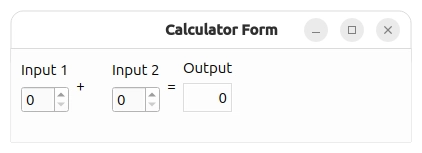
The example presents two spin boxes that are used to input integer values and a label that shows their sum. Whenever either of the spin boxes are updated, the signal-slot connections between the widgets and the form ensure that the label is also updated.
The user interface for this example is designed completely using Qt Widgets Designer. The result is a UI file describing the form, the widgets used, any signal-slot connections between them, and other standard user interface properties.
To ensure that the example can use this file, we enable the
CMAKE_AUTOUIC
feature and list the UI file in the source files:
set(CMAKE_AUTOUIC ON)
qt_add_executable(calculatorform
    calculatorform.cpp calculatorform.h calculatorform.ui
    main.cpp
)
For
qmake
, we need to include a
FORMS
declaration in the example's project file:
FORMS = calculatorform.ui
當構建工程時,
uic
will create a header file that lets us construct the form.
The
CalculatorForm
class uses the user interface described in the
calculatorform.ui
file. To access the form and its contents, we need to include the
ui_calculatorform.h
header file created by
uic
during the build process:
#include "ui_calculatorform.h"
定義
CalculatorForm
類通過子類化
QWidget
because the form itself is based on
QWidget
:
class CalculatorForm : public QWidget
{
    Q_OBJECT
public:
    explicit CalculatorForm(QWidget *parent = nullptr);
private slots:
    void updateResult();
private:
    Ui::CalculatorForm ui;
};
Apart from the constructor, the class contains a private slot
updateResult()
that performs the calculation and updates the output widget accordingly. The private
ui
member variable refers to the form, and is used to access the contents of the user interface.
The constructor simply calls the base class's constructor, sets up the form's user interface and connects the signals
QSpinBox::valueChanged
() to the slot
updateResult()
.
CalculatorForm::CalculatorForm(QWidget *parent)
    : QWidget(parent)
{
    ui.setupUi(this);
    connect(ui.inputSpinBox1, &QSpinBox::valueChanged, this, &CalculatorForm::updateResult);
    connect(ui.inputSpinBox2, &QSpinBox::valueChanged, this, &CalculatorForm::updateResult);
}
用戶界麵的設置是采用
setupUI()
函數。我們傳遞
this
作為自變量到此函數以使用
CalculatorForm
小部件本身作為用戶界麵容器。
槽
updateResult()
添加值並在 outputwidget 設置結果:
void CalculatorForm::updateResult()
{
    const int sum = ui.inputSpinBox1->value() + ui.inputSpinBox2->value();
    ui.outputWidget->setText(QString::number(sum));
}
It is called whenever the value of one of the spin boxes changes.
