The Fusion style is a desktop-oriented style.
The Fusion style is a platform-agnostic style that offers a desktop-oriented look and feel. It implements the same design language as the Fusion style for Qt Widgets .
The Fusion style automatically switches dark and light themes according to the system settings. For information on how to set custom theme colors, refer to the 定制 章节。
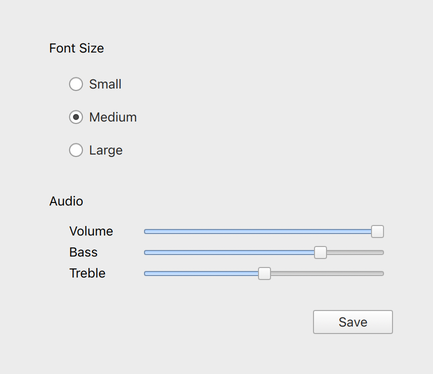
The light theme of the Fusion style. |
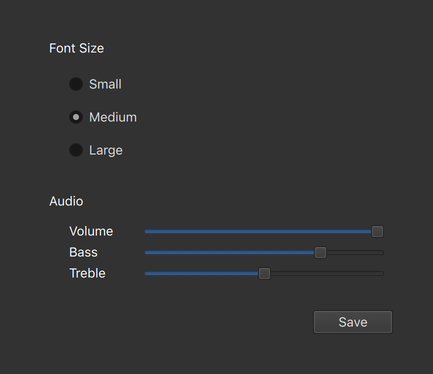
The dark theme of the Fusion style. |
To run an application with the Fusion style, see 在 Qt Quick Controls 中使用风格 .
注意: The Fusion style is not a native desktop style. The style runs on any platform, and looks similar everywhere. Minor differences may occur due to differences in the standard system palettes, available fonts, and font rendering engines.
The Fusion style uses the standard system Palette to provide colors that match the desktop environment.
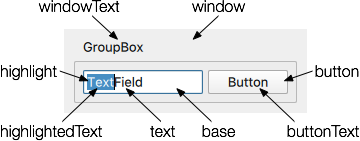
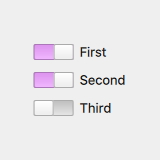
You can specify custom palettes for any control, popup ,或 application window . Explicit palette attributes are automatically propagated from parent to children, overriding any system defaults for that attribute. In the following example, the window and all three switches appear with a violet highlight color:
import QtQuick 2.12 import QtQuick.Controls 2.12 ApplicationWindow { visible: true palette.highlight: "violet" Column { anchors.centerIn: parent Switch { text: qsTr("First"); checked: true } Switch { text: qsTr("Second"); checked: true } Switch { text: qsTr("Third") } } } |
|
