Menu popup that can be used as a context menu or popup menu. 更多...
| import 语句: |
import QtQuick.Controls
|
| 继承: |
(since QtQuick.Controls 2.3 (Qt 5.10))
(since QtQuick.Controls 2.3 (Qt 5.10))
(since QtQuick.Controls 2.3 (Qt 5.10))
(since QtQuick.Controls 2.3 (Qt 5.10))
(since QtQuick.Controls 2.3 (Qt 5.10))
(since QtQuick.Controls 2.3 (Qt 5.10))
(since QtQuick.Controls 2.3 (Qt 5.10))
(since QtQuick.Controls 2.3 (Qt 5.10))
(since QtQuick.Controls 2.3 (Qt 5.10))
(since QtQuick.Controls 2.3 (Qt 5.10))
(since QtQuick.Controls 2.3 (Qt 5.10))
(since QtQuick.Controls 2.3 (Qt 5.10))
(since QtQuick.Controls 2.3 (Qt 5.10))
(since QtQuick.Controls 2.3 (Qt 5.10))
(since QtQuick.Controls 2.3 (Qt 5.10))
(since QtQuick.Controls 2.3 (Qt 5.10))
(since QtQuick.Controls 2.3 (Qt 5.10))
(since QtQuick.Controls 2.3 (Qt 5.10))
(since QtQuick.Controls 2.3 (Qt 5.10))
(since QtQuick.Controls 2.3 (Qt 5.10))
(since QtQuick.Controls 2.3 (Qt 5.10))
(since QtQuick.Controls 2.3 (Qt 5.10))
(since QtQuick.Controls 2.3 (Qt 5.10))
(since QtQuick.Controls 2.3 (Qt 5.10))
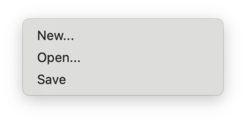
Native macOS menu. |
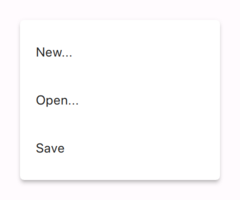
Non-native 材质风格 菜单。 |
Menu has two main use cases:
When used as a context menu, the recommended way of opening the menu is to call popup (). Unless a position is explicitly specified, the menu is positioned at the mouse cursor on desktop platforms that have a mouse cursor available, and otherwise centered over its parent item.
MouseArea {
    anchors.fill: parent
    acceptedButtons: Qt.LeftButton | Qt.RightButton
    onClicked: (mouse) => {
        if (mouse.button === Qt.RightButton)
            contextMenu.popup()
    }
    onPressAndHold: (mouse) => {
        if (mouse.source === Qt.MouseEventNotSynthesized)
            contextMenu.popup()
    }
    Menu {
        id: contextMenu
        MenuItem { text: "Cut" }
        MenuItem { text: "Copy" }
        MenuItem { text: "Paste" }
    }
}
When used as a popup menu, it is easiest to specify the position by specifying the desired x and y coordinates using the respective properties, and call open () to open the menu.
Button {
    id: fileButton
    text: "File"
    onClicked: menu.open()
    Menu {
        id: menu
        y: fileButton.height
        MenuItem {
            text: "New..."
        }
        MenuItem {
            text: "Open..."
        }
        MenuItem {
            text: "Save"
        }
    }
}
If the button should also close the menu when clicked, use the
Popup.CloseOnPressOutsideParent
flag:
    onClicked: menu.visible = !menu.visible
    Menu {
        id: menu
        // ...
        closePolicy: Popup.CloseOnEscape | Popup.CloseOnPressOutsideParent
由于 QtQuick .Controls 2.3 (Qt 5.10), it is also possible to create sub-menus and declare Action objects inside Menu:
Menu {
    Action { text: "Cut" }
    Action { text: "Copy" }
    Action { text: "Paste" }
    MenuSeparator { }
    Menu {
        title: "Find/Replace"
        Action { text: "Find Next" }
        Action { text: "Find Previous" }
        Action { text: "Replace" }
    }
}
Sub-menus are cascading by default on desktop platforms that have a mouse cursor available. Non-cascading menus are shown one menu at a time, and centered over the parent menu.
Typically, menu items are statically declared as children of the menu, but Menu also provides API to add , insert , move and remove items dynamically. The items in a menu can be accessed using itemAt () 或 contentChildren .
尽管 MenuItems are most commonly used with Menu, it can contain any type of item.
As it is inherited from Popup, Menu supports
margins
. By default, all of the built-in styles specify
0
for Menu's margins to ensure that the menu is kept within the bounds of the window. To allow a menu to go outside of the window (to animate it moving into view, for example), set the margins property to
-1
.
You can dynamically create menu items with Instantiator or dynamic object creation .
You can dynamically generate menu items with Instantiator . The following code shows how you can implement a "Recent Files" submenu, where the items come from a list of files stored in settings:
Menu {
    title: qsTr("File")
    Menu {
        id: recentFilesMenu
        title: qsTr("Recent Files")
        enabled: recentFilesInstantiator.count > 0
        Instantiator {
            id: recentFilesInstantiator
            model: settings.recentFiles
            delegate: MenuItem {
                text: settings.displayableFilePath(modelData)
                onTriggered: loadFile(modelData)
            }
            onObjectAdded: (index, object) => recentFilesMenu.insertItem(index, object)
            onObjectRemoved: (index, object) => recentFilesMenu.removeItem(object)
        }
        MenuSeparator {}
        MenuItem {
            text: qsTr("Clear Recent Files")
            onTriggered: settings.clearRecentFiles()
        }
    }
}
You can also dynamically load a component from a QML file using Qt.createComponent (). Once the component is ready, you can call its createObject () method to create an instance of that component.
Row {
    anchors.centerIn: parent
    Component {
        id: menuItemComponent
        MenuItem {}
    }
    Button {
        id: button
        text: "Menu"
        onClicked: menu.open()
        Menu {
            id: menu
        }
    }
    Button {
        text: "Add item"
        onClicked: {
            onClicked: {
                let menuItem = menuItemComponent.createObject(
                    menu.contentItem, { text: qsTr("New item") })
                menu.addItem(menuItem)
            }
        }
    }
}
Since Qt 6.8, a menu offers three different implementations, depending on the platform. You can choose which one should be preferred by setting popupType . This will let you control if a menu should be shown as a separate window, as an item inside the parent window, or as a native menu. You can read more about these options here .
默认
popupType
is decided by the style. The
macOS 风格
, for example, sets it to be
Popup.Native
, while the
想象风格
使用
Popup.Window
(which is the default when the style doesn't set a popup type). If you add customizations to a menu, and want those to be used regardless of the style, you should set the popup type to be
Popup.Window
(或
Popup.Item
) explicitly. Another alternative is to set the
Qt::AA_DontUseNativeMenuWindows
application attribute
. This will disable native context menus for the whole application, irrespective of the style.
Whether a menu will be able to use the preferred type depends on the platform.
Popup.Item
is supported on all platforms, but
Popup.Window
is normally only supported on desktop platforms. Additionally, if the menu is inside a
native menubar
, the menu will be native as well. And if the menu is a sub-menu inside another menu, the parent (or root) menu will decide the type.
When setting
popupType
to
Popup.Native
there are some limitations and differences compared to using
Popup.Item
and
Popup.Window
.
When using native menus, only a subset of the Menu API is supported on all platforms:
In addition, showing a popup (using, for example,
open
() 或
popup
()) will, on some platforms, be a blocking call. This means that the call will not return before the menu is closed again, which can affect the logic in your application. This is especially important to take into consideration if your application is targeting multiple platforms, and as such, sometimes run on platforms where native menus are not supported. In that case the popupType will fall back to
Popup.Item
, for example, and calls to
open
() will not be blocking.
Items like MenuItem will still react to clicks in the corresponding native menu item by emitting signals, for example, but will be replaced by their native counterpart.
Native menus are implemented using the available native menu APIs on the platform. Those menus, and all of their contents, will therefore be rendered by the platform, and not by QML. This means that the delegate will not be used for rendering. It will, however, always be instantiated (but hidden), so that functions such as onCompleted () execute regardless of platform and popupType .
Native menus are currently supported on the following platforms:
另请参阅 Customizing Menu , MenuItem , 菜单控件 , 弹出控件 , 从 JavaScript 动态创建 QML 对象 , Popup type , [QML] ,和 popupType .
|
cascade
:
bool
|
This property holds whether the menu cascades its sub-menus.
The default value is platform-specific. Menus are cascading by default on desktop platforms that have a mouse cursor available. Non-cascading menus are shown one menu at a time, and centered over the parent menu.
注意: Changing the value of the property has no effect while the menu is open.
注意: This property is only supported when using a non-native Menu .
该特性在 QtQuick.Controls 2.3 (Qt 5.10) 引入。
另请参阅 overlap .
This property holds the list of content data.
The list contains all objects that have been declared in QML as children of the menu, and also items that have been dynamically added or inserted using the addItem () 和 insertItem () methods, respectively.
注意:
不像
contentChildren
,
contentData
does include non-visual QML objects. It is not re-ordered when items are inserted or moved.
另请参阅 Item::data and contentChildren .
|
contentModel
:
model
|
This property holds the model used to display menu items.
The content model is provided for visualization purposes. It can be assigned as a model to a content item that presents the contents of the menu.
Menu {
    id: menu
    contentItem: ListView {
        model: menu.contentModel
    }
}
The model allows menu items to be statically declared as children of the menu.
|
count
:
int
|
This property holds the number of items.
该特性在 QtQuick.Controls 2.3 (Qt 5.10) 引入。
|
currentIndex
:
int
|
This property holds the index of the currently highlighted item.
Menu items can be highlighted by mouse hover or keyboard navigation.
注意: This property is only supported when using a non-native Menu .
该特性在 QtQuick.Controls 2.3 (Qt 5.10) 引入。
另请参阅 MenuItem::highlighted .
|
delegate
:
Component
|
This property holds the component that is used to create items to present actions.
Menu {
    Action { text: "Cut" }
    Action { text: "Copy" }
    Action { text: "Paste" }
}
注意: delegates will only be visible when using a non-native Menu .
该特性在 QtQuick.Controls 2.3 (Qt 5.10) 引入。
另请参阅 动作 .
|
focus : bool |
This property holds whether the popup wants focus.
When the popup actually receives focus,
activeFocus
将是
true
。更多信息,见
Qt Quick 中的键盘聚焦
.
默认值为
true
.
注意: This property is only supported when using a non-native Menu .
另请参阅 activeFocus .
|
icon group |
|---|
|
icon.cache : bool |
|
icon.color : color |
|
icon.height : int |
|
icon.name : string |
|
icon.source : url |
|
icon.width : int |
This property group was added in QtQuick .Controls 6.5.
| 名称 | 描述 |
|---|---|
| 名称 |
This property holds the name of the icon to use.
The icon will be loaded from the platform theme. If the icon is found in the theme, it will always be used; even if icon.source is also set. If the icon is not found, icon.source will be used instead. For more information on theme icons, see QIcon::fromTheme (). |
| source |
This property holds the name of the icon to use.
The icon will be loaded as a regular image. 若 icon.name is set and refers to a valid theme icon, it will always be used instead of this property. |
| width |
This property holds the width of the icon.
The icon's width will never exceed this value, though it will shrink when necessary. |
| height |
This property holds the height of the icon.
The icon's height will never exceed this value, though it will shrink when necessary. |
| color |
This property holds the color of the icon.
The icon is tinted with the specified color, unless the color is set to
|
| cache |
This property specifies whether the icon should be cached.
默认值为 true。 更多信息,见 cache . This property was introduced in QtQuick .Controls 2.13. |
注意: This property is only supported when using a non-native Menu .
另请参阅 AbstractButton::text , AbstractButton::display ,和 Icons in Qt Quick Controls .
|
overlap
:
real
|
This property holds the amount of pixels by which the menu horizontally overlaps its parent menu.
The property only has effect when the menu is used as a cascading sub-menu.
The default value is style-specific.
注意: Changing the value of the property has no effect while the menu is open.
注意: This property is only supported when using a non-native Menu .
该特性在 QtQuick.Controls 2.3 (Qt 5.10) 引入。
另请参阅 cascade .
|
title : string |
This property holds the title for the menu.
The title of a menu is often displayed in the text of a menu item when the menu is a submenu, and in the text of a tool button when it is in a menubar.
|
|
|
|
Opens the menu at the mouse cursor on desktop platforms that have a mouse cursor available, and otherwise centers the menu over its parent 项。
The menu can be optionally aligned to a specific menu
item
. This item will then become
current.
若无
item
is specified,
currentIndex
will be set to
-1
.
This QML method was introduced in QtQuick.Controls 2.3 (Qt 5.10).
另请参阅 Popup::open ().
|
|
|
|
Opens the menu at the specified position pos in the popups coordinate system, that is, a coordinate relative to its parent 项。
The menu can be optionally aligned to a specific menu
item
. This item will then become
current.
若无
item
is specified,
currentIndex
will be set to
-1
.
This QML method was introduced in QtQuick.Controls 2.3 (Qt 5.10).
另请参阅 Popup::open ().
|
|
|
|
Opens the menu at the specified position x , y in the popups coordinate system, that is, a coordinate relative to its parent 项。
The menu can be optionally aligned to a specific menu
item
. This item will then become
current.
若无
item
is specified,
currentIndex
will be set to
-1
.
This QML method was introduced in QtQuick.Controls 2.3 (Qt 5.10).
另请参阅 dismiss () 和 Popup::open ().
|
|
Returns the action at
index
,或
null
if the index is not valid or there is no action at the specified index.
This method was introduced in QtQuick.Controls 2.3 (Qt 5.10).
|
|
添加 action to the end of this menu. The menu does not take ownership of the newly added action .
This method was introduced in QtQuick.Controls 2.3 (Qt 5.10).
|
void addItem ( Item item ) |
添加 item to the end of the list of items. The menu does not take ownership of the newly added item .
另请参阅 Dynamically Generating Menu Items .
|
|
添加 menu as a sub-menu to the end of this menu. The menu does not take ownership of the newly added menu .
This method was introduced in QtQuick.Controls 2.3 (Qt 5.10).
|
|
Closes all menus in the hierarchy that this menu belongs to.
注意:
不像
close
() that only closes a menu and its sub-menus (when using
non-native menus
),
dismiss()
closes the whole hierarchy of menus, including the parent menus. In practice,
close()
is suitable e.g. for implementing navigation in a hierarchy of menus, and
dismiss()
is the appropriate method for closing the whole hierarchy of menus.
This method was introduced in QtQuick.Controls 2.3 (Qt 5.10).
另请参阅 popup () 和 Popup::close ().
|
|
插入 action at index . The index is within all items in the menu. The menu does not take ownership of the newly inserted action .
This method was introduced in QtQuick.Controls 2.3 (Qt 5.10).
插入 item at index . The menu does not take ownership of the newly inserted item .
另请参阅 Dynamically Generating Menu Items .
|
|
插入 menu as a sub-menu at index . The index is within all items in the menu. The menu does not take ownership of the newly inserted menu .
This method was introduced in QtQuick.Controls 2.3 (Qt 5.10).
返回项在
index
,或
null
if it does not exist.
|
|
Returns the sub-menu at
index
,或
null
if the index is not valid or there is no sub-menu at the specified index.
This method was introduced in QtQuick.Controls 2.3 (Qt 5.10).
Moves an item from one index to another.
|
|
Removes and destroys the specified action .
This method was introduced in QtQuick.Controls 2.3 (Qt 5.10).
|
|
Removes and destroys the specified item .
This method was introduced in QtQuick.Controls 2.3 (Qt 5.10).
|
|
Removes and destroys the specified menu .
This method was introduced in QtQuick.Controls 2.3 (Qt 5.10).
|
|
Removes and returns the action at index . The index is within all items in the menu.
注意: The ownership of the action is transferred to the caller.
This method was introduced in QtQuick.Controls 2.3 (Qt 5.10).
|
|
Removes and returns the item at index .
注意: The ownership of the item is transferred to the caller.
This method was introduced in QtQuick.Controls 2.3 (Qt 5.10).
|
|
Removes and returns the menu at index . The index is within all items in the menu.
注意: The ownership of the menu is transferred to the caller.
This method was introduced in QtQuick.Controls 2.3 (Qt 5.10).
