Encapsulates a simple tree model. 更多...
| import 语句: |
import Qt.labs.qmlmodels
|
| Since: | Qt 6.10 |
The TreeModel type stores JavaScript/JSON objects as data for a tree model that can be used with TreeView . It is intended to support very simple models without requiring the creation of a custom QAbstractItemModel subclass in C++.
import QtQuick
import QtQuick.Controls
import Qt.labs.qmlmodels
ApplicationWindow {
    visible: true
    width: 500
    height: 500
    TreeView {
        id: treeView
        anchors.fill: parent
        selectionModel: ItemSelectionModel {}
        model: TreeModel {
            id: treeModel
            TableModelColumn {
                display: "checked"
            }
            TableModelColumn {
                display: "size"
            }
            TableModelColumn {
                display: "type"
            }
            TableModelColumn {
                display: "name"
            }
            TableModelColumn {
                display: "lastModified"
            }
            rows: [{
                    checked: false,
                    size: "—",
                    type: "folder",
                    name: "Documents",
                    lastModified: "2025-07-01",
                    rows: [{
                            checked: true,
                            size: "24 KB",
                            type: "file",
                            name: "Resume.pdf",
                            lastModified: "2025-06-20",
                        }, {
                            checked: false,
                            size: "2 MB",
                            type: "folder",
                            name: "Reports",
                            lastModified: "2025-06-10",
                            rows: [{
                                    checked: true,
                                    size: "850 KB",
                                    type: "file",
                                    name: "Q2_Report.docx",
                                    lastModified: "2025-06-15",
                                }, {
                                    checked: false,
                                    size: "1.2 MB",
                                    type: "file",
                                    name: "Q3_Plan.xlsx",
                                    lastModified: "2025-06-18",
                                }]
                        }]
                },
                {
                    checked: false,
                    size: "—",
                    type: "folder",
                    name: "Pictures",
                    lastModified: "2025-05-30",
                    rows: [{
                            checked: true,
                            size: "3.5 MB",
                            type: "file",
                            name: "Vacation.jpg",
                            lastModified: "2025-05-15",
                        }, {
                            checked: false,
                            size: "2.1 MB",
                            type: "file",
                            name: "Family.png",
                            lastModified: "2025-05-20",
                        }]
                }
            ]
        }
        delegate: TreeViewDelegate {}
    }
}
The model's initial data is set with either the rows property or by calling appendRow (). Each column in the model is specified by declaring a TableModelColumn instance, where the order of each instance determines its column index. Once the model's Component::completed () signal has been emitted, the columns and roles will have been established and are then fixed for the lifetime of the model.
Each row represents a node in the tree. Each node has the same type of columns. The TreeModel is designed to work with JavaScript/JSON data so each row is a list of simple key-value pairs:
                {
                    checked: false,
                    size: "—",
                    type: "folder",
                    name: "Pictures",
                    lastModified: "2025-05-30",
                    rows: [{
                            checked: true,
                            size: "3.5 MB",
                            type: "file",
                            name: "Vacation.jpg",
                            lastModified: "2025-05-15",
                        }, {
                            checked: false,
                            size: "2.1 MB",
                            type: "file",
                            name: "Family.png",
                            lastModified: "2025-05-20",
                        }]
                }
A node can have child nodes and these will be stored in an array associated with the "rows" key. "rows" is reserved for this purpose: only the list of child nodes should be associated with this key.
The model is manipulated via QModelIndices . To access a specific row/node, the getRow () function can be used. It's also possible to access the model's JavaScript data directly via the rows property, but it is not possible to modify the model data this way.
To add new rows, use appendRow (). To modify existing rows, use setRow (), removeRow () 和 clear ().
|
columnCount
:
int
|
This read-only property holds the number of columns in the model.
The number of columns is fixed for the lifetime of the model after the rows property is set or appendRow () is called for the first time.
|
rows : object |
This property holds the model data in the form of an array of rows.
另请参阅 getRow (), setRow (), appendRow (), clear (),和 columnCount .
|
appendRow ( object treeRow ) |
追加 treeRow to the root node.
另请参阅 setRow () 和 removeRow ().
|
appendRow ( QModelIndex parent , object treeRow ) |
Appends a new treeRow to parent , with the values (cells) in treeRow .
treeModel.appendRow(index, {
    checked: false,
    size: "-",
    type: "folder",
    name: "Orders",
    lastModified: "2025-07-02",
    rows: [
        {
            checked: true,
            size: "38 KB",
            type: "file",
            name: "monitors.xlsx",
            lastModified: "2025-07-02"
        },
        {
            checked: true,
            size: "54 KB",
            type: "file",
            name: "notebooks.xlsx",
            lastModified: "2025-07-02"
        }
    ]
});
若 parent is invalid, treeRow gets appended to the root node.
另请参阅 setRow () 和 removeRow ().
|
clear () |
Removes all rows from the model.
另请参阅 removeRow ().
Returns the data from the TreeModel 在给定 index belonging to the given role .
|
object getRow (const QModelIndex & rowIndex ) |
Returns the treeRow at rowIndex in the model.
注意: the returned object cannot be used to modify the contents of the model; use setTreeRow() instead.
另请参阅 setRow (), appendRow (),和 removeRow ().
返回 QModelIndex object referencing the given treeIndex and column , which can be passed to the data () function to get the data from that cell, or to setData () to edit the contents of that cell.
The first parameter treeIndex represents a path of row numbers tracing from the root to the desired row and is used for navigation inside the tree. This is best explained through an example.
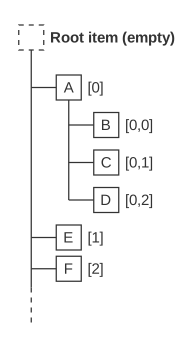
|
|
With this overload it is possible to obtain a QModelIndex to a node without having a QModelIndex to its parent node.
If no node is found by the list specified, an invalid model index is returned. Please note that an invalid model index is referencing the root of the node.
另请参阅 QModelIndex and related Classes in QML and data ().
返回 QModelIndex object referencing the given row and column of a given parent which can be passed to the data () function to get the data from that cell, or to setData () to edit the contents of that cell.
另请参阅 QModelIndex and related Classes in QML and data ().
|
removeRow ( QModelIndex rowIndex ) |
Removes the TreeRow referenced by rowIndex 来自模型。
treeModel.removeTreeRow(rowIndex)
另请参阅 clear ().
|
bool setData ( QModelIndex index , variant value , string role ) |
Inserts or updates the data field named by role in the TreeRow at the given index with value . Returns true if sucessful, false if not.
|
setRow ( QModelIndex rowIndex , object treeRow ) |
Replaces the TreeRow at rowIndex in the model with treeRow . A row with child rows will be rejected.
All columns/cells must be present in
treeRow
, and in the correct order. The child rows of the row remain unaffected.
treeModel.setRow(rowIndex, {
    checked: true,
    size: "-",
    type: "folder",
    name: "Subtitles",
    lastModified: "2025-07-07",
    iconColor: "blue"
});
另请参阅 appendRow ().
