QPalette 類包含各 Widget 狀態的顔色組。 更多...
| 頭: |
#include <QPalette>
|
| CMake: |
find_package(Qt6 REQUIRED COMPONENTS Gui)
target_link_libraries(mytarget PRIVATE Qt6::Gui)
|
| qmake: |
QT += gui
|
| enum | ColorGroup { Disabled, Active, Inactive, Normal } |
| enum | ColorRole { Window, WindowText, Base, AlternateBase, ToolTipBase, …, NoRole } |
| QPalette () | |
| QPalette (Qt::GlobalColor button ) | |
| QPalette (const QColor & button ) | |
| QPalette (const QColor & button , const QColor & window ) | |
| QPalette (const QBrush & windowText , const QBrush & button , const QBrush & light , const QBrush & dark , const QBrush & mid , const QBrush & text , const QBrush & bright_text , const QBrush & base , const QBrush & window ) | |
| QPalette (const QPalette & p ) | |
| QPalette (QPalette && other ) | |
| ~QPalette () | |
(從 6.6 起)
const QBrush &
|
accent () const |
| const QBrush & | alternateBase () const |
| const QBrush & | base () const |
| const QBrush & | brightText () const |
| const QBrush & | brush (QPalette::ColorGroup group , QPalette::ColorRole role ) const |
| const QBrush & | brush (QPalette::ColorRole role ) const |
| const QBrush & | button () const |
| const QBrush & | buttonText () const |
| qint64 | cacheKey () const |
| const QColor & | color (QPalette::ColorGroup group , QPalette::ColorRole role ) const |
| const QColor & | color (QPalette::ColorRole role ) const |
| QPalette::ColorGroup | currentColorGroup () const |
| const QBrush & | dark () const |
| const QBrush & | highlight () const |
| const QBrush & | highlightedText () const |
| bool | isBrushSet (QPalette::ColorGroup cg , QPalette::ColorRole cr ) const |
| bool | isCopyOf (const QPalette & p ) const |
| bool | isEqual (QPalette::ColorGroup cg1 , QPalette::ColorGroup cg2 ) const |
| const QBrush & | light () const |
| const QBrush & | link () const |
| const QBrush & | linkVisited () const |
| const QBrush & | mid () const |
| const QBrush & | midlight () const |
| const QBrush & | placeholderText () const |
| QPalette | resolve (const QPalette & other ) const |
| void | setBrush (QPalette::ColorRole role , const QBrush & brush ) |
| void | setBrush (QPalette::ColorGroup group , QPalette::ColorRole role , const QBrush & brush ) |
| void | setColor (QPalette::ColorGroup group , QPalette::ColorRole role , const QColor & color ) |
| void | setColor (QPalette::ColorRole role , const QColor & color ) |
| void | setColorGroup (QPalette::ColorGroup cg , const QBrush & windowText , const QBrush & button , const QBrush & light , const QBrush & dark , const QBrush & mid , const QBrush & text , const QBrush & bright_text , const QBrush & base , const QBrush & window ) |
| void | setCurrentColorGroup (QPalette::ColorGroup cg ) |
| const QBrush & | shadow () const |
| void | swap (QPalette & other ) |
| const QBrush & | text () const |
| const QBrush & | toolTipBase () const |
| const QBrush & | toolTipText () const |
| const QBrush & | window () const |
| const QBrush & | windowText () const |
| QVariant | operator QVariant () const |
| bool | operator!= (const QPalette & p ) const |
| QPalette & | operator= (QPalette && other ) |
| QPalette & | operator= (const QPalette & p ) |
(從 6.6 起)
bool
|
operator== (const QPalette & p ) const |
| QDataStream & | operator<< (QDataStream & s , const QPalette & p ) |
| QDataStream & | operator>> (QDataStream & s , QPalette & p ) |
調色闆由 3 個顔色組組成: Active , Disabled ,和 Inactive 。Qt 中的所有 Widget 都包含調色闆,並使用它們的調色闆來繪製自己。這使 UI (用戶界麵) 變得易於配置,且更容易保持一緻性。
若創建新的 Widget,強烈推薦使用調色闆中的顔色,而不是硬編碼特定顔色。
顔色組:
活動和不活動窗口兩者,可以包含禁用 Widget (被禁用 Widget 經常被稱為 不可訪問 or 變灰 )。
大多數風格,Active 和 Inactive 看起來一樣。
可以為調色闆的任何顔色組中的特定角色,設置顔色和筆刷采用 setColor () 和 setBrush ()。顔色組包含用於繪製 Widget 自身的一組顔色。推薦 Widget 使用來自調色闆的顔色組角色 (譬如:foreground 和 base),而不是像 "紅色" 或 "綠鬆石色" 的文字顔色。顔色角色的枚舉和定義在 ColorRole 文檔編製。
強烈推薦使用當前風格的默認調色闆 (返迴通過 QGuiApplication::palette ()) 並按需求修改。這由 Qt 小部件完成的,當繪製它們時。
要修改顔色組,調用函數 setColor () 和 setBrush (),從屬想要純色,或像素圖模式。
還有相應的 color () 和 brush () getter,和常用方便函數以獲取 ColorRole 對於當前 ColorGroup : window (), windowText (), base (),等。
可以使用拷貝構造函數拷貝調色闆,並測試看 2 調色闆是否 identical 使用 isCopyOf ().
QPalette 的優化是通過使用 隱式共享 ,因此,把 QPalette 對象作為自變量傳遞很高效。
警告: 某些風格的所有繪製並不使用調色闆 (例如:若它們利用本機主題引擎)。這是 Windows Vista 和 macOS 風格兩者的情況。
另請參閱 QApplication::setPalette (), QWidget::setPalette (),和 QColor .
| 常量 | 值 | 描述 |
|---|---|---|
QPalette::Disabled
|
1
|
|
QPalette::Active
|
0
|
|
QPalette::Inactive
|
2
|
|
QPalette::Normal
|
Active
|
Active 的同義詞 |
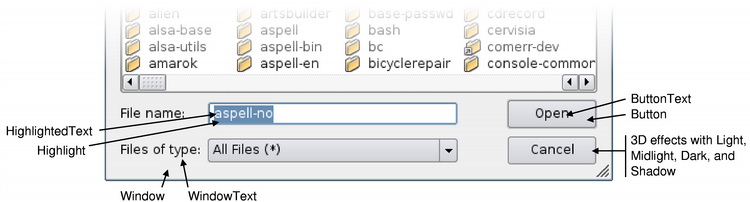
ColorRole 枚舉定義當前 GUI 中使用的不同符號顔色角色。
中心角色包括:
| 常量 | 值 | 描述 |
|---|---|---|
QPalette::Window
|
10
|
一般背景色。 |
QPalette::WindowText
|
0
|
一般前景色。 |
QPalette::Base
|
9
|
主要用作文本錄入 Widget 的背景色,但也可用於其它描繪 (譬如:組閤框下拉列錶和工具欄手柄的背景)。它通常為白色,或另一淺色。 |
QPalette::AlternateBase
|
16
|
在交替行顔色的視圖中用作替代背景色 (見 QAbstractItemView::setAlternatingRowColors ()). |
QPalette::ToolTipBase
|
18
|
用作背景色對於 QToolTip and QWhatsThis 。工具提示使用 Inactive (不活動) 顔色組對於 QPalette ,因為工具提示不是活動窗口。 |
QPalette::ToolTipText
|
19
|
用作前景顔色對於 QToolTip and QWhatsThis 。工具提示使用 Inactive (不活動) 顔色組對於 QPalette ,因為工具提示不是活動窗口。 |
QPalette::PlaceholderText
|
20
|
用作各種文本輸入 Widget 的占位符顔色。該枚舉值在 Qt 5.12 引入 |
QPalette::Text
|
6
|
前景顔色使用
Base
。這通常如同
WindowText
,在這種情況下,它必須提供很好的對比與
Window
and
Base
.
|
QPalette::Button
|
1
|
一般按鈕的背景色。此背景可以不同於
Window
因為有些樣式要求不同背景色對於按鈕。
|
QPalette::ButtonText
|
8
|
前景顔色使用
Button
顔色。
|
QPalette::BrightText
|
7
|
文本顔色很不同於
WindowText
,且有鮮明對比與
Dark
。通常用於需要繪製的文本,其中
Text
or
WindowText
會給齣較差的對比 (譬如:按下按鈕)。注意,文本顔色可以用於除僅單詞外的東西;文本顔色
usually
用於文本,但綫條、圖標、等使用文本顔色角色也非常常見。
|
有一些顔色角色主要用於 3D 斜角和陰影效果。所有這些通常派生自
Window
,並以依賴這種關係的方式被使用。例如,按鈕依賴它以使斜角看起來很有吸引力,和 Motif 滾動條依賴於
Mid
稍微不同於
Window
.
| 常量 | 值 | 描述 |
|---|---|---|
QPalette::Light
|
2
|
更亮比
Button
顔色。
|
QPalette::Midlight
|
3
|
介於
Button
and
Light
.
|
QPalette::Dark
|
4
|
更暗比
Button
.
|
QPalette::Mid
|
5
|
介於
Button
and
Dark
.
|
QPalette::Shadow
|
11
|
非常深的顔色。默認情況下,陰影顔色為 Qt::black . |
被選中 (標記) 的項有 2 種角色:
| 常量 | 值 | 描述 |
|---|---|---|
QPalette::Highlight
|
12
|
指示選定項 (或當前項) 的顔色。默認情況下,高亮顔色為 Qt::darkBlue . |
QPalette::Accent (since Qt 6.6)
|
21
|
通常是對比 (或補充) Base、Windows 和 Button 顔色的顔色。它通常錶示用戶對桌麵個性化的選擇。交互組件的樣式化是典型用例。除非明確設置,它默認為高亮。 |
QPalette::HighlightedText
|
13
|
文本顔色形成對比與
Highlight
。默認情況下,高亮文本顔色為
Qt::white
.
|
有 2 超鏈接相關顔色角色:
| 常量 | 值 | 描述 |
|---|---|---|
QPalette::Link
|
14
|
用於未拜訪超鏈接的文本顔色。默認情況下,鏈接顔色為 Qt::blue . |
QPalette::LinkVisited
|
15
|
用於已拜訪超鏈接的文本顔色。默認情況下,鏈接拜訪顔色為 Qt::magenta . |
注意,不要使用
Link
and
LinkVisited
角色,當在 Qt 中渲染富文本時,推薦使用 CSS 和
QTextDocument::setDefaultStyleSheet
() 函數來更改鏈接的外觀。例如:
    QTextBrowser browser;
    QColor linkColor(Qt::red);
    QString sheet = QString::fromLatin1("a { text-decoration: underline; color: %1 }").arg(linkColor.name());
    browser.document()->setDefaultStyleSheet(sheet);
| 常量 | 值 | 描述 |
|---|---|---|
QPalette::NoRole
|
17
|
沒有角色;此特殊角色經常用於指示,沒有賦值角色。 |
構造沒有設置顔色角色的空調色闆對象。
當用作調色闆對於 QWidget 顔色,解析如描述通過 QWidget::setPalette ().
另請參閱 QApplication::setPalette () 和 QApplication::palette ().
構造調色闆從
button
顔色。其它顔色是自動計算的,基於此顔色。
Window
也會是按鈕顔色。
構造調色闆從
button
顔色。其它顔色是自動計算的,基於此顔色。
Window
也會是按鈕顔色。
構造調色闆從 button 顔色和 window 。其它顔色是基於這些顔色自動計算的。
構造調色闆。可以傳遞畫筆、像素圖、或純色為 windowText , button , light , dark , mid , text , bright_text , base and window .
另請參閱 QBrush .
構造副本為 p .
此構造函數很快感謝 隱式共享 .
[noexcept]
QPalette::
QPalette
(
QPalette
&&
other
)
移動構造 QPalette 實例,使之指嚮相同對象 other 所指嚮的。
在被移動後,隻可以賦值給或銷毀 other 。任何其它操作都將導緻未定義行為。
[noexcept]
QPalette::
~QPalette
()
銷毀調色闆。
[since 6.6]
const
QBrush
&QPalette::
accent
() const
返迴當前顔色組的重點筆刷。
該函數在 Qt 6.6 引入。
返迴當前顔色組的替代基筆刷。
返迴當前顔色組的基畫筆。
返迴當前顔色組的亮文本前景筆刷。
返迴筆刷按指定顔色 group ,用於給定顔色 role .
另請參閱 color (), setBrush (),和 ColorRole .
這是重載函數。
返迴已設置的筆刷為給定顔色 role 在當前 ColorGroup .
另請參閱 color (), setBrush (),和 ColorRole .
返迴當前顔色組的按鈕筆刷。
返迴當前顔色組的按鈕文本前景筆刷。
返迴內容標識數對於此 QPalette 對象。截然不同的 QPalette 對象可以擁有相同鍵,若它們引用相同內容。
cacheKey() 會改變,當變更調色闆時。
返迴顔色按指定顔色 group ,用於給定顔色 role .
另請參閱 brush (), setColor (),和 ColorRole .
這是重載函數。
返迴已設置的顔色為給定顔色 role 在當前 ColorGroup .
返迴調色闆的當前顔色組。
另請參閱 setCurrentColorGroup ().
返迴當前顔色組的深色筆刷。
返迴當前顔色組的高亮筆刷。
返迴當前顔色組的高亮文本筆刷。
返迴
true
若
ColorGroup
cg
and
ColorRole
cr
先前在此調色闆中有設置;否則返迴
false
.
The ColorGroup cg 應該小於 QPalette::NColorGroups ,但可以使用 QPalette::Current 。 在此情況下,將使用先前設置的當前顔色組。
The ColorRole cr 應該小於 QPalette::NColorRoles .
另請參閱 setBrush () 和 currentColorGroup ().
返迴
true
若此調色闆和
p
是彼此的副本 (即:它們中的一個是作為其它的副本創建的,且隨後未修改);否則返迴
false
。這比相等嚴格得多。
另請參閱 operator= () 和 operator== ().
返迴
true
(通常很快) 若顔色組
cg1
等於
cg2
;否則返迴
false
.
返迴當前顔色組的淺色筆刷。
返迴當前顔色組未拜訪的鏈接文本筆刷。
返迴當前顔色組拜訪的鏈接文本筆刷。
返迴當前顔色組的中間筆刷。
返迴當前顔色組的中光筆刷。
返迴當前顔色組的占位符文本筆刷。
注意: 在 Qt 5.12 之前,占位符文本顔色被硬編碼成 QPalette::text (). color () 采用應用瞭 128 的 Alpha。在 Qt 6,它是獨立顔色。
返迴新的 QPalette 是並集對於此實例和 other 。在此實例中設置的顔色角色,優先。未在此實例中設置的角色將獲取自 other .
另請參閱 isBrushSet .
設置筆刷為給定顔色 role 到指定 brush 為調色闆中的所有組。
另請參閱 brush (), setColor (),和 ColorRole .
這是重載函數。
設置筆刷按指定顔色 group ,用於給定顔色 role ,到 brush .
另請參閱 brush (), setColor (),和 ColorRole .
設置顔色按指定顔色 group ,用於給定顔色 role ,到指定純 color .
另請參閱 setBrush (), color (),和 ColorRole .
這是重載函數。
設置的顔色用於給定顔色 role ,在所有顔色組,到指定純 color .
另請參閱 brush (), setColor (),和 ColorRole .
設置組按 cg 。可以傳遞畫筆、像素圖、或純色為 windowText , button , light , dark , mid , text , bright_text , base and window .
另請參閱 QBrush .
把調色闆的當前顔色組設為 cg .
另請參閱 currentColorGroup ().
返迴當前顔色組的陰影筆刷。
[noexcept]
void
QPalette::
swap
(
QPalette
&
other
)
交換此調色闆實例與 other 。此操作很快且從不失敗。
返迴當前顔色組的文本前景筆刷。
返迴當前顔色組的工具提示基筆刷。此筆刷用於 QToolTip and QWhatsThis .
注意: 工具提示使用 Inactive (不活動) 顔色組對於 QPalette ,因為工具提示不是活動窗口。
返迴當前顔色組的工具提示文本筆刷。此筆刷用於 QToolTip and QWhatsThis .
注意: 工具提示使用 Inactive (不活動) 顔色組對於 QPalette ,因為工具提示不是活動窗口。
返迴當前顔色組的窗口 (一般背景) 筆刷。
返迴當前顔色組的窗口文本 (一般前景) 筆刷。
返迴調色闆作為 QVariant
返迴
true
(很慢) 若此調色闆不同於
p
;否則返迴
false
(通常很快)。
注意: 當前 ColorGroup 不考慮,當比較調色闆時
另請參閱 operator== ().
[noexcept]
QPalette
&QPalette::
operator=
(
QPalette
&&
other
)
移動賦值 other 到此 QPalette 實例。
賦值 p 到此調色闆,並返迴此調色闆的引用。
此操作很快,感謝 隱式共享 .
[since 6.6]
bool
QPalette::
operator==
(const
QPalette
&
p
) const
返迴
true
(通常很快) 若此調色闆等於
p
;否則返迴
false
(很慢)。
注意: 下列不考慮,當比較調色闆時:
current
ColorGroup
該函數在 Qt 6.6 引入。
另請參閱 operator!= ().
寫入調色闆 p 到流 s 並返迴流引用。
另請參閱 QDataStream 運算符格式 .
讀取調色闆從流 s 到調色闆 p ,並返迴流引用。
另請參閱 QDataStream 運算符格式 .
