Demonstrates how to handle website permission requests, and manage existing permissions.
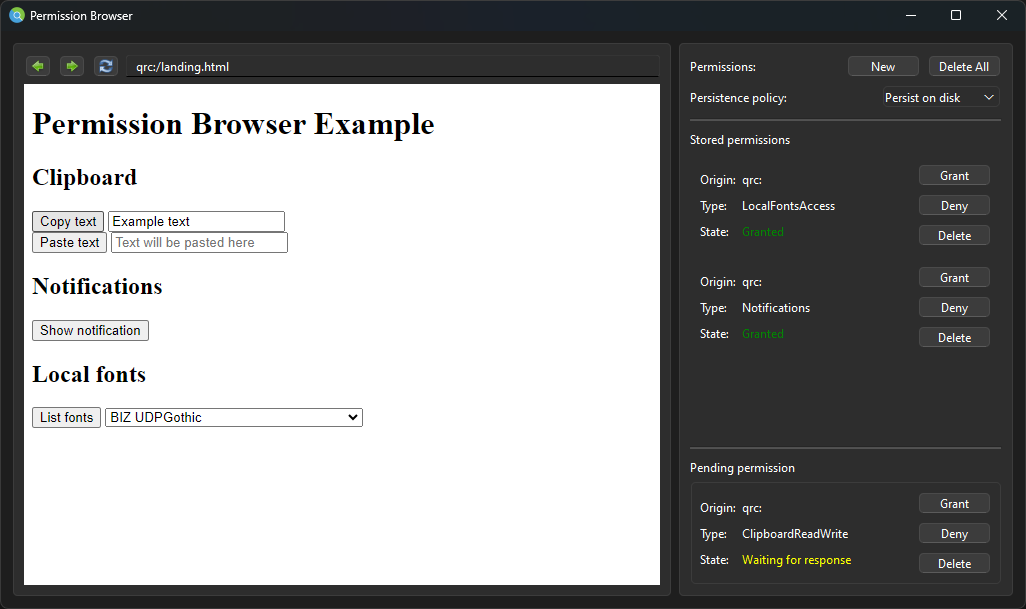
Permission Browser demonstrates how to use the QWebEnginePermission class to manage website permissions. The example includes code for handling incoming permission requests, as well as modifying already existing permissions. Also demonstrated are the effects of the different permission persistence policies defined within the QWebEngineProfile 类。
要运行范例从 Qt Creator ,打开 欢迎 模式,然后选择范例从 范例 。更多信息,见 Qt Creator:教程:构建并运行 .
The
MainWindow
类继承
QMainWindow
. Inside, we declare a convenience pointer to the
QVBoxLayout
which will lay out the widgets used to manipulate individual permissions, as well as another convenience pointer to the widget displaying the currently pending permission request. We also declare a
QWebEngineView
, which will be used to display the actual webpage contents.
class MainWindow : public QMainWindow, public Ui_MainWindow
{
    Q_OBJECT
public:
    explicit MainWindow(const QUrl &url);
    ~MainWindow();
private slots:
    void handlePermissionRequested(QWebEnginePermission permission);
    void handleUrlChanged(const QUrl &url);
    void handlePermissionModified(PermissionWidget *widget);
    void handleDeleteAllClicked();
    void handleNewClicked();
    void handleRefreshClicked();
    void handleBackClicked();
    void handleForwardClicked();
    void handlePolicyComboBoxIndexChanged(int);
private:
    bool containsPermission(const QWebEnginePermission &permission);
    PermissionWidget *createPermissionWidget(const QWebEnginePermission &permission);
    void loadStoredPermissions();
    QVBoxLayout *m_layout;
    QWebEngineProfile *m_profile;
    QWebEngineView *m_webview;
    PermissionWidget *m_pendingWidget;
};
The rest of the layout for the application is defined inside mainwindow.ui, and was created using Qt Creator's Design mode.
MainWindow
is a child class of Ui_MainWindow, which is a C++ class generated at compile time from the definitions found inside mainwindow.ui.
The
PermissionWidget
class defines a widget corresponding to a single
QWebEnginePermission
instance. For convenience, the
QWebEnginePermission
object is stored within. The widget itself has controls for granting, denying, or deleting the permission; all of this is defined inside
PermissionWidget.ui
.
class PermissionWidget : public QWidget, public Ui_PermissionWidget
{
    Q_OBJECT
public:
    PermissionWidget(const QWebEnginePermission &permission, QWidget *parent = nullptr);
    QWebEnginePermission m_permission;
signals:
    void permissionModified(PermissionWidget *widget);
private:
    void updateState();
};
When clicking the "New" button in the main window's UI, a pop-up window will appear, allowing the user to pre-grant permission to a known origin. That pop-up is defined by the
PermissionDialog
类:
class PermissionDialog : public QDialog, public Ui_PermissionDialog
{
    Q_OBJECT
public:
    PermissionDialog(const QWebEngineProfile *profile, QWidget *parent = nullptr);
    QWebEnginePermission permission() const;
private:
    const QWebEngineProfile *m_profile;
};
Whenever a website uses an API that might compromise the user's privacy, the browser is expected to show them a prompt asking to either grant or deny permission. The PermissionBrowser example has a dedicated section at the bottom right, which gets populated with a
PermissionWidget
whenever that happens.
The
PermissionWidget
displays the permission's origin, the requested
QWebEnginePermission::PermissionType
, as well as the current status of that permission. It also has buttons for granting and denying the permission. Since the permission status is (by default) remembered, the delete button allows the user to remove the permission from the underlying storage.
To achieve all this, we first connect
QWebEnginePage
's
permissionRequested
signal to
MainWindow
's
handlePermissionRequested
槽:
connect(m_webview->page(), &QWebEnginePage::permissionRequested, this, &MainWindow::handlePermissionRequested);
The signal handler is relatively simple: it attempts to create a
PermissionWidget
instance for the provided
QWebEnginePermission
object, and if it succeeds it plugs that widget into the
QFrame
designated for pending permissions. We also subscribe to
PermissionWidget
's
permissionModified
signal so that we can later move the
PermissionWidget
from the bottom right to the list of existing widgets above.
void MainWindow::handlePermissionRequested(QWebEnginePermission permission)
{
    PermissionWidget *widget = createPermissionWidget(permission);
    if (widget) {
        m_pendingFrame->layout()->addWidget(widget);
        connect(widget, &PermissionWidget::permissionModified, this, &MainWindow::handlePermissionModified);
        if (m_pendingWidget)
            m_pendingWidget->deleteLater();
        m_pendingWidget = widget;
    }
}
We only create a new
PermissionWidget
if we don't already have an existing one:
PermissionWidget *MainWindow::createPermissionWidget(const QWebEnginePermission &permission)
{
    if (containsPermission(permission))
        return nullptr;
    return new PermissionWidget(permission, this);
}
The QWebEnginePermission interface provides the grant () 和 deny () functions, which are all that's needed to change the status of a permission. If the application needs to forget about a permission, we use the reset () 函数。
Inside the
PermissionWidget
constructor, we hook those function up to the buttons'
clicked
signal, so that we can execute the relevant functionality on the
QWebEnginePermission
对象。
Whenever a button is pressed, we emit the
permissionModified
信号,其中
MainWindow
uses to know when it needs to move the widget from the bottom-right to the list of existing permissions. We also make sure to call
updateState()
, which handles visual updates to the widget. When the delete button is pressed, we also make sure mark the widget for deletion, since we only want to display existing permissions to the user.
PermissionWidget::PermissionWidget(const QWebEnginePermission &permission, QWidget *parent)
    : QWidget(parent)
    , m_permission(permission)
{
    setupUi(this);
    connect(m_deleteButton, &QPushButton::clicked, [this]() {
        m_permission.reset();
        emit permissionModified(this);
        deleteLater();
    });
    connect(m_grantButton, &QPushButton::clicked, [this]() {
        m_permission.grant();
        updateState();
        emit permissionModified(this);
    });
    connect(m_denyButton, &QPushButton::clicked, [this]() {
        m_permission.deny();
        updateState();
        emit permissionModified(this);
    });
    updateState();
}
The
updateState()
function displays the data supplied by
QWebEnginePermission
to the user. It also makes sure that, when a permission is in the
QWebEnginePermission::Invalid
state, the buttons for granting or denying it are disabled.
void PermissionWidget::updateState()
{
    switch (m_permission.state()) {
    case QWebEnginePermission::State::Invalid:
        m_stateLabel->setText("<font color='gray'>Invalid</font>");
        m_grantButton->setEnabled(false);
        m_denyButton->setEnabled(false);
        break;
    case QWebEnginePermission::State::Ask:
        m_stateLabel->setText("<font color='yellow'>Waiting for response</font>");
        break;
    case QWebEnginePermission::State::Granted:
        m_stateLabel->setText("<font color='green'>Granted</font>");
        break;
    case QWebEnginePermission::State::Denied:
        m_stateLabel->setText("<font color='red'>Denied</font>");
        break;
    }
    m_typeLabel->setText(QMetaEnum::fromType<QWebEnginePermission::PermissionType>().valueToKey((quint8)m_permission.permissionType()));
    m_originLabel->setText(m_permission.origin().toDisplayString());
}
When a pending permission is granted or denied, we want to move the associated widget to the list above, which contains all currently existing permissions. We do this in the
MainWindow::handlePermissionModified
槽。
void MainWindow::handlePermissionModified(PermissionWidget *widget)
{
    if (!m_pendingWidget || m_pendingWidget != widget)
        return;
    m_pendingFrame->layout()->removeWidget(widget);
    m_pendingWidget = nullptr;
    if (!QWebEnginePermission::isPersistent(widget->m_permission.permissionType())
        || widget->m_permission.state() == QWebEnginePermission::State::Ask
        || m_profile->persistentPermissionsPolicy() == QWebEngineProfile::PersistentPermissionsPolicy::AskEveryTime) {
        widget->deleteLater();
        return;
    }
    m_layout->insertWidget(0, widget);
}
Notably, we only do this in cases where we know the permission is remembered; some
PermissionTypes
are non-persistent, which means they require a permission prompt be shown to the user every time they're used. We also exclude permissions with a
QWebEnginePermission::Ask
state, which indicates that the permission was
reset
(), and we don't add anything to the list of existing permissions when
QWebEngineProfile::persistentPermissionsPolicy
被设为
AskEveryTime
.
注意:
检查
QWebEnginePermission::PermissionType
documentation to see which
PermissionTypes
are persistent.
By default, permissions are stored to disk and retrieved again on application startup. To get a list of all existing website permissions, we call QWebEngineProfile::listAllPermissions ():
void MainWindow::loadStoredPermissions()
{
    QList<QWebEnginePermission> permissionsList = m_profile->listAllPermissions();
    for (QWebEnginePermission &permission : permissionsList) {
        PermissionWidget *widget = createPermissionWidget(permission);
        if (widget)
            m_layout->insertWidget(0, widget);
    }
}
For every permission in the list, we simply construct a new
PermissionWidget
, and add it to the list on the right-hand side of the screen. Existing permissions are modified
using the exact same API as pending ones
.
Certain permissions may be granted in advance, provided the origin and permission type are known. Clicking on the "New" button in the top right will create a pop-up dialog that allows you to do just that. The dialog is implemented by the
PermissionDialog
类:
PermissionDialog::PermissionDialog(const QWebEngineProfile *profile, QWidget *parent)
    : QDialog(parent), m_profile(profile)
{
    setupUi(this);
    auto metaEnum = QMetaEnum::fromType<QWebEnginePermission::PermissionType>();
    for (int i = 0; i < metaEnum.keyCount(); ++i) {
        auto permissionType = QWebEnginePermission::PermissionType(metaEnum.value(i));
        if (QWebEnginePermission::isPersistent(permissionType))
            m_permissionTypeComboBox->addItem(metaEnum.key(i), QVariant::fromValue(permissionType));
    }
}
We populate the QComboBox 使用 QMetaEnum type associated with QWebEnginePermission::PermissionType . We make sure to filter out non-persistent permission types, since pre-granting these is not supported.
We display the dialog and add show the resulting
PermissionWidget
in the UI inside the
MainWindow::handleNewClicked
slot. The new permission is handled the same way we would if a website requested it: by calling
handlePermissionRequested()
.
void MainWindow::handleNewClicked()
{
    PermissionDialog dialog(m_profile);
    if (dialog.exec() == QDialog::Accepted) {
        handlePermissionRequested(dialog.permission());
    }
}
By default, permissions are stored to disk for every named QWebEngineProfile , and in memory for every unnamed/off-the-record one. Normally, this setting won't be changed at runtime, but this example explores the effects of each option.
To ensure the user will be shown previously existing permissions, we need to call QWebEngineProfile::listAllPermissions ():
void MainWindow::loadStoredPermissions()
{
    QList<QWebEnginePermission> permissionsList = m_profile->listAllPermissions();
    for (QWebEnginePermission &permission : permissionsList) {
        PermissionWidget *widget = createPermissionWidget(permission);
        if (widget)
            m_layout->insertWidget(0, widget);
    }
}
This is done one time at startup, as well as whenever the user changes the policy from the QComboBox from the top right.
void MainWindow::handlePolicyComboBoxIndexChanged(int)
{
    auto policy =
            m_policyComboBox->currentData().value<QWebEngineProfile::PersistentPermissionsPolicy>();
    if (policy == m_profile->persistentPermissionsPolicy())
        return;
    for (int i = m_layout->count() - 1; i >= 0; i--) {
        PermissionWidget *widget = qobject_cast<PermissionWidget *>(m_layout->itemAt(i)->widget());
        if (!widget)
            continue;
        widget->deleteLater();
    }
    m_profile->setPersistentPermissionsPolicy(policy);
    loadStoredPermissions();
}
