Describes a Path and associated properties for stroking and filling. 更多...
| import 语句: |
import QtQuick.Shapes 1.8
|
| 继承: |
(从 6.8 起)
(从 6.8 起)
(从 6.7 起)
A Shape contains one or more ShapePath elements. At least one ShapePath is necessary in order to have a Shape output anything visible. A ShapePath itself is a 路径 with additional properties describing the stroking and filling parameters, such as the stroke width and color, the fill color or gradient, join and cap styles, and so on. As with ordinary 路径 objects, ShapePath also contains a list of path elements like PathMove , PathLine , PathCubic , PathQuad , PathArc , together with a starting position.
Any property changes in these data sets will be bubble up and change the output of the Shape. This means that it is simple and easy to change, or even animate, the starting and ending position, control points, or any stroke or fill parameters using the usual QML bindings and animation types like NumberAnimation .
In the following example the line join style changes automatically based on the value of joinStyleIndex:
ShapePath {
    strokeColor: "black"
    strokeWidth: 16
    fillColor: "transparent"
    capStyle: ShapePath.RoundCap
    property int joinStyleIndex: 0
    property variant styles: [
        ShapePath.BevelJoin,
        ShapePath.MiterJoin,
        ShapePath.RoundJoin
    ]
    joinStyle: styles[joinStyleIndex]
    startX: 30
    startY: 30
    PathLine { x: 100; y: 100 }
    PathLine { x: 30; y: 100 }
}
Once associated with a Shape, here is the output with a joinStyleIndex of 2 (ShapePath.RoundJoin):
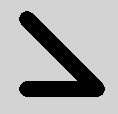
另请参阅 Qt Quick 范例 - 形状 , 天气预报范例 ,和 Shape .
|
capStyle : enumeration |
This property defines how the end points of lines are drawn. The default value is
ShapePath.SquareCap
.
| 常量 | 描述 |
|---|---|
ShapePath.FlatCap
|
A square line end that does not cover the end point of the line. |
ShapePath.SquareCap
|
A square line end that covers the end point and extends beyond it by half the line width. |
ShapePath.RoundCap
|
A rounded line end. |
|
dashOffset : real |
This property defines the starting point on the dash pattern, measured in units used to specify the dash pattern.
默认值为 0。
另请参阅 QPen::setDashOffset ().
This property defines the dash pattern when ShapePath . strokeStyle 被设为 ShapePath .DashLine. The pattern must be specified as an even number of positive entries where the entries 1, 3, 5... are the dashes and 2, 4, 6... are the spaces. The pattern is specified in units of the pen's width.
The default value is (4, 2), meaning a dash of 4 * ShapePath . strokeWidth pixels followed by a space of 2 * ShapePath . strokeWidth 像素。
另请参阅 QPen::setDashPattern ().
|
fillColor : color |
This property holds the fill color.
当设为
transparent
, no filling occurs.
默认值为
white
.
注意:
若
fillGradient
or
fillItem
are set to something other than
null
, these will take precedence over
fillColor
。
fillColor
will be ignored in this case.
|
fillGradient : ShapeGradient |
This property defines the fill gradient. By default no gradient is enabled and the value is
null
. In this case the fill will either be based on the
fillItem
property if it is set, and otherwise the
fillColor
property will be used.
注意: The Gradient type cannot be used here. Rather, prefer using one of the advanced subtypes, like LinearGradient .
注意:
If set to something other than
null
,
fillGradient
will take precedence over both
fillItem
and
fillColor
.
|
fillItem
:
Item
|
This property defines another Qt Quick Item to use as fill by the shape. The item must be texture provider (such as a layered item , ShaderEffectSource 或 图像 ). If it is not a valid texture provider, this property will be ignored.
The visual parent of
fillItem
must be a Qt Quick
Item
. In particular, since
ShapePath
is not an
Item
, its children cannot be used as fill items. Manually setting the
fillItem
's parent is needed when it is created as a child of the
ShapePath
.
For instance, creating an
图像
object directly in the
fillItem
property assignment will make it a child of the
ShapePath
. In this case, its parent must be set manually. In the following example we use the window's
contentItem
as the parent.
fillItem: Image {
    visible: false
    source: "contents.png"
    parent: window.contentItem
}
注意:
When using a layered item as a
fillItem
, you may see pixelation effects when transforming the fill. Setting the
layer.smooth
property to true will give better visual results in this case.
By default no fill item is set and the value is
null
.
注意:
If set to something other than
null
,
fillItem
property takes precedence over
fillColor
。
fillGradient
property in turn takes precedence over both
fillItem
and
fillColor
.
该特性在 Qt 6.8 引入。
|
fillRule : enumeration |
This property holds the fill rule. The default value is
ShapePath.OddEvenFill
. For an explanation on fill rules, see
QPainterPath::setFillRule
().
| 常量 | 描述 |
|---|---|
ShapePath.OddEvenFill
|
Odd-even fill rule. |
ShapePath.WindingFill
|
Non-zero winding fill rule. |
|
fillTransform
:
matrix4x4
|
This property defines a transform to be applied to the path's fill pattern (
fillGradient
or
fillItem
). It has no effect if the fill is a solid color or transparent. By default no fill transform is enabled and the value of this property is the
identity
matrix.
This example displays a rectangle filled with the contents of
myImageItem
rotated 45 degrees around the center point of
myShape
:
ShapePath {
    fillItem: myImageItem
    fillTransform: PlanarTransform.fromRotate(45, myShape.width / 2, myShape.height / 2)
    PathRectangle { x: 10; y: 10; width: myShape.width - 20; height: myShape.height - 20 }
}
该特性在 Qt 6.8 引入。
|
joinStyle : enumeration |
This property defines how joins between two connected lines are drawn. The default value is
ShapePath.BevelJoin
.
| 常量 | 描述 |
|---|---|
ShapePath.MiterJoin
|
线外部边缘按角度延伸相交,并填充此区域。 |
ShapePath.BevelJoin
|
填充 2 线条之间的三角形凹槽。 |
ShapePath.RoundJoin
|
填充 2 条线之间的弧形。 |
|
miterLimit : int |
当
joinStyle
被设为
ShapePath.MiterJoin
, this property specifies how far the miter join can extend from the join point.
The default value is 2.
|
pathHints
:
PathHints
|
This property describes characteristics of the shape. If set, these hints may allow optimized rendering. By default, no hints are set. It can be a combination of the following values:
| 常量 | 描述 |
|---|---|
ShapePath.PathLinear
|
The path only has straight lines, no curves. |
ShapePath.PathQuadratic
|
The path does not have any cubic curves: only lines and quadratic Bezier curves. |
ShapePath.PathConvex
|
The path does not have any dents or holes. All straight lines between two points inside the shape will be completely inside the shape. |
ShapePath.PathFillOnRight
|
The path follows the TrueType convention where outlines around solid fill have their control points ordered clockwise, and outlines around holes in the shape have their control points ordered counter-clockwise. |
ShapePath.PathSolid
|
The path has no holes, or mathematically speaking it is simply connected . |
ShapePath.PathNonIntersecting
|
The path outline does not cross itself. |
ShapePath.PathNonOverlappingControlPointTriangles
|
The triangles defined by the curve control points do not overlap with each other, or with any of the line segments. Also, no line segments intersect. This implies
PathNonIntersecting
.
|
Not all hints are logically independent, but the dependencies are not enforced. For example,
PathLinear
implies
PathQuadratic
, but it is valid to have
PathLinear
without
PathQuadratic
.
The pathHints property describes a set of statements known to be true; the absence of a hint does not necessarily mean that the corresponding statement is false.
该特性在 Qt 6.7 引入。
|
strokeColor : color |
This property holds the stroking color.
当设为
transparent
, no stroking occurs.
默认值为
white
.
|
strokeStyle : enumeration |
This property defines the style of stroking. The default value is ShapePath .SolidLine.
| 常量 | 描述 |
|---|---|
ShapePath.SolidLine
|
纯线条。 |
ShapePath.DashLine
|
由几像素分隔的虚线。 |
|
strokeWidth : real |
This property holds the stroke width.
When set to a negative value, no stroking occurs.
默认值为 1。
