Identical to GridLayout , but having only one row. 更多...
| import 語句: | import QtQuick.Layouts |
| 繼承: | Item |
To be able to use this type more efficiently, it is recommended that you understand the general mechanism of the Qt Quick Layouts module. Refer to Qt Quick Layouts 概述 瞭解更多信息。
It is available as a convenience for developers, as it offers a cleaner API.
Items in a RowLayout support these attached properties:
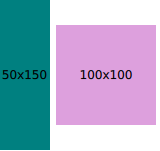
RowLayout {
    id: layout
    anchors.fill: parent
    spacing: 6
    Rectangle {
        color: 'teal'
        Layout.fillWidth: true
        Layout.minimumWidth: 50
        Layout.preferredWidth: 100
        Layout.maximumWidth: 300
        Layout.minimumHeight: 150
        Text {
            anchors.centerIn: parent
            text: parent.width + 'x' + parent.height
        }
    }
    Rectangle {
        color: 'plum'
        Layout.fillWidth: true
        Layout.minimumWidth: 100
        Layout.preferredWidth: 200
        Layout.preferredHeight: 100
        Text {
            anchors.centerIn: parent
            text: parent.width + 'x' + parent.height
        }
    }
}
Read more about attached properties here .
另請參閱 ColumnLayout , GridLayout , StackLayout , Row ,和 Qt Quick Layouts 概述 .
|
[since QtQuick.Layouts 1.1] layoutDirection : enumeration |
This property holds the layout direction of the row layout - it controls whether items are laid out from left to right or right to left. If
Qt.RightToLeft
is specified, left-aligned items will be right-aligned and right-aligned items will be left-aligned.
可能的值:
| 常量 | 描述 |
|---|---|
Qt.LeftToRight
|
(default) Items are laid out from left to right. |
Qt.RightToLeft
|
Items are laid out from right to left |
This property was introduced in QtQuick.Layouts 1.1.
另請參閱 GridLayout::layoutDirection and ColumnLayout::layoutDirection .
|
spacing : real |
This property holds the spacing between each cell. The default value is
5
.
