Discovering the available devices and supported codecs.
Audio Recorder demonstrates how to identify the available devices and supported codecs, and the use of QAudioRecorder class.
要運行範例從 Qt Creator ,打開 歡迎 模式,然後選擇範例從 範例 。更多信息,見 Qt Creator:教程:構建並運行 .
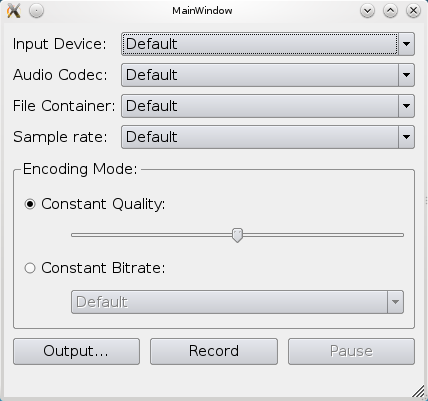
We display a window for the user to select the appropriate audio input, codec, container, sample rate, and channels. It allows setting of either quality or bit rate. Finally, the output file can be selected and recording can be started.
The lists are populated using the following methods:
The quality slider is setup from 0 (zero) to QMediaRecorder::VeryHighQuality with a default value of QMediaRecorder::NormalQuality , while the bit rate box are hard-coded into the list.
To record audio we simply create a QAudioRecorder object,
audioRecorder = new QAudioRecorder(this);
and setup the lists as described above. The text on the record and pause buttons are toggled depending on the
state
的
audioRecorder
object. This means that if the state is
QMediaRecorder::StoppedState
then the button text will be "Record" and "Pause". In
QMediaRecorder::RecordingState
the record button will have the text "Stop", and in
QMediaRecorder::PausedState
the pause button will have the text "Resume".
Pressing the buttons will also result in a toggle based on the state. If recording is stopped, then pressing the record button will set the encoding settings and container on the
audioRecorder
object, and start recording using the
record
() 方法。
QMediaFormat format;
format.setCodec(boxValue(ui->audioCodecBox).toString());
audioRecorder->setMediaFormat(format);
audioRecorder->setSampleRate(boxValue(ui->sampleRateBox).toInt());
audioRecorder->setBitRate(boxValue(ui->bitrateBox).toInt());
audioRecorder->setQuality(QMediaRecorder::EncodingQuality(ui->qualitySlider->value()));
audioRecorder->setEncodingMode(ui->constantQualityRadioButton->isChecked() ?
                         QMediaRecorder::ConstantQualityEncoding :
                         QMediaRecorder::ConstantBitRateEncoding);
QString container = boxValue(ui->containerBox).toString();
audioRecorder->record();
While recording, the status bar of the application is updated with duration information from the
durationChanged
signal from the
audioRecorder
對象。
ui->statusbar->showMessage(tr("Recorded %1 sec").arg(duration / 1000));
