QTabletEvent 類包含數位闆事件的描述參數。 更多...
| 頭: |
#include <QTabletEvent>
|
| CMake: |
find_package(Qt6 REQUIRED COMPONENTS Gui)
target_link_libraries(mytarget PRIVATE Qt6::Gui)
|
| qmake: |
QT += gui
|
| 繼承: | QSinglePointEvent |
| QTabletEvent (QEvent::Type type , const QPointingDevice * dev , const QPointF & pos , const QPointF & globalPos , qreal pressure , float xTilt , float yTilt , float tangentialPressure , qreal rotation , float z , Qt::KeyboardModifiers keyState , Qt::MouseButton button , Qt::MouseButtons buttons ) | |
| qreal | pressure () const |
| qreal | rotation () const |
| qreal | tangentialPressure () const |
| qreal | xTilt () const |
| qreal | yTilt () const |
| qreal | z () const |
數位闆事件 由數位闆外圍設備 (譬如 Wacom 數位闆及各種其它品牌) 和電磁手寫筆設備 (包括采用某些類型的數位闆計算機) 生成。(不同於 QTouchEvent 觸摸屏生成,甚至在觸摸屏上使用無源手寫筆時)。
數位闆事件類似於鼠標事件;例如, x (), y (), pos (), globalX (), globalY (),和 globalPos () 訪問器提供光標位置,且可以看到哪個 buttons () 被按下 (將手寫筆尖端按在數位闆錶麵相當於鼠標左鍵)。但數位闆事件還傳遞數位闆設備驅動程序提供的一些額外信息;例如,可能想要做更高分辨率坐標的亞像素渲染 ( globalPosF ()),調節顔色亮度基於 pressure () 將工具緊靠數位闆錶麵,使用不同筆刷根據使用中的工具類型 ( deviceType ()),以某種方式調節筆刷形狀根據工具相對數位闆錶麵 X 軸和 Y 軸的傾斜 ( xTilt () 和 yTilt ()),及使用虛擬橡皮擦而不是筆刷若用戶切換到雙端手寫筆的另一端 ( pointerType ()).
每個事件均包含接受標誌,指示接收者是否想要此事件。應該調用 QTabletEvent::accept () if you handle the tablet event; otherwise it will be sent to the parent widget. The exception are TabletEnterProximity and TabletLeaveProximity events: these are only sent to QApplication 且不校驗它們是否被接受。
The QWidget::setEnabled () 函數可以用於啓用/禁用 Widget 的鼠標、數位闆及鍵盤事件。
事件處理程序 QWidget::tabletEvent () receives TabletPress, TabletRelease and TabletMove events. Qt will first send a tablet event, then if it is not accepted by any widget, it will send a mouse event. This allows users of applications that are not designed for tablets to use a tablet like a mouse. However high-resolution drawing applications should handle the tablet events, because they can occur at a higher frequency, which is a benefit for smooth and accurate drawing. If the tablet events are rejected, the synthetic mouse events may be compressed for efficiency.
注意,當按下懸停在數位闆上的手寫筆按鈕時將生成某些類型的數位闆按鈕按下,而對於其它類型,將手寫筆按在數位闆錶麵以同時注冊按下手寫筆按鈕有必要。
若數位闆在 xorg.conf 被配置為使用 Wacom 驅動程序,則手寫筆、橡皮擦及 (可選) 光標和觸摸闆將存在單獨 XInput "設備"。Qt 通過它們的名稱識彆這些。否則,若數位闆被配置為使用 evdev 驅動程序,將隻存在一個設備且應用程序可能無法區分手寫筆和橡皮擦。
數位闆支持目前要求 WACOM Windows 驅動程序提供 DLL
wintab32.dll
待安裝。它包含在較舊包中,例如
pentablet_5.3.5-3.exe
.
構造數位闆事件為給定 type .
The pos 參數指示事件發生在 Widget 中哪裏; globalPos 是絕對坐標對應位置。
pressure gives the pressure exerted on the device dev .
xTilt and yTilt give the device's degree of tilt from the x and y axes respectively.
keyState 指定按下瞭哪個鍵盤修飾符 (如 Ctrl ).
The
z
parameter gives the Z coordinate of the device on the tablet; this is usually given by a wheel on a 4D mouse. If the device does not support a Z-axis (i.e.
QPointingDevice::capabilities
() does not include
ZPosition
), pass
0
這裏。
The
tangentialPressure
parameter gives the tangential pressure thumbwheel value from an airbrush. If the device does not support tangential pressure (i.e.
QPointingDevice::capabilities
() does not include
TangentialPressure
), pass
0
這裏。
rotation
gives the device's rotation in degrees. 4D mice, the Wacom Art Pen, and the Apple Pencil support rotation. If the device does not support rotation (i.e.
QPointingDevice::capabilities
() does not include
Rotation
), pass
0
這裏。
The button 導緻給定值事件來自 Qt::MouseButton 枚舉。若事件 type 不是 TabletPress or TabletRelease ,此事件的相應按鈕為 Qt::NoButton .
buttons 是事件發生時的所有按鈕狀態。
另請參閱 pos (), globalPos (), device (), pressure (), xTilt (), yTilt (), uniqueId (), rotation (), tangentialPressure (),和 z ().
返迴設備的壓力。0.0 指示手寫筆不在數位闆中,1.0 指示手寫筆的最大壓力數。
另請參閱 tangentialPressure ().
Returns the rotation of the current tool in degrees, where zero means the tip of the stylus is pointing towards the top of the tablet, a positive value means it's turned to the right, and a negative value means it's turned to the left. This can be given by a 4D Mouse or a rotation-capable stylus (such as the Wacom Art Pen or the Apple Pencil). If the device does not support rotation, this value is always 0.0.
返迴設備的切嚮壓力。這通常由噴槍工具指輪給齣。範圍是從 -1.0 到 1.0。0.0 指示中立位置。目前噴槍隻可以從中立位置嚮正值方嚮移動。若設備不支持切嚮壓力,此值始終為 0.0。
注意: 值按單精度浮點形式存儲。
另請參閱 pressure ().
返迴設備 (例如:鋼筆) 和 X 軸垂直方嚮之間的角度。正值朝嚮數位闆物理右側。角度範圍 -60 到 +60 度。
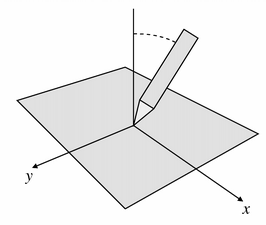
注意: 值按單精度浮點形式存儲。
另請參閱 yTilt ().
返迴設備 (例如:鋼筆) 和 Y 軸垂直方嚮之間的角度。正值朝嚮數位闆底部。角度範圍 -60 到 +60 度。
注意: 值按單精度浮點形式存儲。
另請參閱 xTilt ().
返迴設備的 Z 位置。通常,這由 4D 鼠標滾輪錶示。若設備不支持 Z 軸,此值始終為 0。這是 not 如同壓力。
注意: 值按單精度浮點形式存儲。
另請參閱 pressure ().
