The example demonstrates best practices for using Qt's translation and localization features in CMake and Qt Quick , in particular changing the language of an application during runtime. It extends the simpler Localized Clock Example .
见 Qt Linguist 手册 了解翻译 Qt 应用程序的更多有关信息。
The example shows the current time and date in your system's locale and language. The UI texts are also localized for the following languages: English, German, French, Spanish, Italian, Japanese, Korean, Portuguese, Arabic, and Chinese. Users can also use a menu button to select different languages and locales.
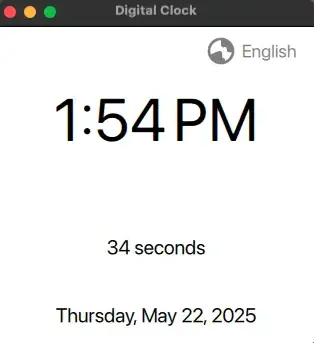
The English version of the application:
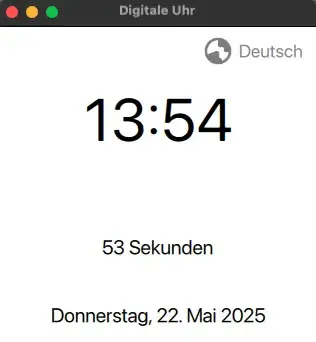
The German version after changing the language at runtime:
The application has four parts:
The CMake integration is the same as the CMake integration 的 Localized Clock example. Please refer to that page for more details.
The starting point of the application, responsible for loading the QML module.
int main(int argc, char *argv[])
{
    QGuiApplication app(argc, argv);
    QQmlApplicationEngine engine;
    QObject::connect(
            &engine, &QQmlApplicationEngine::objectCreationFailed, &app,
            [](const QUrl &) { QCoreApplication::exit(-1); }, Qt::QueuedConnection);
    engine.loadFromModule("qtexamples.localizedclockswitchlocale", "Main");
    return app.exec();
}
TranslatorManager
is a QML singleton class that manages language and locale switching at runtime. The central method of the class is
TranslatorManager::switchLanguage()
, which accepts a string representing a language code.
While the method is marked with Q_INVOKABLE , the TranslatorManager class is declared with QML_ELEMENT and QML_SINGLETON . This allows the method to be directly accessed from QML; also, see Main.qml .
void TranslatorManager::switchLanguage(const QString &lang)
{
    QLocale locale(lang);
    QLocale::setDefault(locale);
    qApp->removeTranslator(&m_translator); // not necessary from Qt 6.10
    if (m_translator.load(locale, "clock"_L1, "_"_L1, ":/i18n/"_L1)
        && qApp->installTranslator(&m_translator)) {
        m_engine.retranslate();
    } else {
        qWarning("Could not load translation to %s!", qPrintable(locale.name()));
    }
}
Upon switching language, the previous translation is removed ( QCoreApplication::removeTranslator ()) and a new translation for the selected language is loaded ( QTranslator::load ()) and installed ( QCoreApplication::installTranslator ()). QQmlEngine::retranslate () then triggers the retranslation of the strings in the QML document.
Changing language could also affect how dates and times are displayed. For instance, if QLocale on your system prefers locale "en_US" for "en", and "de_DE" for "de":
Upon switching the language, the application updates its QLocale according to the selected language using QLocale::setDefault (). When representing time, the function Date.toLocaleTimeString () takes care of localizing the time and date according to the locale of the application (see Main.qml ).
The main QML file defines the application's user interface. The UI presents time, date, and a counter for seconds. For the basic translation (window title) and plural handling (number of seconds), please refer to the Localized Clock 范例。
Upon selecting an item from the
Menu
TranslatorManager.switchLanguage()
is called with the respective language code. This call also takes care of retranslating the translatable texts (see
Translator Manager
). However, we still need to invoke
updateClock()
to update the time representation in the new localization format when the language is changed.
        ListModel {
            id: languageModel
            ListElement { name: "English"; code: "en" }
            ListElement { name: "Deutsch"; code: "de" }
            ListElement { name: "العربية"; code: "ar" }
            ListElement { name: "한국어"; code: "ko" }
            ListElement { name: "中文"; code: "zh" }
            ListElement { name: "日本語"; code: "ja" }
            ListElement { name: "Français"; code: "fr" }
            ListElement { name: "Italiano"; code: "it" }
            ListElement { name: "Español"; code: "es" }
            ListElement { name: "Português"; code: "pt" }
        }
        Menu {
            id: languageMenu
            width: languageButton.width
            Repeater {
                model: languageModel
                delegate: MenuItem {
                    required property string name
                    required property string code
                    text: name
                    onTriggered: {
                        TranslatorManager.switchLanguage(code)
                        root.selectedLanguage = name
                        root.updateClock()
                    }
                }
            }
        }
