The Satellite Info example shows the available satellites using Sky View, Table View, or RSSI View and the user's current position. It is implemented with Qt Positioning and Qt Quick .
This example demonstrates the usage of Qt Positioning QML API :
The example also shows how to use a custom
C++
model together with a custom proxy model from
QML
.
要運行範例從 Qt Creator ,打開 歡迎 模式,然後選擇範例從 範例 。更多信息,見 Qt Creator:教程:構建並運行 .
The example shows satellite information in three different tabs. The data is taken from the SatelliteSource::satellitesInView and SatelliteSource::satellitesInUse 特性。
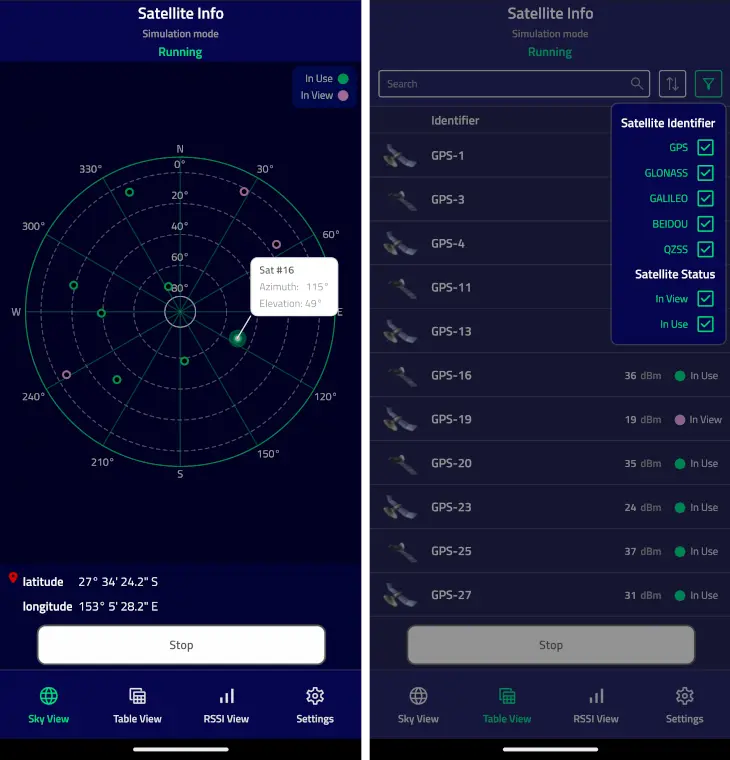
The
Sky View
tab shows the relative satellite positions using the
Azimuth
and
Elevation
attributes
. Clicking on an individual satellite object opens a popup with the
satellite identifier
, its azimuth, and elevation.
The Table View tab shows the list of all detected satellites, and allows to apply sorting and filtering to the list.
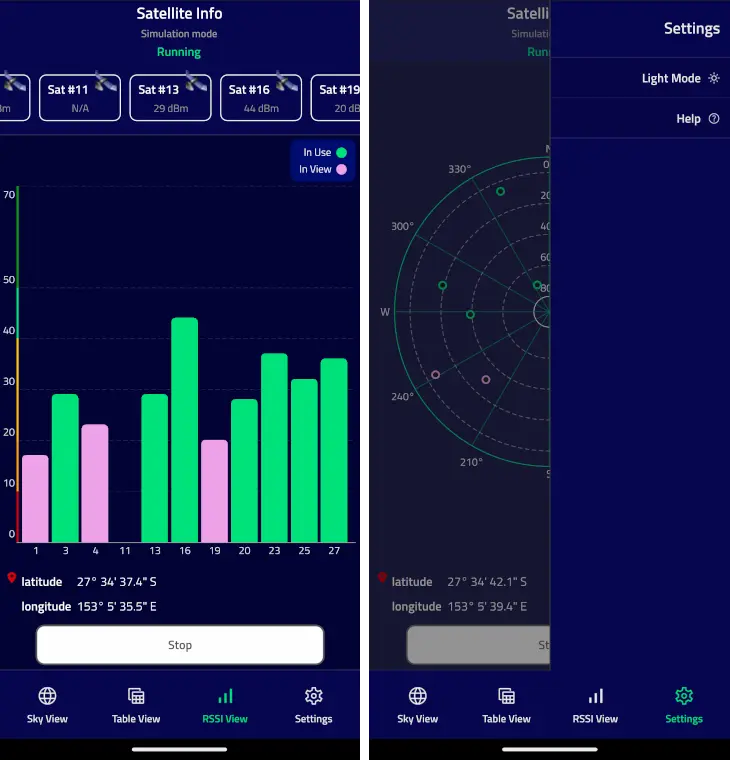
The RSSI View tab shows the signal strength of satellites in view using the signalStrength property. The numbers below the bars represent the individual satellite identifiers .
The Sky View and RSSI View tabs also show the current latitude and longitude. They use PositionSource::position property to extract this information.
The 狀態 block on top of the tabs shows the current mode or the last error.
The 設置 menu allows you to switch the application color mode and show the help information.
The application operates in three different modes:
| 應用程序模式 | 描述 |
|---|---|
| 運行 | The application continuously queries the system for satellite and position updates. When new data is available, it will be displayed. |
| Stopped | The application stops updating the satellite and position information. |
| Single | The application makes a single satellite and position update request. |
The application automatically switches into a simulation mode if the platform does not provide satellite or position information. The simulation mode uses an NMEA plugin with pre-recorded NMEA data.
注意:
Apple does not provide any APIs to retrieve satellite information, so on
macOS
and
iOS
the satellite information will always be taken from pre-recorded data. These API limitations do not affect positioning information, so current position can be displayed correctly.
The current position is retrieved from the
PositionSource
QML object. The
onPositionChanged
handler is used to receive position updates. The string representations of latitude and longitude are extracted from the
coordinate
特性。
PositionSource {
    id: positionSource
    name: root.simulation ? "nmea" : ""
    onPositionChanged: {
        let posData = position.coordinate.toString().split(", ")
        positionBox.latitudeString = posData[0]
        positionBox.longitudeString = posData[1]
    }
}
Similarly to the position, the current satellite information is retrieved from the
SatelliteSource
QML object. The
onSatellitesInViewChanged
and
onSatellitesInUseChanged
handlers are used to get the updated satellites in view and satellites in use respectively. In this example, the data is then forwarded to the
C++
model, which is later used in all views.
SatelliteSource {
    id: satelliteSource
    name: root.simulation ? "nmea" : ""
    onSatellitesInViewChanged: root.satellitesModel.updateSatellitesInView(satellitesInView)
    onSatellitesInUseChanged: root.satellitesModel.updateSatellitesInUse(satellitesInUse)
}
注意:
The example shows both the QML Positioning API, and the integration of C++ model to QML. That is the reason why the satellite information is first retrieved in
QML
, then forwarded to
C++
, and then back to
QML
to be used in the model. In practice, if the application is supposed to use complex
C++
models, consider directly using the
QGeoSatelliteInfoSource
class from
C++
.
The example uses two custom models -
SatelliteModel
and
SortFilterModel
.
The
SatelliteModel
類派生自
QAbstractListModel
並重實現
rowCount
(),
data
(),和
roleNames
() methods to represent the satellite information. Using
QAbstractListModel
as a base class allows to easily use the model with the
QML
ListView
and
Repeater
types. A custom
size
property is used only in the
RSSI View
tab to dynamically calculate the width of the tab bars.
class SatelliteModel : public QAbstractListModel
{
    Q_OBJECT
    Q_PROPERTY(int size READ rowCount NOTIFY sizeChanged)
    QML_ELEMENT
public:
    explicit SatelliteModel(QObject *parent = nullptr);
    int rowCount(const QModelIndex &parent = QModelIndex()) const override;
    QVariant data(const QModelIndex &index, int role = Qt::DisplayRole) const override;
    QHash<int, QByteArray> roleNames() const override;
public slots:
    void updateSatellitesInView(const QList<QGeoSatelliteInfo> &inView);
    void updateSatellitesInUse(const QList<QGeoSatelliteInfo> &inUse);
signals:
    void sizeChanged();
};
The
roleNames()
method is used to map the model's roles to the property names which can be used to access the model data from
QML
. For example, the
id
name is used to extract the satellite identifier, and the
rssi
name is used to get the signal strength.
QHash<int, QByteArray> SatelliteModel::roleNames() const
{
    return {
        {Roles::IdRole, "id"},
        {Roles::RssiRole, "rssi"},
        {Roles::AzimuthRole, "azimuth"},
        {Roles::ElevationRole, "elevation"},
        {Roles::SystemRole, "system"},
        {Roles::SystemIdRole, "systemId"},
        {Roles::InUseRole, "inUse"},
        {Roles::VisibleNameRole, "name"}
    };
}
在
QML
side, we can use these names to get the actual values. For example, the implementation of
RSSI View
使用
rssi
,
inUse
,和
id
role names to draw the bars that represent individual satellites:
Repeater {
    id: repeater
    model: root.satellitesModel
    delegate: Rectangle {
        required property var modelData
        height: rect.height
        width: view.singleWidth
        color: "transparent"
        SemiRoundedRectangle {
            anchors.bottom: satId.top
            width: parent.width
            height: (parent.height - satId.height)
                    * Math.min(parent.modelData.rssi, rect.maxVisibleLevel)
                    / rect.maxVisibleLevel
            color: parent.modelData.inUse ? root.inUseColor : root.inViewColor
        }
        Text {
            id: satId
            anchors.horizontalCenter: parent.horizontalCenter
            anchors.bottom: parent.bottom
            text: parent.modelData.id
            color: Theme.textSecondaryColor
            font.pixelSize: Theme.smallFontSize
            font.weight: Theme.fontLightWeight
        }
    }
}
The
SortFilterModel
class is used to provide custom sorting and filtering of the satellite objects shown in the
Table View
tab.
The model is derived from
QSortFilterProxyModel
並重實現
filterAcceptsRow
() 和
lessThan
() methods to provide filtering and sorting. The model also exposes several
slots
to tune the filtering and sorting behavior.
class SortFilterModel : public QSortFilterProxyModel
{
    Q_OBJECT
    QML_ELEMENT
public:
    explicit SortFilterModel(QObject *parent = nullptr);
public slots:
    void updateFilterString(const QString &str);
    void updateShowInView(bool show);
    void updateShowInUse(bool show);
    void updateSelectedSystems(int id, bool show);
    void updateSortRoles(int role, bool use);
protected:
    bool filterAcceptsRow(int row, const QModelIndex &parent) const override;
    bool lessThan(const QModelIndex &left, const QModelIndex &right) const override;
};
These slots can be called from both
C++
and
QML
. For example, the
Satellite Identifier
delegate uses the
updateSelectedSystems()
slot to show or hide the information about satellites belonging to certain satellite systems. Likewise, the
Satellite Status
delegates use the
updateShowInView()
and
updateShowInUse()
slots to filter the satellites with a specific status.
Repeater {
    model: root.satelliteSystemModel
    delegate: CheckElement {
        required property var modelData
        text: modelData.name
        Layout.alignment: Qt.AlignRight
        onCheckedChanged: {
            root.sortFilterModel.updateSelectedSystems(modelData.id, checked)
        }
    }
}
    ...
CheckElement {
    text: qsTr("In View")
    Layout.alignment: Qt.AlignRight
    onCheckedChanged: root.sortFilterModel.updateShowInView(checked)
}
CheckElement {
    text: qsTr("In Use")
    Layout.alignment: Qt.AlignRight
    onCheckedChanged: root.sortFilterModel.updateShowInUse(checked)
}
For a CMake-based build, we need to add the following to the
CMakeLists.txt
:
qt_add_qml_module(satelliteinfo
    URI SatelliteInformation
    VERSION 1.0
    SOURCES
        roles.h
        satellitemodel.cpp satellitemodel.h
        sortfiltermodel.cpp sortfiltermodel.h
    QML_FILES
        ApplicationScreen.qml
        Button.qml
        Header.qml
        HelpPopup.qml
        LegendBox.qml
        Main.qml
        RssiView.qml
        PageButton.qml
        PermissionsScreen.qml
        PositionBox.qml
        SatelliteView.qml
        SettingsView.qml
        SkyView.qml
        Theme.qml
        ViewSwitch.qml
    RESOURCES
        icons/checkbox.svg
        icons/checkbox_blank.svg
        icons/darkmode.svg
        icons/filter.svg
        icons/help.svg
        icons/lightmode.svg
        icons/place.svg
        icons/qtlogo_green.png
        icons/qtlogo_white.png
        icons/rssiview.svg
        icons/satellite_small.png
        icons/satellite1.png
        icons/satellite2.png
        icons/search.svg
        icons/settings.svg
        icons/skyview.svg
        icons/sort.svg
        icons/tableview.svg
)
For a qmake build, we need to modify the
satelliteinfo.pro
file in the following way:
CONFIG += qmltypes
QML_IMPORT_NAME = SatelliteInformation
QML_IMPORT_MAJOR_VERSION = 1
qml_resources.files = \
    qmldir \
    ApplicationScreen.qml \
    Button.qml \
    Header.qml \
    HelpPopup.qml \
    LegendBox.qml \
    Main.qml \
    RssiView.qml \
    PageButton.qml \
    PermissionsScreen.qml \
    PositionBox.qml \
    SatelliteView.qml \
    SettingsView.qml \
    SkyView.qml \
    Theme.qml \
    ViewSwitch.qml
qml_resources.prefix = /qt/qml/SatelliteInformation
RESOURCES += qml_resources
icon_resources.files = \
    icons/checkbox.svg \
    icons/checkbox_blank.svg \
    icons/darkmode.svg \
    icons/filter.svg \
    icons/help.svg \
    icons/lightmode.svg \
    icons/place.svg \
    icons/qtlogo_green.png \
    icons/qtlogo_white.png \
    icons/rssiview.svg \
    icons/satellite_small.png \
    icons/satellite1.png \
    icons/satellite2.png \
    icons/search.svg \
    icons/settings.svg \
    icons/skyview.svg \
    icons/sort.svg \
    icons/tableview.svg
icon_resources.prefix = /qt/qml/SatelliteInformation
RESOURCES += icon_resources
另請參閱 所有 Qt 範例 , Qt Positioning 範例 ,和 Qt Quick 範例和教程 .
