Capturing a screen or window.
Screen Capture demonstrates how to capture a screen or window using QScreenCapture and QWindowCapture . The example shows a list of screens and windows and displays a live preview of the selected item using a QMediaCaptureSession 和 QVideoWidget . Capturing can be started and stopped with a button .
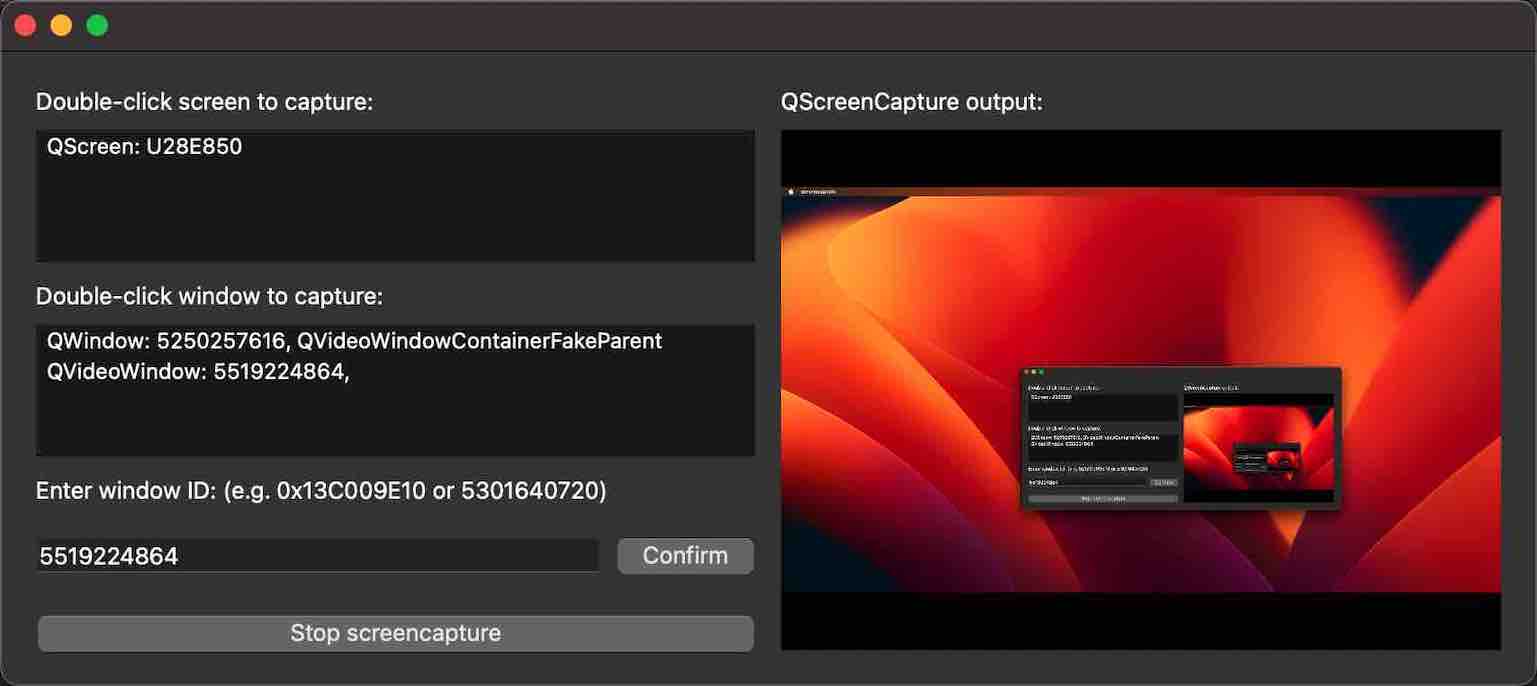
要運行範例從 Qt Creator ,打開 歡迎 模式,然後選擇範例從 範例 。更多信息,見 Qt Creator:教程:構建並運行 .
The example consists of three custom classes. The UI and all screen capture functionality is implemented in the class ScreenCapturePreview. The classes ScreenListModel and WindowListModel only serve as models behind the two QListView widgets. The main function creates a ScreenCapturePreview object, which in turn creates instances of QScreenCapture and QWindowCapture ,和 QMediaCaptureSession and QVideoWidget , in addition to all the UI widgets.
The screen and window models are populated with the return values of QGuiApplication::screens () 和 QWindowCapture::capturableWindows () 分彆。
When a list item is selected, it is connected to the QScreenCapture 對象采用 setScreen (), or to the QWindowCapture 對象采用 setWindow (). The capture object is connected to the QMediaCaptureSession 對象采用 setScreenCapture () 和 setWindowCapture (), respectively. The capture session in turn is connected to the QVideoWidget 對象采用 setVideoOutput (). Thus, the capture output is previewed in the video widget on the right hand side of the UI.
The start/stop button calls QScreenCapture::start () 和 QScreenCapture::stop (),或 QWindowCapture::start () 和 QWindowCapture::stop ().
A QMessageBox pops up if the errorOccurred 信號發射。
