動畫框架提供動畫 GUI 元素的輕鬆方式。它能夠動畫 Qt 特性值對於 Widget 或 QObject 。由框架提供的大多數特徵還可用於 Qt Quick ,若以聲明方式定義動畫是可能的。
此概述闡述框架的體係結構,通過範例演示常用技術為動畫 QObject 和 GUI 元素。
The following diagram shows the most important classes provided by the framework:
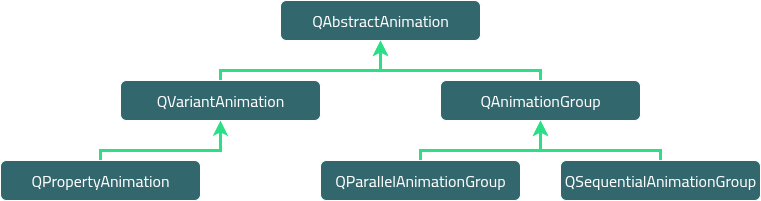
It includes the QAbstractAnimation class, which provides the necessary foundation for animations. This class defines the generic properties for all animations supported by the framework. For example, the ability to start, stop, and pause an animation. The class also receives the time change notifications.
The framework further provides the QVariantAnimation and QAnimationGroup classes, which build on their base case, QAbstractAnimation . Next in the hierarchy is QPropertyAnimation ,其派生自 QVariantAnimation , and it lets you animate a Qt property of a widget or QObject . The class performs interpolation on the property value using an easing curve. With these in place, you just need a QObject class with a Qt property value that you can animate.
注意: It is required that the target object you are animating is a QObject or its subclass. This is necessary as the animation framework depends on the 元對象係統 for all the information about the object it is animating.
Complex animations can be constructed by building a tree structure of QAbstractAnimation s, where the tree is a QAnimationGroup that contains other animations. These animation groups can also contain subgroups representing different groups or animations, such as QParallelAnimationGroup and QSequentialAnimationGroup .
Behind the scenes, all animations are controlled by a global timer, which sends updates about all animations that are running.
For detailed information of these individual classes' and their roles in the framework, refer to their documentation.
These classes provide the necessary infrastructure to create both simple and complex animations.
| 所有動畫的基礎 | |
| 動畫組的抽象基類 | |
| 控製動畫的緩和麯綫 | |
| 平行動畫組 | |
| 暫停 QSequentialAnimationGroup | |
| 動畫 Qt 特性 | |
| 動畫的順序組 | |
| 控製動畫的時間綫 | |
| 用於動畫的基類 |
As the QPropertyAnimation class can interpolate on Qt properties, it is used often. In fact, its superclass— QVariantAnimation —provides an abstract implementation of updateCurrentValue (), which does not change any value unless you change it on the valueChanged 信號 .
The framework lets you animate the Qt properties of the existing classes in Qt. For example, the QWidget class—can be embedded in a QGraphicsView —has properties for its bounds, colors, and so on. The following example demonstrates how you can animate a QPushButton 小部件:
#include <QApplication>
#include <QPushButton>
#include <QPropertyAnimation>
class MyButtonWidget : public QWidget
{
public:
    MyButtonWidget(QWidget *parent = nullptr);
};
MyButtonWidget::MyButtonWidget(QWidget *parent) : QWidget(parent)
{
    QPushButton *button = new QPushButton(tr("Animated Button"), this);
    QPropertyAnimation *anim = new QPropertyAnimation(button, "pos", this);
    anim->setDuration(10000);
    anim->setStartValue(QPoint(0, 0));
    anim->setEndValue(QPoint(100, 250));
    anim->start();
}
int main(int argc, char *argv[])
{
    QApplication a(argc, argv);
    MyButtonWidget buttonAnimWidget;
    buttonAnimWidget.resize(QSize(800, 600));
    buttonAnimWidget.show();
    return a.exec();
}
範例動畫
pos
Qt property of a
QPushButton
, to move it from the top–left corner of the screen to the end position (250, 250), in 10 seconds (10000 milliseconds).
It uses the linear interpolation method to control the speed of animation between the start and end values. Try adding another value in–between the start and end value to see how they are interpolated. This time use the QPropertyAnimation::setKeyValueAt () function to add these values:
...
anim->setDuration(10000);
anim->setKeyValueAt(0, QPoint(0, 0));
anim->setKeyValueAt(0.8, QPoint(250, 250));
anim->setKeyValueAt(1, QPoint(0, 0));
...
In this example, the animation moves the button to (250, 250) in 8 seconds, and moves it back to its original position in the remaining 2 seconds. The button's movement is linear-interpolated between these points.
還可以動畫 QObject 's value that is not declared as a Qt property, if the value has a setter method. In such cases, derive a new class from the class that contains the value, and add a Qt property for that value with the setter.
注意: Each Qt property requires a getter also, so you should provide a getter if that is not defined.
class MyGraphicsRectItem : public QObject, public QGraphicsRectItem
{
    Q_OBJECT
    Q_PROPERTY(QPointF pos READ pos WRITE setPos)
};
在此範例中,
MyGraphicsRectItem
派生自
QGraphicsRectItem
and
QObject
, and defines the
pos
property. You can animate the item's
pos
even if
QGraphicsRectItem
does not provide the
pos
特性。
For a general introduction to the Qt property system, refer to Qt 的特性係統 .
QPropertyAnimation 還可以用於動畫 QGraphicsItem , which does not inherit QObject . In such cases, you derive a class from the graphics item that you want to animate. This derived class should also inherit form QObject to enable using QPropertyAnimation 在 QGraphicsItem . The following example shows how this is done:
class Pixmap : public QObject, public QGraphicsPixmapItem
{
    Q_OBJECT
    Q_PROPERTY(QPointF pos READ pos WRITE setPos)
    ...
}
注意: 還可以派生自 QGraphicsWidget , which already is a QObject .
As described in the previous section, you need to define properties that you want to animate. The derived class must inherit from QObject first as the meta-object system requires it.
A QPropertyAnimation performs linear interpolation between the start and end property values. In addition to adding more key values to the animation, you can also choose an easing curve to control the speed of interpolation between 0 and 1, without changing the path.
MyButtonWidget::MyButtonWidget(QWidget *parent) : QWidget(parent)
{
    QPushButton *button = new QPushButton(tr("Animated Button"), this);
    QPropertyAnimation *anim = new QPropertyAnimation(button, "pos", this);
    anim->setDuration(10000);
    anim->setStartValue(QPoint(0, 0));
    anim->setEndValue(QPoint(100, 250));
    anim->setEasingCurve(QEasingCurve::OutBounce);
    anim->start();
}
In this example, the animation follows a curve that makes the
button
bounce like a ball.
QEasingCurve
offers a large collection of curves to choose from the
QEasingCurve::Type
enum. If you want to use another curve that is not available, implement one yourself and register it with
QEasingCurve
.
An application often contains more than one animation. For example, it wants to move more than one graphics item simultaneously or move them in sequence after each other.
The subclasses of QAnimationGroup — QSequentialAnimationGroup and QParallelAnimationGroup —are containers for other animations so that these animations can be animated either in sequence or parallel. The QAnimationGroup does not animate properties, but it gets notified of time changes periodically. This enables it to forward those time changes to the animation groups, which control when their animations are played.
The two following examples demonstrate the use of both QSequentialAnimationGroup and QParallelAnimationGroup :
MyButtonWidget::MyButtonWidget(QWidget *parent) : QWidget(parent)
{
    QPushButton *bonnie = new QPushButton(tr("Bonnie"), this);
    QPushButton *clyde = new QPushButton(tr("Clyde"), this);
    QPropertyAnimation *anim1 = new QPropertyAnimation(bonnie, "pos", this);
    anim1->setDuration(3000);
    anim1->setStartValue(QPoint(0, 0));
    anim1->setEndValue(QPoint(100, 250));
    QPropertyAnimation *anim2 = new QPropertyAnimation(clyde, "pos", this);
    anim2->setDuration(3000);
    anim2->setStartValue(QPoint(100, 250));
    anim2->setEndValue(QPoint(500, 500));
    QParallelAnimationGroup *parallelAnim = new QParallelAnimationGroup;
    parallelAnim->addAnimation(anim1);
    parallelAnim->addAnimation(anim2);
    parallelAnim->start();
}
A parallel group plays more than one animation at the same time. Its start () function starts all animations that are part of the group.
MyButtonWidget::MyButtonWidget(QWidget *parent) : QWidget(parent)
{
    QPushButton *bonnie = new QPushButton(tr("Bonnie"), this);
    QPushButton *clyde = new QPushButton(tr("Clyde"), this);
    QPropertyAnimation *anim1 = new QPropertyAnimation(bonnie, "pos", this);
    anim1->setDuration(3000);
    anim1->setStartValue(QPoint(0, 0));
    anim1->setEndValue(QPoint(100, 250));
    QPropertyAnimation *anim2 = new QPropertyAnimation(clyde, "pos", this);
    anim2->setDuration(3000);
    anim2->setStartValue(QPoint(0, 0));
    anim2->setEndValue(QPoint(200, 250));
    QSequentialAnimationGroup *sequenceAnim = new QSequentialAnimationGroup;
    sequenceAnim->addAnimation(anim1);
    sequenceAnim->addAnimation(anim2);
    sequenceAnim->start();
}
As the name suggests, a QSequentialAnimationGroup plays its animations in sequence. It starts the next animation in the list after the previous finishes.
A group is an animation itself, so you can add it to another group. This way, building an animation tree, which define when the animations are played in relation to each other.
A QPropertyAnimation should always have a parent that controls its lifespan. A typical application may include several animations that are grouped, where the animation group takes ownership of those animations. An independent QPropertyAnimation must be explicitly assigned a parent to control its lifespan. In the following example, you can see that an independent QPropertyAnimation 擁有 QApplication instance as its parent:
#include <QApplication>
#include <QPushButton>
#include <QPropertyAnimation>
class MyButtonWidget : public QWidget
{
public:
    MyButtonWidget(QWidget *parent = nullptr);
};
MyButtonWidget::MyButtonWidget(QWidget *parent) : QWidget(parent)
{
    QPushButton *button = new QPushButton(tr("Animated Button"), this);
    QPropertyAnimation *anim = new QPropertyAnimation(button, "pos", this);
    anim->setDuration(10000);
    anim->setStartValue(QPoint(0, 0));
    anim->setEndValue(QPoint(100, 250));
    anim->start();
}
int main(int argc, char *argv[])
{
    QApplication a(argc, argv);
    MyButtonWidget buttonAnimWidget;
    buttonAnimWidget.resize(QSize(800, 600));
    buttonAnimWidget.show();
    return a.exec();
}
注意: You can also control the animation's lifespan by choosing a 刪除策略 while starting it.
