许可向导范例展示如何以 Qt 实现复杂向导。
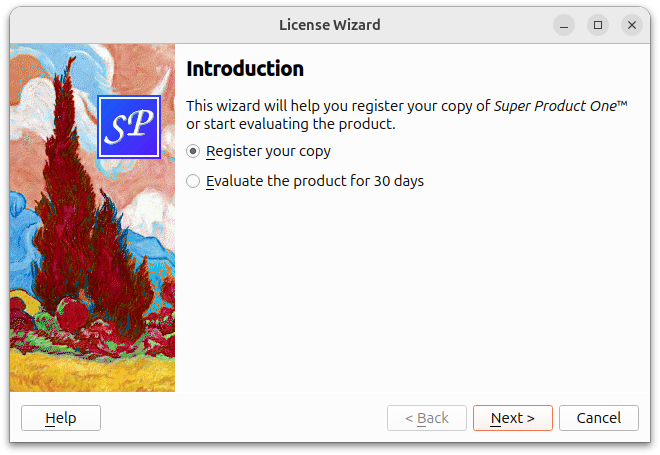
Most wizards have a linear structure, with page 1 followed by page 2 and so on until the last page. The 通俗向导 example shows how to create such wizards.
Some wizards are more complex in that they allow different traversal paths based on the information provided by the user. The License Wizard example illustrates this. It provides several wizard pages; depending on which options are selected, the user can reach different pages.
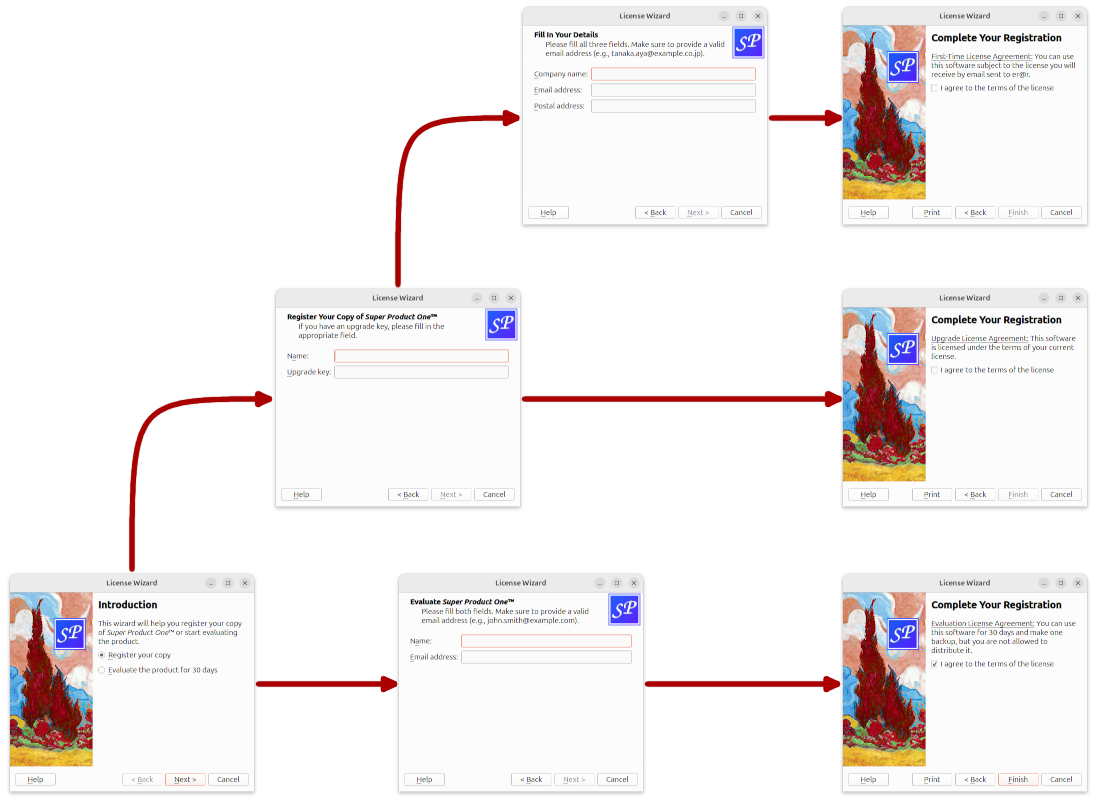
范例由以下类组成:
LicenseWizard
继承
QWizard
and implements a non-linear five-page wizard that leads the user through the process of choosing a license agreement.
IntroPage
,
EvaluatePage
,
RegisterPage
,
DetailsPage
,和
ConclusionPage
are
QWizardPage
subclasses that implement the wizard pages.
The
LicenseWizard
类派生自
QWizard
and provides a five-page wizard that guides the user through the process of registering their copy of a fictitious software product. Here's the class definition:
class LicenseWizard : public QWizard
{
    Q_OBJECT
public:
    enum { Page_Intro, Page_Evaluate, Page_Register, Page_Details,
           Page_Conclusion };
    LicenseWizard(QWidget *parent = nullptr);
private slots:
    void showHelp();
};
The class's public API is limited to a constructor and an enum. The enum defines the IDs associated with the various pages:
| 类名 | 枚举值 | 页面 ID |
|---|---|---|
IntroPage
|
Page_Intro
|
0 |
EvaluatePage
|
Page_Evaluate
|
1 |
RegisterPage
|
Page_Register
|
2 |
DetailsPage
|
Page_Details
|
3 |
ConclusionPage
|
Page_Conclusion
|
4 |
For this example, the IDs are arbitrary. The only constraints are that they must be unique and different from -1. IDs allow us to refer to pages.
LicenseWizard::LicenseWizard(QWidget *parent)
    : QWizard(parent)
{
    setPage(Page_Intro, new IntroPage);
    setPage(Page_Evaluate, new EvaluatePage);
    setPage(Page_Register, new RegisterPage);
    setPage(Page_Details, new DetailsPage);
    setPage(Page_Conclusion, new ConclusionPage);
    setStartId(Page_Intro);
In the constructor, we create the five pages, insert them into the wizard using
QWizard::setPage
(), and set
Page_Intro
to be the first page.
#ifndef Q_OS_MAC
    setWizardStyle(ModernStyle);
#endif
We set the style to ModernStyle on all platforms except macOS,
    setOption(HaveHelpButton, true);
    setPixmap(QWizard::LogoPixmap, QPixmap(":/images/logo.png"));
    connect(this, &QWizard::helpRequested, this, &LicenseWizard::showHelp);
    setWindowTitle(tr("License Wizard"));
}
配置
QWizard
以展示
帮助
按钮,将其连接到
showHelp()
slot. We also set the
LogoPixmap
for all pages that have a header (i.e.,
EvaluatePage
,
RegisterPage
,和
DetailsPage
).
void LicenseWizard::showHelp()
{
    static QString lastHelpMessage;
    QString message;
    switch (currentId()) {
    case Page_Intro:
        message = tr("The decision you make here will affect which page you "
                     "get to see next.");
        break;
    ...
    default:
        message = tr("This help is likely not to be of any help.");
    }
    if (lastHelpMessage == message)
        message = tr("Sorry, I already gave what help I could. "
                     "Maybe you should try asking a human?");
    QMessageBox::information(this, tr("License Wizard Help"), message);
    lastHelpMessage = message;
}
在
showHelp()
, we display help texts that are appropriate for the current page. If the user clicks
帮助
twice for the same page, we say, "Sorry, I already gave what help I could. Maybe you should try asking a human?"
页面的定义在
licensewizard.h
和实现在
licensewizard.cpp
,连同
LicenseWizard
.
这里是定义和实现对于
IntroPage
:
class IntroPage : public QWizardPage
{
    Q_OBJECT
public:
    IntroPage(QWidget *parent = nullptr);
    int nextId() const override;
private:
    QLabel *topLabel;
    QRadioButton *registerRadioButton;
    QRadioButton *evaluateRadioButton;
};
IntroPage::IntroPage(QWidget *parent)
    : QWizardPage(parent)
{
    setTitle(tr("Introduction"));
    setPixmap(QWizard::WatermarkPixmap, QPixmap(":/images/watermark.png"));
    topLabel = new QLabel(tr("This wizard will help you register your copy of "
                             "<i>Super Product One</i>™ or start "
                             "evaluating the product."));
    topLabel->setWordWrap(true);
    registerRadioButton = new QRadioButton(tr("&Register your copy"));
    evaluateRadioButton = new QRadioButton(tr("&Evaluate the product for 30 "
                                              "days"));
    registerRadioButton->setChecked(true);
    QVBoxLayout *layout = new QVBoxLayout;
    layout->addWidget(topLabel);
    layout->addWidget(registerRadioButton);
    layout->addWidget(evaluateRadioButton);
    setLayout(layout);
}
页面继承自 QWizardPage 。设置 title 和 水印像素图 . By not setting any subTitle , we ensure that no header is displayed for this page. (On Windows, it is customary for wizards to display a watermark pixmap on the first and last pages, and to have a header on the other pages.)
int IntroPage::nextId() const
{
    if (evaluateRadioButton->isChecked()) {
        return LicenseWizard::Page_Evaluate;
    } else {
        return LicenseWizard::Page_Register;
    }
}
The
nextId()
函数返回 ID 为
EvaluatePage
若
评估产品为 30 天
选项被复选;否则返回 ID 为
RegisterPage
.
The
EvaluatePage
is slightly more involved:
class EvaluatePage : public QWizardPage
{
    Q_OBJECT
public:
    EvaluatePage(QWidget *parent = nullptr);
    int nextId() const override;
private:
    QLabel *nameLabel;
    QLabel *emailLabel;
    QLineEdit *nameLineEdit;
    QLineEdit *emailLineEdit;
};
EvaluatePage::EvaluatePage(QWidget *parent)
    : QWizardPage(parent)
{
    setTitle(tr("Evaluate <i>Super Product One</i>™"));
    setSubTitle(tr("Please fill both fields. Make sure to provide a valid "
                   "email address (e.g., john.smith@example.com)."));
    nameLabel = new QLabel(tr("N&ame:"));
    nameLineEdit = new QLineEdit;
    ...
    registerField("evaluate.name*", nameLineEdit);
    registerField("evaluate.email*", emailLineEdit);
    ...
}
Then we create the child widgets, create
wizard fields
associated with them, and put them into layouts. The fields are created with an asterisk (
*
) next to their name. This makes them
mandatory fields
, that is, fields that must be filled before the user can press the
下一
button (
Continue
on macOS). The fields' values can be accessed from any other page using
QWizardPage::field
().
Resetting the page amounts to clearing the two text fields.
int EvaluatePage::nextId() const
{
    return LicenseWizard::Page_Conclusion;
}
The next page is always the
ConclusionPage
.
The
RegisterPage
and
DetailsPage
非常类似于
EvaluatePage
。让我们直接转到
ConclusionPage
:
class ConclusionPage : public QWizardPage
{
    Q_OBJECT
public:
    ConclusionPage(QWidget *parent = nullptr);
    void initializePage() override;
    int nextId() const override;
    void setVisible(bool visible) override;
private slots:
    void printButtonClicked();
private:
    QLabel *bottomLabel;
    QCheckBox *agreeCheckBox;
};
这次,重实现
QWizardPage::initializePage
() 和
QWidget::setVisible
(), in addition to
nextId
(). We also declare a private slot:
printButtonClicked()
.
int IntroPage::nextId() const
{
    if (evaluateRadioButton->isChecked()) {
        return LicenseWizard::Page_Evaluate;
    } else {
        return LicenseWizard::Page_Register;
    }
}
默认实现的
QWizardPage::nextId
() returns the page with the next ID, or -1 if the current page has the highest ID. This behavior would work here, because
Page_Conclusion
equals 5 and there is no page with a higher ID, but to avoid relying on such subtle behavior, we reimplement
nextId
() 以返回 -1。
void ConclusionPage::initializePage()
{
    QString licenseText;
    if (wizard()->hasVisitedPage(LicenseWizard::Page_Evaluate)) {
        licenseText = tr("<u>Evaluation License Agreement:</u> "
                         "You can use this software for 30 days and make one "
                         "backup, but you are not allowed to distribute it.");
    } else if (wizard()->hasVisitedPage(LicenseWizard::Page_Details)) {
        const QString emailAddress = field("details.email").toString();
        licenseText = tr("<u>First-Time License Agreement:</u> "
                         "You can use this software subject to the license "
                         "you will receive by email sent to %1.").arg(emailAddress);
    } else {
        licenseText = tr("<u>Upgrade License Agreement:</u> "
                         "This software is licensed under the terms of your "
                         "current license.");
    }
    bottomLabel->setText(licenseText);
}
使用
QWizard::hasVisitedPage
() to determine the type of license agreement the user has chosen. If the user filled the
EvaluatePage
, the license text refers to an Evaluation License Agreement. If the user filled the
DetailsPage
, the license text is a First-Time License Agreement. If the user provided an upgrade key and skipped the
DetailsPage
, the license text is an Update License Agreement.
void ConclusionPage::setVisible(bool visible)
{
    QWizardPage::setVisible(visible);
    if (visible) {
        wizard()->setButtonText(QWizard::CustomButton1, tr("&Print"));
        wizard()->setOption(QWizard::HaveCustomButton1, true);
        connect(wizard(), &QWizard::customButtonClicked,
                this, &ConclusionPage::printButtonClicked);
    } else {
        wizard()->setOption(QWizard::HaveCustomButton1, false);
        disconnect(wizard(), &QWizard::customButtonClicked,
                   this, &ConclusionPage::printButtonClicked);
    }
}
想要显示
打印
按钮在向导中当
ConclusionPage
is up. One way to accomplish this is to reimplement
QWidget::setVisible
():
printButtonClicked()
槽。
printButtonClicked()
槽。
