A chat application to share messages of any kind in a chat room.
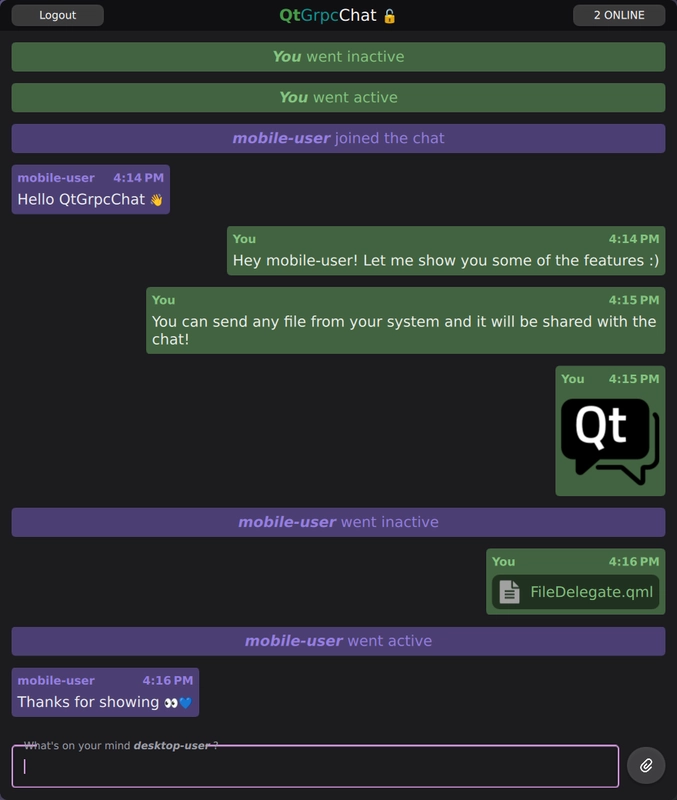
The 聊天 example demonstrates advanced usage of the QtGrpc client API. The server enables users to register and authenticate, allowing them to join the ChatRoom . Once joined, users can share various message types in the ChatRoom , such as text messages, images, user activity or any other files from their disk with all other participants.
qtgrpc_chat_server
is running and successfully listening.
localhost
address should suffice when running the
qtgrpc_chat_client
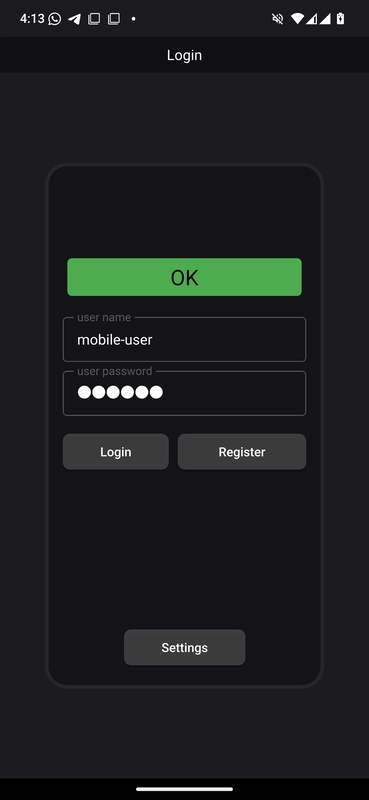
. If you are using a device other than the one hosting the server, specify the correct IP address of the host running the server in the Settings dialog.
GRPC_CHAT_USE_EMOJI_FONT
CMake option is enabled on the client to build with a smooth emoji experience 🚀.
要运行范例从 Qt Creator ,打开 欢迎 模式,然后选择范例从 范例 。更多信息,见 Qt Creator:教程:构建并运行 .
This example introduces the following Qt modules and classes.
The Protobuf schema defines the structure of messages and services used in the chat application. The schema is split into two files:
syntax = "proto3";
package chat;
import "chatmessages.proto";
service QtGrpcChat {
    // Register a user with \a Credentials.
    rpc Register(Credentials) returns (None);
    // Join as a registered user and exchange \a ChatMessage(s)
    rpc ChatRoom(stream ChatMessage) returns (stream ChatMessage) {}
}
The
qtgrpcchat.proto
file specifies the QtGrpcChat service, which provides two RPC methods:
Register
: Registers a user with the provided
Credentials
. The server stores and verifies users from a database in plain text.
ChatRoom
: Establishes a bidirectional stream for exchanging
ChatMessage
(s) between all connected clients. The server broadcasts all incoming messages to other connected clients.
syntax = "proto3";
package chat;
import "QtCore/QtCore.proto";
message ChatMessage {
    string username = 1;
    int64 timestamp = 2;
    oneof content {
        TextMessage text = 3;
        FileMessage file = 4;
        UserStatus user_status = 5;
    }
}
The
chatmessages.proto
file defines
ChatMessage
, which is a
tagged union (also known as a sum type)
. It represents all the individual messages that can be sent through the
ChatRoom
streaming RPC. Every
ChatMessage
must include a
username
and
timestamp
to identify the sender.
You include the
QtCore/QtCore.proto
import to enable the types of the
QtProtobufQtCoreTypes
module, allowing seamless conversion between
QtCore
-specific types and their Protobuf equivalents.
message FileMessage {
    enum Type {
        UNKNOWN = 0;
        IMAGE = 1;
        AUDIO = 2;
        VIDEO = 3;
        TEXT = 4;
    }
    Type type = 1;
    string name = 2;
    bytes content = 3;
    uint64 size = 4;
    message Continuation {
        uint64 index = 1;
        uint64 count = 2;
        QtCore.QUuid uuid = 3;
    }
    optional Continuation continuation = 5;
}
FileMessage
is one of the supported message types for the
ChatMessage
sum type. It allows wrapping any local file into a message. The optional
Continuation
field ensures reliable delivery by handling large file transfers in chunks.
注意:
For more details on using the
ProtobufQtCoreTypes
module in your Protobuf schema and application code, see
Qt Core usage
.
注意: The server application described here uses the gRPC ™ 库。
The server application uses the asynchronous gRPC callback API . This allows us to benefit from the performance advantages of the async API without the complexity of manually managing completion queues.
class QtGrpcChatService final : public chat::QtGrpcChat::CallbackService
You declare the
QtGrpcChatService
class, which subclasses the
CallbackService
of the generated
QtGrpcChat
service.
    grpc::ServerBidiReactor<chat::ChatMessage, chat::ChatMessage> *
    ChatRoom(grpc::CallbackServerContext *context) override
    {
        return new ChatRoomReactor(this, context);
    }
    grpc::ServerUnaryReactor *Register(grpc::CallbackServerContext *context,
                                       const chat::Credentials *request,
                                       chat::None * /*response*/) override
Also override the virtual functions to implement the functionality for the two gRPC methods provided by the service:
Register
method verifies and stores users in a plain text database.
ChatRoom
method checks credentials provided in the metadata against the database. If successful, it establishes a bidirectional stream for communication.
    // Broadcast \a message to all connected clients. Optionally \a skip a client
    void broadcast(const std::shared_ptr<chat::ChatMessage> &message, const ChatRoomReactor *skip)
    {
        for (auto *client : activeClients()) {
            assert(client);
            if (skip && client == skip)
                continue;
            client->startSharedWrite(message);
        }
    }
The service implementation tracks all active clients that connect or disconnect through the
ChatRoom
method. This enables the
broadcast
functionality, which shares messages with all connected clients. To reduce storage and overhead, the
ChatMessage
is wrapped in a
shared_ptr
.
    // Share \a response. It will be kept alive until the last write operation finishes.
    void startSharedWrite(std::shared_ptr<chat::ChatMessage> response)
    {
        std::scoped_lock lock(m_writeMtx);
        if (m_response) {
            m_responseQueue.emplace(std::move(response));
        } else {
            m_response = std::move(response);
            StartWrite(m_response.get());
        }
    }
The
startSharedWrite
method is a member function of the
ChatRoomReactor
. If the reactor is currently writing, the message is buffered in a queue. Otherwise, a write operation is initiated. There is a single and unique message shared between all clients. Each copy of the
response
message increases the
use_count
. Once all clients have finished writing the message, and its
use_count
drops to 0 its resources are freed.
    // Distribute the incoming message to all other clients.
    m_service->broadcast(m_request, this);
    m_request = std::make_shared<chat::ChatMessage>(); // detach
    StartRead(m_request.get());
This snippet is part of the
ChatRoomReactor::OnReadDone
virtual method. Each time this method is called, a new message has been received from the client. The message is broadcast to all other clients, skipping the sender.
    std::scoped_lock lock(m_writeMtx);
    if (!m_responseQueue.empty()) {
        m_response = std::move(m_responseQueue.front());
        m_responseQueue.pop();
        StartWrite(m_response.get());
        return;
    }
    m_response.reset();
This snippet is part of the
ChatRoomReactor::OnWriteDone
virtual method. Each time this method is called, a message has been written to the client. If there are buffered messages in the queue, the next message is written. Otherwise,
m_response
is reset to signal that no write operation is in progress. A lock is used to protect against contention with the
broadcast
方法。
The client application uses the provided Protobuf schema to communicate with the server. It provides both front-end and back-end capabilities for registering users and handling the long-lived bidirectional stream of the
ChatRoom
gRPC
method. This enables the visualization and communication of
ChatMessage
。
add_library(qtgrpc_chat_client_proto STATIC)
qt_add_protobuf(qtgrpc_chat_client_proto
    QML
    QML_URI QtGrpcChat.Proto
    PROTO_FILES
        ../proto/chatmessages.proto
    PROTO_INCLUDES
        $<TARGET_PROPERTY:Qt6::ProtobufQtCoreTypes,QT_PROTO_INCLUDES>
)
qt_add_grpc(qtgrpc_chat_client_proto CLIENT
    PROTO_FILES
        ../proto/qtgrpcchat.proto
    PROTO_INCLUDES
        $<TARGET_PROPERTY:Qt6::ProtobufQtCoreTypes,QT_PROTO_INCLUDES>
)
First, generate the source files from the Protobuf schema. Since the
qtgrpcchat.proto
file does not contain any
message
definitions, only
qtgrpcgen
generation is required. Also provide the
PROTO_INCLUDES
的
ProtobufQtCoreTypes
module to ensure the
"QtCore/QtCore.proto"
import is valid.
target_link_libraries(qtgrpc_chat_client_proto
    PUBLIC
        Qt6::Protobuf
        Qt6::ProtobufQtCoreTypes
        Qt6::Grpc
)
Ensure that the independent
qtgrpc_chat_client_proto
target is publicly linked against its dependencies, including the
ProtobufQtCoreTypes
module. The application target is then linked against this library.
The backend of the application is built around four crucial elements:
ChatEngine
: A QML-facing singleton that manages the application logic.
ClientWorker
: A worker object that provides
gRPC
client functionality asynchronously.
ChatMessageModel
: A custom
QAbstractListModel
for handling and storing
ChatMessage
。
UserStatusModel
: A custom
QAbstractListModel
for managing user activity.
    explicit ChatEngine(QObject *parent = nullptr);
    ~ChatEngine() override;
    // Register operations
    Q_INVOKABLE void registerUser(const chat::Credentials &credentials);
    // ChatRoom operations
    Q_INVOKABLE void login(const chat::Credentials &credentials);
    Q_INVOKABLE void logout();
    Q_INVOKABLE void sendText(const QString &message);
    Q_INVOKABLE void sendFile(const QUrl &url);
    Q_INVOKABLE void sendFiles(const QList<QUrl> &urls);
    Q_INVOKABLE bool sendFilesFromClipboard();
The snippet above shows some of the
Q_INVOKABLE
functionality that is called from QML to interact with the server.
    explicit ClientWorker(QObject *parent = nullptr);
    ~ClientWorker() override;
public Q_SLOTS:
    void registerUser(const chat::Credentials &credentials);
    void login(const chat::Credentials &credentials);
    void logout();
    void sendFile(const QUrl &url);
    void sendFiles(const QList<QUrl> &urls);
    void sendMessage(const chat::ChatMessage &message);
The slots provided by the
ClientWorker
somewhat mirror the API exposed by the
ChatEngine
。
ClientWorker
operates in a dedicated thread to handle expensive operations, such as transmitting or receiving large files, in the background.
m_clientWorker->moveToThread(&m_clientThread);
m_clientThread.start();
connect(&m_clientThread, &QThread::finished, m_clientWorker, &QObject::deleteLater);
connect(m_clientWorker, &ClientWorker::registerFinished, this, &ChatEngine::registerFinished);
connect(m_clientWorker, &ClientWorker::chatError, this, &ChatEngine::chatError);
...
在
ChatEngine
constructor, assign the
ClientWorker
to its dedicated worker thread and continue handling and forwarding its signals to make them available on the QML side.
void ChatEngine::registerUser(const chat::Credentials &credentials)
{
    QMetaObject::invokeMethod(m_clientWorker, &ClientWorker::registerUser, credentials);
}
...
void ClientWorker::registerUser(const chat::Credentials &credentials)
{
    if (credentials.name().isEmpty() || credentials.password().isEmpty()) {
        emit chatError(tr("Invalid credentials for registration"));
        return;
    }
    if ((!m_client || m_hostUriDirty) && !initializeClient()) {
        emit chatError(tr("Failed registration: unabled to initialize client"));
        return;
    }
    auto reply = m_client->Register(credentials, QGrpcCallOptions{}.setDeadlineTimeout(5s));
    const auto *replyPtr = reply.get();
    connect(
        replyPtr, &QGrpcCallReply::finished, this,
        [this, reply = std::move(reply)](const QGrpcStatus &status) {
            emit registerFinished(status);
        },
        Qt::SingleShotConnection);
}
This demonstrates how the
ChatEngine
interacts with the
ClientWorker
to register users. Since the
ClientWorker
runs in its own thread, it is important to use
invokeMethod
to call its member functions safely.
在
ClientWorker
, you check whether the client is uninitialized or if the host URI has changed. If either condition is met, call
initializeClient
, which creates a new
QGrpcHttp2Channel
. Since this is an expensive operation, minimize its occurrences.
To handle the
Register
RPC, use the
setDeadlineTimeout
option to guard against server inactivity. It is generally recommended to set a deadline for unary RPCs.
void ClientWorker::login(const chat::Credentials &credentials)
{
    if (credentials.name().isEmpty() || credentials.password().isEmpty()) {
        emit chatError(tr("Invalid credentials for login"));
        return;
    }
    ...
    QGrpcCallOptions opts;
    opts.setMetadata({
        { "user-name",     credentials.name().toUtf8()     },
        { "user-password", credentials.password().toUtf8() },
    });
    connectStream(opts);
}
When logging into the
ChatRoom
,you can use the
setMetadata
option to provide user credentials, as required by the server for authentication. The actual call and connection setup are handled in the
connectStream
方法。
void ClientWorker::connectStream(const QGrpcCallOptions &opts)
{
    ...
    m_chatStream = m_client->ChatRoom(*initialMessage, opts);
    ...
    connect(m_chatStream.get(), &QGrpcBidiStream::finished, this,
            [this, opts](const QGrpcStatus &status) {
                if (m_chatState == ChatState::Connected) {
                    // If we're connected retry again in 250 ms, no matter the error.
                    QTimer::singleShot(250, [this, opts]() { connectStream(opts); });
                } else {
                    setState(ChatState::Disconnected);
                    m_chatResponse = {};
                    m_userCredentials = {};
                    m_chatStream.reset();
                    emit chatStreamFinished(status);
                }
            });
    ...
To implement basic reconnection logic in case the stream finishes abruptly while you are still connected. This is done by simply calling
connectStream
again with the
QGrpcCallOptions
from the initial call. This ensures that all required connections are also updated.
注意: Android’s Doze/App-Standby mode can be triggered, e.g., by using the FileDialog or switching to another app. This mode shuts down network access, closing all active QTcpSocket connections and causing the stream to be finished . You can address this issue with the reconnection logic.
    connect(m_chatStream.get(), &QGrpcBidiStream::messageReceived, this, [this] {
        ...
        switch (m_chatResponse.contentField()) {
        case chat::ChatMessage::ContentFields::UninitializedField:
            qDebug("Received uninitialized message");
            return;
        case chat::ChatMessage::ContentFields::Text:
            if (m_chatResponse.text().content().isEmpty())
                return;
            break;
        case chat::ChatMessage::ContentFields::File:
            // Download any file messages and store the downloaded URL in the
            // content, allowing the model to reference it from there.
            m_chatResponse.file()
                .setContent(saveFileRequest(m_chatResponse.file()).toString().toUtf8());
            break;
        ...
        emit chatStreamMessageReceived(m_chatResponse);
    });
    setState(Backend::ChatState::Connecting);
}
When messages are received, the
ClientWorker
performs some pre-processing, such as saving the
FileMessage
content, so that the
ChatEngine
only needs to focus on the models. Use the
ContentFields
enum to safely check the
oneof content
field of our ChatMessage sum type.
void ChatEngine::sendText(const QString &message)
{
    if (message.trimmed().isEmpty())
        return;
    if (auto request = m_clientWorker->createMessage()) {
        chat::TextMessage tmsg;
        tmsg.setContent(message.toUtf8());
        request->setText(std::move(tmsg));
        QMetaObject::invokeMethod(m_clientWorker, &ClientWorker::sendMessage, *request);
        m_chatMessageModel->appendMessage(*request);
    }
}
...
void ClientWorker::sendMessage(const chat::ChatMessage &message)
{
    if (!m_chatStream || m_chatState != ChatState::Connected) {
        emit chatError(tr("Unable to send message"));
        return;
    }
    m_chatStream->writeMessage(message);
}
When sending messages, the
ChatEngine
creates properly formatted requests. For example, the
sendText
method accepts a
QString
and uses the
createMessage
function to generate a valid message with the
username
and
timestamp
fields set. The client is then invoked to send the message, and a copy is enqueued into our own
ChatMessageModel
.
import QtGrpc
import QtGrpcChat
import QtGrpcChat.Proto
The following imports are used in the QML code:
QtGrpc
: Provides
QtGrpc
QML functionality, such as the
StatusCode
.
QtGrpcChat
: Our application module, which includes components like the
ChatEngine
singleton.
QtGrpcChat.Proto
: Provides QML access to our generated
protobuf types
.
    Connections {
        target: ChatEngine
        function onChatStreamFinished(status) {
            root.handleStatus(status)
            loginView.clear()
        }
        function onChatStateChanged() {
            if (ChatEngine.chatState === Backend.ChatState.Connected && mainView.depth === 1)
                mainView.push("ChatView.qml")
            else if (ChatEngine.chatState === Backend.ChatState.Disconnected && mainView.depth > 1)
                mainView.pop()
        }
        function onRegisterFinished(status) {
            root.handleStatus(status)
        }
        function onChatError(message) {
            statusDisplay.text = message
            statusDisplay.color = "yellow"
            statusDisplay.restart()
        }
    }
Main.qml
handles core signals emitted by the
ChatEngine
. Most of these signals are handled globally and are visualized in any state of the application.
Rectangle {
    id: root
    property credentials creds
    ...
    ColumnLayout {
        id: credentialsItem
        ...
        RowLayout {
            id: buttonLayout
            ...
            Button {
                id: loginButton
                ...
                enabled: nameField.text && passwordField.text
                text: qsTr("Login")
                onPressed: {
                    root.creds.name = nameField.text
                    root.creds.password = passwordField.text
                    ChatEngine.login(root.creds)
                }
            }
The generated message types from the protobuf schema are accessible in QML as they're
QML_VALUE_TYPE
s (a
camelCase
version of the message definition). The
LoginView.qml
使用
credentials
value type property to initiate the
login
在
ChatEngine
.
        ListView {
            id: chatMessageView
            ...
            component DelegateBase: Item {
                id: base
                required property chatMessage display
                default property alias data: chatLayout.data
                ...
            }
            ...
            // We use the DelegateChooser and the 'whatThis' role to determine
            // the correct delegate for any ChatMessage
            delegate: DelegateChooser {
                role: "whatsThis"
                ...
                DelegateChoice {
                    roleValue: "text"
                    delegate: DelegateBase {
                        id: dbt
                        TextDelegate {
                            Layout.fillWidth: true
                            Layout.maximumWidth: root.maxMessageBoxWidth
                            Layout.preferredHeight: implicitHeight
                            Layout.bottomMargin: root.margin
                            Layout.leftMargin: root.margin
                            Layout.rightMargin: root.margin
                            message: dbt.display.text
                            selectionColor: dbt.lightColor
                            selectedTextColor: dbt.darkColor
                        }
                    }
                }
在
ChatView.qml
,
ListView
displays messages in the
ChatRoom
. This is slightly more complex, as you need to handle the
ChatMessage
sum type conditionally.
You can use a DelegateChooser, which allows us to select the appropriate delegate based on the type of message. Use the default
whatThis
role in the model, which provides the message type for each
ChatMessage
instance. The
DelegateBase
component then accesses the
display
role of the model, making the chatMessage data available for rendering.
TextEdit {
    id: root
    required property textMessage message
    text: message.content
    color: "#f3f3f3"
    font.pointSize: 14
    wrapMode: TextEdit.Wrap
    readOnly: true
    selectByMouse: true
}
Here is one of the components that visualizes the
TextMessage
type. It uses the
textMessage
value type from the protobuf module to visualize the text.
                TextArea.flickable: TextArea {
                    id: inputField
                    function sendTextMessage() : void {
                        if (text === "")
                            return
                        ChatEngine.sendText(text)
                        text = ""
                    }
                    ...
                    Keys.onPressed: (event) => {
                        if (event.key === Qt.Key_Return && event.modifiers & Qt.ControlModifier) {
                            sendTextMessage()
                            event.accepted = true
                        } else if (event.key === Qt.Key_V && event.modifiers & Qt.ControlModifier) {
                            if (ChatEngine.sendFilesFromClipboard())
                                event.accepted = true
                        }
                    }
The Chat client provides various access points in sending messages like:
inputField
inputField
To secure communication between the server and clients, SSL/TLS encryption is used. This requires the following at a minimum:
使用 OpenSSL to create these files and set up our gRPC communication to use SSL/TLS.
        grpc::SslServerCredentialsOptions sslOpts;
        sslOpts.pem_key_cert_pairs.emplace_back(grpc::SslServerCredentialsOptions::PemKeyCertPair{
            LocalhostKey,
            LocalhostCert,
        });
        builder.AddListeningPort(QtGrpcChatService::httpsAddress(), grpc::SslServerCredentials(sslOpts));
        builder.AddListeningPort(QtGrpcChatService::httpAddress(), grpc::InsecureServerCredentials());
You provide the
Private Key
and
Certificate
到
gRPC
server. With that, you can construct the
SslServerCredentials
to enable TLS on the server-side. In addition to secure communication, also allow unencrypted access.
The server listens on the following addresses:
0.0.0.0:65002
0.0.0.0:65003
The server binds to
0.0.0.0
to listen on all network interfaces, allowing access from any device on the same network.
if (m_hostUri.scheme() == "https") {
    if (!QSslSocket::supportsSsl()) {
        emit chatError(tr("The device doesn't support SSL. Please use the 'http' scheme."));
        return false;
    }
    QFile crtFile(":/res/root.crt");
    if (!crtFile.open(QFile::ReadOnly)) {
        qFatal("Unable to load root certificate");
        return false;
    }
    QSslConfiguration sslConfig;
    QSslCertificate crt(crtFile.readAll());
    sslConfig.addCaCertificate(crt);
    sslConfig.setProtocol(QSsl::TlsV1_2OrLater);
    sslConfig.setAllowedNextProtocols({ "h2" }); // Allow HTTP/2
    // Disable hostname verification to allow connections from any local IP.
    // Acceptable for development but avoid in production for security.
    sslConfig.setPeerVerifyMode(QSslSocket::VerifyNone);
    opts.setSslConfiguration(sslConfig);
}
The client loads the
Root CA Certificate
, as you self-signed the CA. This certificate is used to create the
QSslCertificate
. It is important to provide the
"h2"
protocol with
setAllowedNextProtocols
, as you are using HTTP/2.
另请参阅 所有 Qt 范例 .
