The Qt Quick for Android API examples are provided as Android Studio projects. The project folders are found in your Qt install location.
For example, under the default Windows install path, they are found here:
C:\Qt\Examples\Qt-/1\platforms\android
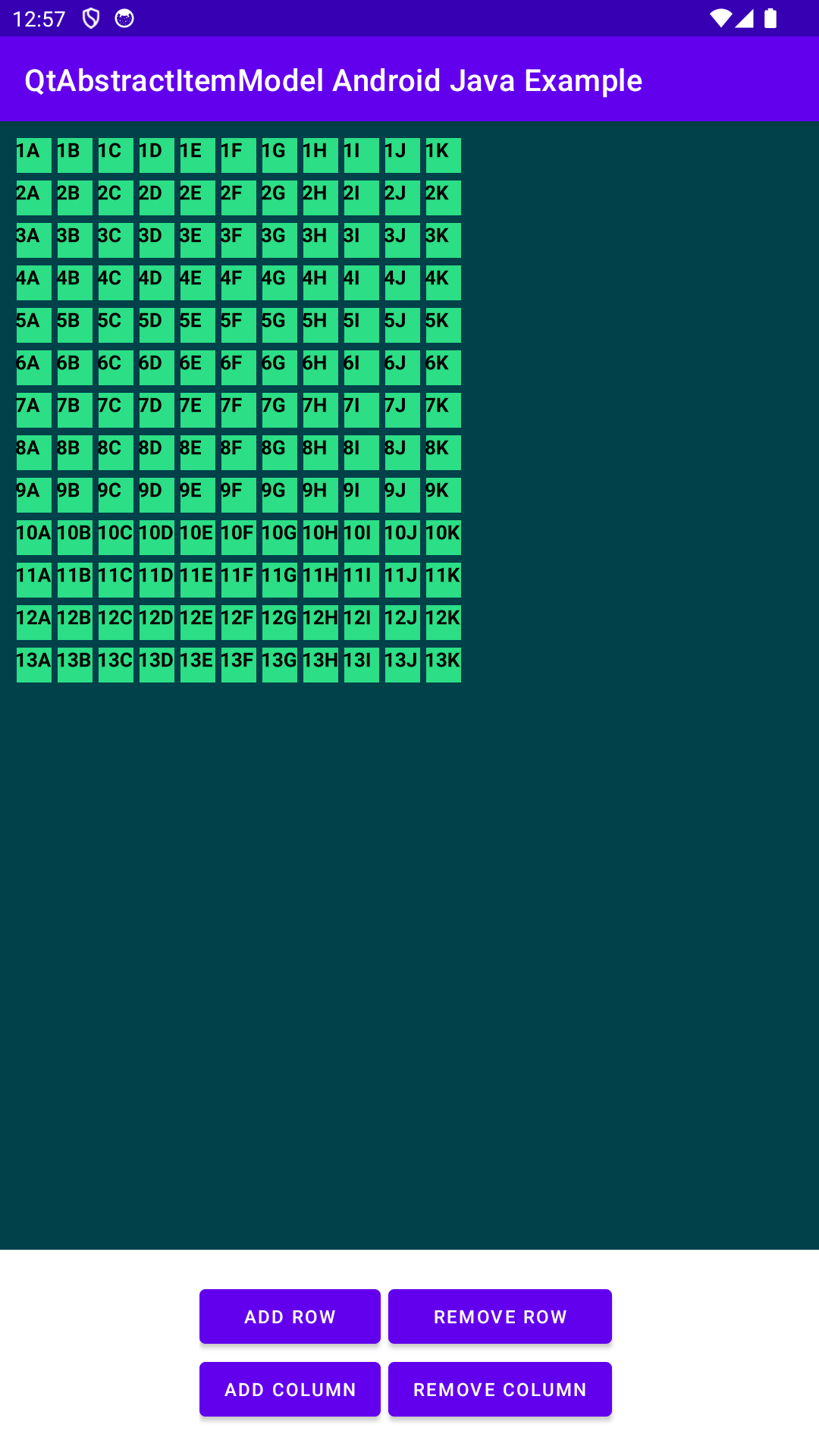
This example consists of two projects: an Android Studio project (qtabstractitemmodel_java) and a QML project (qtabstractitemmodel). You can import the QML project into an Android project.
The example shows how to handle complex data types between Java and QML. It demonstrates how to use the
QtAbstractItemModel
and
QtModelIndex
Java API classes. In QML, the data usage is demonstrated with the
TableView
item. In Java, data usage is demonstrated with a model of nested ArrayList items for rows and columns. For more information on how QML works, see
Qt QML
.
To run this example, you need Android Studio and
Qt Tools for Android Studio
on top of a standard Qt for Android installation. Open qtabstractitemmodel_java in Android Studio and follow the instructions in
Qt Tools for Android Studio
to import the
qtabstractitemmodel
.
On the QML project side, the example uses a
Rectangle
as the root object. The
dataModel
property variable holds the data model created and delivered from the Java side.
Rectangle {
    id: mainRectangle
    property AbstractItemModel dataModel
TableView
displays our data model. On the
delegate
property, the example defines each cell item of the model with
文本
.
    TableView {
        id: tableView
        model: mainRectangle.dataModel
        anchors {fill: parent; margins: 20}
        columnSpacing: 4
        rowSpacing: 6
        boundsBehavior: TableView.OvershootBounds
        clip: true
        ScrollBar.vertical: ScrollBar {
           policy: ScrollBar.AsNeeded
        }
        ScrollBar.horizontal: ScrollBar{
           policy: ScrollBar.AsNeeded
        }
In the delegate, the example sets the
row
and
column
properties through the
QHash<int, QByteArray> QAbstractItemModel::roleNames() const
and
QtModelIndex index(int row, int column, QtModelIndex parent)
and
Object data(QtModelIndex qtModelIndex, int role)
methods of the model.
Calling these methods from QML means the execution takes place in the Qt qtMainLoopThread thread context.
见 QAbstractItemModel for a detailed description.
    TableView {
        id: tableView
        model: mainRectangle.dataModel
        anchors {fill: parent; margins: 20}
        columnSpacing: 4
        rowSpacing: 6
        boundsBehavior: TableView.OvershootBounds
        clip: true
        ScrollBar.vertical: ScrollBar {
           policy: ScrollBar.AsNeeded
        }
        ScrollBar.horizontal: ScrollBar{
           policy: ScrollBar.AsNeeded
        }
The Android Studio project (qtabstractitemmodel_java) contains one Activity class
MainActivity
and
MyDataModel
类。
The data model, c MyDataModel, extends
QtAbstractItemModel
类。
QtAbstractItemModel
is a wrapper for
QAbstractItemModel
.
As the methods of
MyDataModel
class are called from both, QML and Android sides, the execution occurs in both thread contexts, Qt qtMainLoopThread, and Android main thread contexts. You must ensure synchronization when accessing member variables in methods of the
MyDataModel
类。
First, the example initializes the model with a simple row and column mock data set. Note that this constructor method is called in the Android main thread context.
/*
* Initializes the two-dimensional array list with following content:
* [] [] [] [] 1A 1B 1C 1D
* [] [] [] [] 2A 2B 2C 2D
* [] [] [] [] 3A 3B 3C 3D
* [] [] [] [] 4A 4B 4C 4D
* Threading: called in Android main thread context.
*/
public MyDataModel() {
The example overrides the
QtAbstractItemModel
methods for different purposes. The columnCount() and rowCount() methods return the count of each in a model. The execution of each rowCount() occurs in both thread contexts, Qt qtMainLoopThread and Android main thread contexts.
/*
* Returns the count of columns.
* Threading: called in Android main thread context.
* Threading: called in Qt qtMainLoopThread thread context.
*/
@Override
synchronized public int columnCount(QtModelIndex qtModelIndex) {
    return m_columns;
}
/*
* Returns the count of rows.
* Threading: called in Android main thread context.
* Threading: called in Qt qtMainLoopThread thread context.
*/
@Override
synchronized public int rowCount(QtModelIndex qtModelIndex) {
    return m_dataList.size();
}
Method data() provides model data based on the role and index from Java to QML. The roleNames() method returns a hash matching numerical role values to their names as strings; in QML, we use these role names to fetch corresponding data from the model. The index() method returns the new model index. Method parent() should return a parent of the index. Still, as this example focuses on data without parent indices, we override the method and return an empty QtModelIndex(). As the methods are called from QML, the execution occurs in the Qt qtMainLoopThread thread context.
/*
* Returns the data to QML based on the roleNames
* Threading: called in Qt qtMainLoopThread thread context.
*/
@Override
synchronized public Object data(QtModelIndex qtModelIndex, int role) {
    switch (role) {
        case ROLE_ROW:
            Cell elementForRow = m_dataList.get(qtModelIndex.row()).get(qtModelIndex.column());
            String row = String.valueOf(elementForRow.getRow());
            return row;
        case ROLE_COLUMN:
            Cell elementForColumn = m_dataList.get(qtModelIndex.row()).get(qtModelIndex.column());
            String column = elementForColumn.getColumn();
            return column;
        default:
            Log.w(TAG, "data unrecognized role: " + role);
            return null;
    }
}
/*
* Defines what string i.e. role in QML side gets the data from Java side.
* Threading: called in Qt qtMainLoopThread thread context.
*/
@Override
synchronized public HashMap<Integer, String> roleNames() {
    HashMap<Integer, String> roles = new HashMap<>();
    roles.put(ROLE_ROW, "row");
    roles.put(ROLE_COLUMN, "column");
    return roles;
}
/*
* Returns a new index model.
* Threading: called in Qt qtMainLoopThread thread context.
*/
@Override
synchronized public QtModelIndex index(int row, int column, QtModelIndex parent) {
    return createIndex(row, column, 0);
}
/*
* Returns a parent model.
* Threading: not used called in this example.
*/
@Override
synchronized public QtModelIndex parent(QtModelIndex qtModelIndex) {
    return new QtModelIndex();
}
The example implements methods on the model side for
MainActivity
UI interaction to add and remove rows and columns. Calls begin, end, insert, and remove rows to update model indexes, like beginInsertRow(). Because the example uses the
QtAbstractItemModel
, it must call beginInsertRows() and endInsertRows() every time it inserts new rows into the model. The same applies to removal. As the methods are called from the Android side, the execution takes place in the Android main thread context.
/*
* Adds a row.
* Threading: called in Android main thread context.
*/
synchronized public void addRow() {
    if (m_columns > 0 && m_dataList.size() < MAX_ROWS_AND_COLUMNS) {
        beginInsertRows(new QtModelIndex(), m_dataList.size(), m_dataList.size());
        m_dataList.add(generateRow());
        endInsertRows();
    }
}
/*
* Removes a row.
* Threading: called in Android main thread context.
*/
synchronized public void removeRow() {
    if (m_dataList.size() > 1) {
        beginRemoveRows(new QtModelIndex(), m_dataList.size() - 1, m_dataList.size() - 1);
        m_dataList.remove(m_dataList.size() - 1);
        endRemoveRows();
    }
}
The example implements methods on the model side for
MainActivity
UI interaction to add and remove columns. Calls begin, end, insert, and remove columns to update model indexes, like beginRemoveColumn(). The same context awareness applies as with the add and remove row methods.
/*
* Adds a column.
* Threading: called in Android main thread context.
*/
synchronized public void addColumn() {
    if (!m_dataList.isEmpty() && m_columns < MAX_ROWS_AND_COLUMNS) {
        beginInsertColumns(new QtModelIndex(), m_columns, m_columns);
        generateColumn();
        m_columns += 1;
        endInsertColumns();
    }
}
/*
* Removes a column.
* Threading: called in Android main thread context.
*/
synchronized public void removeColumn() {
    if (m_columns > 1) {
        int columnToRemove = m_columns - 1;
        beginRemoveColumns(new QtModelIndex(), columnToRemove, columnToRemove);
        m_columns -= 1;
        endRemoveColumns();
    }
}
MainActivity
实现
QtQmlStatusChangeListener
interface to get status updates when the QML is loaded. It is also the main Android activity.
The example creates and initializes the data model. See also QtQuickView
private final MyDataModel m_model = new MyDataModel();
The example sets the UI button and its listeners to allow the users to interact with the model via the UI.
/*
* Returns the count of columns.
* Threading: called in Android main thread context.
* Threading: called in Qt qtMainLoopThread thread context.
*/
@Override
synchronized public int columnCount(QtModelIndex qtModelIndex) {
    return m_columns;
}
/*
* Returns the count of rows.
* Threading: called in Android main thread context.
* Threading: called in Qt qtMainLoopThread thread context.
*/
@Override
synchronized public int rowCount(QtModelIndex qtModelIndex) {
    return m_dataList.size();
}
The example starts loading the QML content. Loading happens in the background until the
ready
status is updated.
/*
* Returns the data to QML based on the roleNames
* Threading: called in Qt qtMainLoopThread thread context.
*/
@Override
synchronized public Object data(QtModelIndex qtModelIndex, int role) {
    switch (role) {
        case ROLE_ROW:
            Cell elementForRow = m_dataList.get(qtModelIndex.row()).get(qtModelIndex.column());
            String row = String.valueOf(elementForRow.getRow());
            return row;
        case ROLE_COLUMN:
            Cell elementForColumn = m_dataList.get(qtModelIndex.row()).get(qtModelIndex.column());
            String column = elementForColumn.getColumn();
            return column;
        default:
            Log.w(TAG, "data unrecognized role: " + role);
            return null;
    }
}
/*
* Defines what string i.e. role in QML side gets the data from Java side.
* Threading: called in Qt qtMainLoopThread thread context.
*/
@Override
synchronized public HashMap<Integer, String> roleNames() {
    HashMap<Integer, String> roles = new HashMap<>();
    roles.put(ROLE_ROW, "row");
    roles.put(ROLE_COLUMN, "column");
    return roles;
}
/*
* Returns a new index model.
* Threading: called in Qt qtMainLoopThread thread context.
*/
@Override
synchronized public QtModelIndex index(int row, int column, QtModelIndex parent) {
    return createIndex(row, column, 0);
}
/*
* Returns a parent model.
* Threading: not used called in this example.
*/
@Override
synchronized public QtModelIndex parent(QtModelIndex qtModelIndex) {
    return new QtModelIndex();
}
The example sets the data model when the QML content is loaded, and the status is ready.
/*
* Adds a row.
* Threading: called in Android main thread context.
*/
synchronized public void addRow() {
    if (m_columns > 0 && m_dataList.size() < MAX_ROWS_AND_COLUMNS) {
        beginInsertRows(new QtModelIndex(), m_dataList.size(), m_dataList.size());
        m_dataList.add(generateRow());
        endInsertRows();
    }
}
/*
* Removes a row.
* Threading: called in Android main thread context.
*/
synchronized public void removeRow() {
    if (m_dataList.size() > 1) {
        beginRemoveRows(new QtModelIndex(), m_dataList.size() - 1, m_dataList.size() - 1);
        m_dataList.remove(m_dataList.size() - 1);
        endRemoveRows();
    }
}
