注意: As of Qt 6.4, lightmap baking is in an early technical preview state. Changes to features, quality, and API are likely to happen in future releases.
Baked lightmaps allow pre-generating the direct lighting from lights such as DirectionalLight , PointLight ,和 SpotLight , including the shadows cast by the lights. At run time, instead of performing the appropriate calculations in the fragment shader, and, in case of shadows, generating the potentially costly shadow maps in real time, the pre-generated image map is sampled instead.
A lightmap is generated per Model . Even if a Model has multiple submeshes, and is therefore associated with multiple materials, there will be one single lightmap image generated for the entire model.
Lightmaps are generated using raytracing, which by nature provides proper occlusion ("light does not travel through walls"), and possibly more realistic shadows than the real-time techniques for lighting and shadow mapping.
More importantly, lightmaps also allow baking indirect lighting , providing a solution for global illumination. This takes light rays reflected from other surfaces in the scene into account.
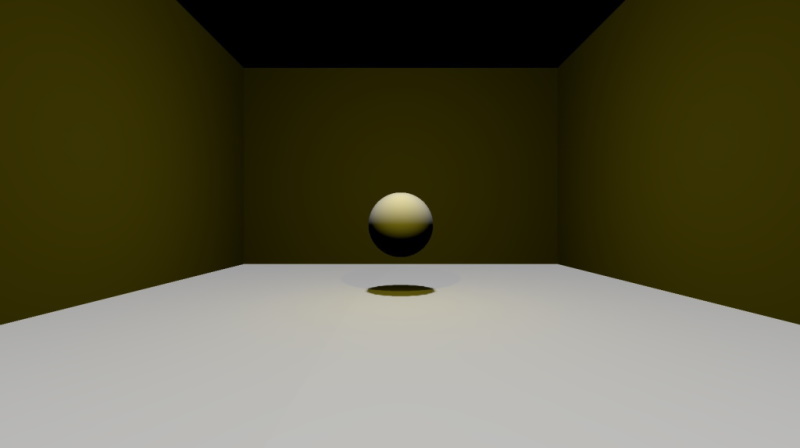
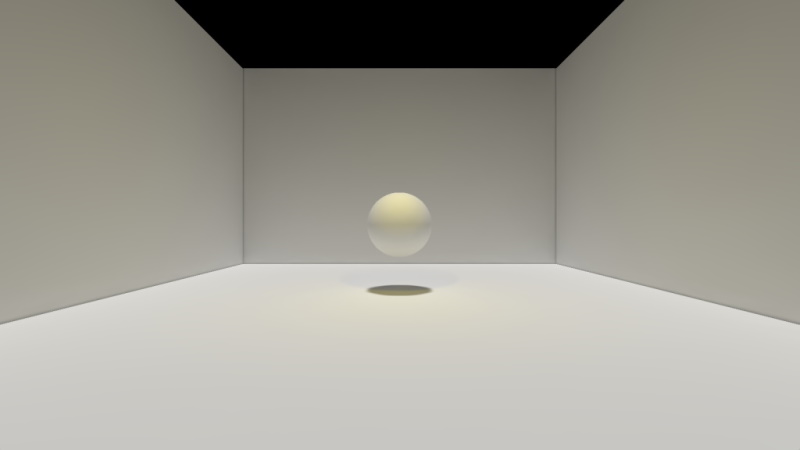
Below is a simple example. The scene contains four Rectangle and a Sphere model, with a DirectionalLight pointing downwards and a PointLight . The rectangle models are rotated 0 and 90 degrees, which exaggerates the limitations of the real-time lighting calculations because they are all either parallel or perpendicular to the DirectionalLight 's direction.
On the second image, the scene is rendered with lightmapping enabled, after having lightmaps baked for all five models. Both lights are set to fully baked, meaning both direct and indirect illumination is baked. Indirect lighting uses 256 samples and a maximum of 3 bounces . The resulting lightmaps were then denoised. This gives a significantly more realistic image.
Real-time lighting
Fully baked lighting
Below is a snippet that shows how the lightmapped results were achieved. The difference lies in the usedInBakedLighting , bakeMode ,和 bakedLightmap properties. For this example, the lightmap size has been reduced using the texelsPerUnit property, to save disk space and reduce application load times.
DirectionalLight {
    bakeMode: Light.BakeModeAll
    eulerRotation.x: -90
    brightness: 0.5
    castsShadow: true
    shadowFactor: 75
}
PointLight {
    bakeMode: Light.BakeModeAll
    y: 200
    z: 100
    color: "#d9c62b"
    castsShadow: true
    shadowFactor: 75
}
Model {
    usedInBakedLighting: true
    bakedLightmap: BakedLightmap {
        enabled: true
        key: "sphere1"
    }
    source: "#Sphere"
    materials: PrincipledMaterial { }
    y: 100
}
Model {
    usedInBakedLighting: true
    bakedLightmap: BakedLightmap {
        enabled: true
        key: "rect1"
    }
    source: "#Rectangle"
    materials: PrincipledMaterial { }
    eulerRotation.x: -90
    scale: Qt.vector3d(10, 10, 10)
}
// ... three additional Rectangle models, with rotations 0, 90, and -90
The above example used fully baked lights. A light can also be configured to only use baked lighting for indirect illumination, while performing direct lighting and shadow mapping in real time. In the below scene there are 5 point lights, all of which are set to BakeModeIndirect for the second screenshot. While the direct lighting and shadows look identical, the second image looks significantly better due to a degree of global illumination added.
Real-time lighting

With baked indirect lighting added

Lights contributing to baked lighting have their bakeMode property set to either Light.BakeModeIndirect or Light.BakeModeAll . The latter indicates that both the direct and indirect contribution for that particular light is coming from the lightmap. The direct contribution always includes shadows as well. On the other hand, if the intention with the lightmap is only to add indirect illumination to the scene for a particular light, while still having direct lighting calculated (and perform shadow mapping) in real time, then the light should use Light.BakeModeIndirect 代替。
注意: Lightmaps are, generally speaking, suitable for models that are static when it comes to transform, geometry, and materials. The same applies to the lights participating in the baked lighting.
For example, a scene that rotates a Model by animating the eulerRotation property will give visually incorrect results when applying a lightmap to that Model . The rendering results for that particular Model will be incorrect, as the pre-generated lightmap only captures one single rotation state for the object. The same would be true, taking another example, if the material for one of the model's submeshes dynamically changes its baseColor property based on time (animation) or some user interaction. The lightmap can only capture one given material baseColor . The same is true for lights. For example, a DirectionalLight that rotates, changes its brightness, color, etc. over time is not suitable for baked lighting.
注意: On the other hand, it is always a designer choice when to use lightmapping. Especially with BakeModeIndirect lights, it is likely that there will be scenes where the results are still visually satisfying, even though some of the objects in the lightmapped scene employ dynamic behavior.
Lightmapping is a complex engine and tooling feature. It replaces and reimplements several pieces of the engine's rendering pipeline. It works with a fundamentally different rendering model when baking lightmaps, while still consuming and interoperating with the same scene structure, asset data, and engine data structures. The raytracing-based results will often outclass the real-time alternatives, sometimes significantly, which comes at the expense of limitations, such as the mandatory static-ness of the models and lights involved, and, sometimes, quality and rendering artifact issues that are specific to lightmapping.
In practice it will be an artistic choice by the designers what type of lighting to use, and when. All three bakeMode settings have their uses, and complex, larger scenes may very well utilize all three for different lights, depending on what is deemed suitable for a given section of the scene, and what sort of models, materials, and dynamic behavior are present. Lightmapping is not a simple on/off type of toggle switch that can be enabled for any scene and application, but a powerful feature that assumes careful evaluation of the lighting needs of a given scene, and often requires the scene contents and behavior to be designed accordingly, combined with a test-and-tune loop where different lightmap baking and quality settings are explored and tested before deciding on the final approach and the related settings.
注意:
Lightmaps do not support two-sided surfaces. With real time lighting a material with a
cull mode
of
Material.NoCulling
automatically inverts the normal as appropriate based on the facing of the fragment. This is not an option for lightmaps since lightmap baking does not operate in view space. Therefore, avoid baked lighting for models that would rely on this.
Properties and types relevant for baking lightmaps, meaning the offline process of generating the image maps that capture direct and indirect lighting and can be used by the renderer in subsequent runs of the application:
As of Qt 6.4, the lightmap baking process has to be triggered manually. Whenever the command line argument
--bake-lightmaps
is present, or the environment variable
QT_QUICK3D_BAKE_LIGHTMAPS
被設為
1
(or another non-zero value), the engine will work in baking mode and exit the application once baking has completed. The steps of the baking process can be followed by checking the messages printed on the debug output. The result is a binary file (
lightmaps.bin
by default) written to the current working directory containing all the baked lightmaps in the scene. There will also be a
.raw
file created that contains the whole lightmap and some extra data that is needed for denoising. Each lightmap is uniquely identified in the file by the unique key from
BakedLightmap::key
.
Preparing a lightmapped scene takes the following main steps:
qml
tool. Once baking completes, the progress of which can be followed on the console/debug output, the application exits.
As of Qt 6.5, a runtime solution is provided interactively through the DebugView . Under Tools there is now a button that when pressed will trigger the baking process. A window will pop up showing the current process. Canceling can be done by either hitting the cancel button or closing this window. When complete, it will write the lightmap binary to the current directory.
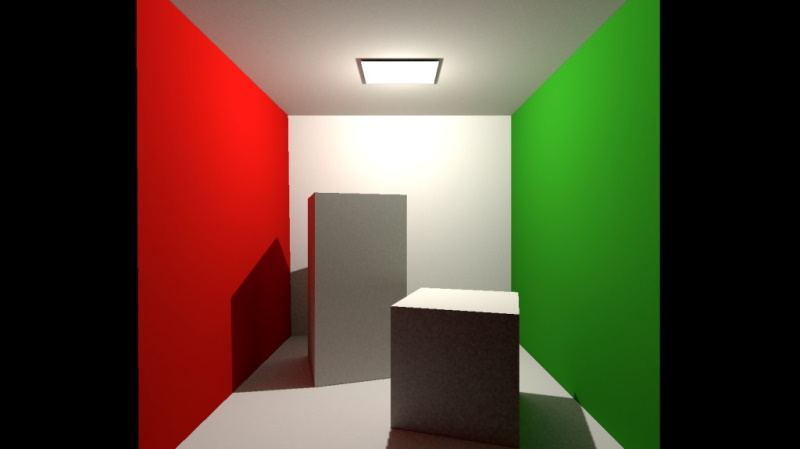
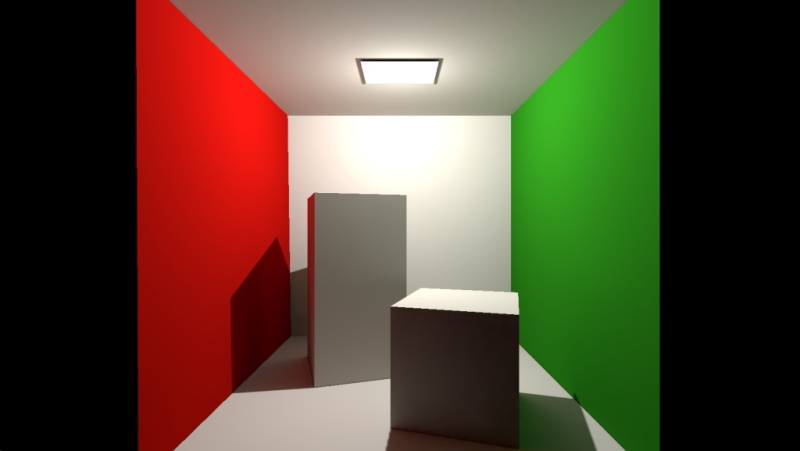
Below is an example of a Cornell box scene, rendered first using the lightmap baked with 256 samples and a maximum of 3 bounces . In the second example, the generated image file has been denoised, and the results look significantly better, with the noise mostly gone.
Original
Denoised
Denoising is done automatically on every baked lightmap. It is possible to do just denoising, if an existing baked
.raw
lightmap file exists in the working directory, by clicking the
Denoise
button in the
DebugView
. It is also possible to denoise by calling the application with the
--denoise-lightmaps
argument. To tweak the strength of the denoising, the
denoiseSigma
property can be used.
Lightmap UV coordinates do not use the same UV data as regular texturing. When rendering with lightmaps, neither the UV0 nor UV1 data is used by the renderer when sampling the lightmap. Instead, there is an additional, dedicated UV channel in the mesh, containing UV charts laid out in a manner that is suitable for the purposes of lightmapping. This involves avoiding overlaps and having padding where appropriate. For regular UV data there are no such requirements, and one may very well want to use the same U and V coordinates for more than one vertex.
The process of generating a suitable UV set is called lightmap UV unwrapping. Qt will perform this when baking lightmaps and store the resulting mesh in the lightmaps file so that a compatible mesh is always loaded and used for the generated lightmap. This means that, if a model will always use baked lighting, then the source mesh file does not need to be shipped with the application.
For each model, including all its submeshes, the lightmap baking process will determine a suitable lightmap texture size during the lightmap UV generation phase. This has an impact on quality, performance, and resource usage (both on disk and in memory).
The default is often suitable and needs no adjustment, especially for models with medium to high complexity.
For very simple models it may be desirable to manually reduce the size, however, because a smaller lightmap size could still provide visually good looking results, while reducing the asset (lightmap image) sizes saves both disk space and memory. To do this, set the texelsPerUnit to a suitably small number. The actual lightmap width and height will then, depending on the size and the geometry of the model, try to approximate the texel density so that it matches texelsPerUnit .
When changing the value, one should always rebake the lightmaps and visually inspect the results in order to evaluate the effects of the changed lightmap size.
Properties and types relevant when using the pre-baked lightmaps at run time:
Once the baking has successfully completed, running the application normally (without the command-line argument or environment variable set) will now pick up the generated lightmap images and render correctly, which is not possible until the lightmaps have been baked first. If desired, the application can place those in a different location, or ship them as part of the executable via the Qt Resource System. This is enabled by the source 特性。
Taking the example code with the sphere and four rectangles from above, the baking process generates a
lightmaps.bin
file containing all the baked meshes and lightmaps. The application needs to ship this file, so that it can be found by the engine, in the location specified by
source
.
