QML 客戶端通信通過 WebSocket 采用 QWebChannel 服務器。
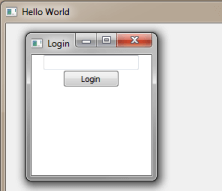
ChatClient QML 提供簡單 QWebChannel 客戶端,實現使用 JavaScript 和 QML。
This example shows how you can use the basic elements with the client JavaScript implementation of
QWebChannel
,像連接到信號 (
newMessage
),調用槽 (
sendMessage
),及處理特性改變 (
userList
).
客戶端初始化
WebSocket
connection to the chat server at port 12345 on localhost. When the WebSocket opens, a WebChannel object is created, taking the WebSocket as first argument and a callback function as the second argument. When the callback is called, the client receives an object named
chatserver
, containing all the necessary signals, slots, and properties for implementing a chat client. The callback function connects
userListChanged
,
newMessage
,和
keepAlive
在
chatserver
object with separate functions handling those signals, and then it calls
show
on
loginWindow
.
The
Window
with
loginWindow
as id handles the login procedure. It contains a
LoginForm
defined in LoginForm.ui.qml. When you press the button, it calls the
login
function on the
chatserver
object with the login name and and a callback function as arguments. This callback function handles both if the login succeeds or fails.
After login, the client uses a
MainForm
, defined in MainForm.ui.qml, with
mainUi
as id, to post messages using the
sendMessage
slot, read messages using the
newMessage
signal, and to view the names of all connected users using the
userList
property. Also, the client responds to the server's
keepAlive
signal in order for the server to detect disconnected clients and remove them from the
userList
特性。
客戶端能夠工作於 Qt WebChannel ChatServer 範例 .
另請參閱 Qt WebChannel ChatServer 範例 and Qt WebChannel ChatClient HTML 範例 .
