Using Graphs for 2D in a Widget based application.
Graphs 2D support only Qt Quick applications. This example shows how to display a simple 2D pie graph in a Qt Widgets applications using a QQuickWidget .
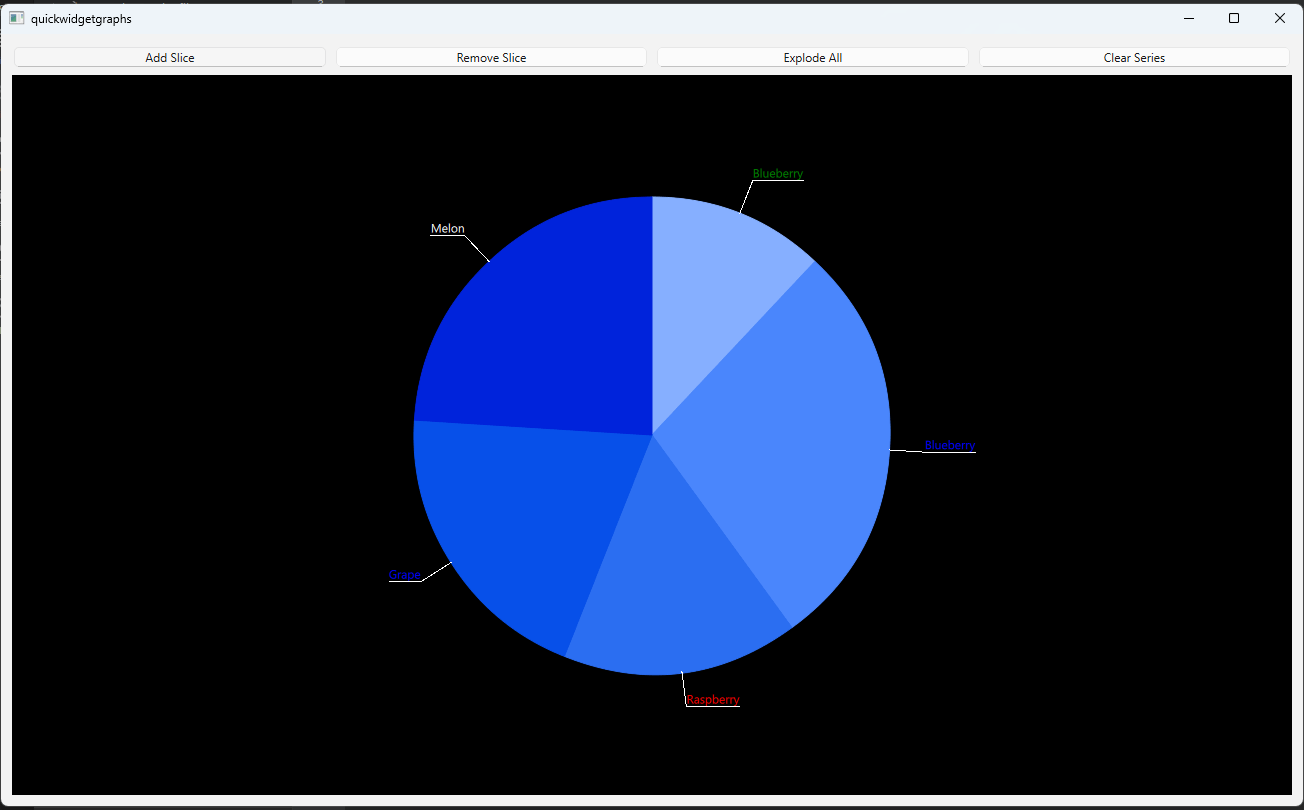
要运行范例从 Qt Creator ,打开 欢迎 模式,然后选择范例从 范例 。更多信息,见 Qt Creator:教程:构建并运行 .
PieWidget
class implements the main view of the demo application. In the
PieWidget
class, instantiate the widgets used to implement the application layout and UI elements.
m_quickWidget = new QQuickWidget;
m_widget

=


new


QWidget


;
m_vLayout

=


new


QVBoxLayout


(m_widget);
m_hLayout

=


new


QHBoxLayout


;
...
PieGraph
class is used to handle logic for adding and removing slices, and have other functionalities.
m_pieGraph = new PieGraph;
...
void PieWidget::initializeButtons()
{
    QPushButton *addButton = new QPushButton("Add Slice");
    QPushButton *removeButton = new QPushButton("Remove Slice");
    QPushButton *explodeButton = new QPushButton("Explode All");
    QPushButton *clearButton = new QPushButton("Clear Series");
    m_hLayout->addWidget(addButton);
    m_hLayout->addWidget(removeButton);
    m_hLayout->addWidget(explodeButton);
    m_hLayout->addWidget(clearButton);
    QObject::connect(addButton, &QPushButton::clicked, m_pieGraph, &PieGraph::onAddSlice);
    QObject::connect(removeButton, &QPushButton::clicked, m_pieGraph, &PieGraph::onRemoveSlice);
    QObject::connect(explodeButton, &QPushButton::clicked, m_pieGraph, &PieGraph::onExplode);
    QObject::connect(clearButton, &QPushButton::clicked, m_pieGraph, &PieGraph::onClearSeries);
}
The
PieGraph
class implements all the logic for manipulating Graph data in this example.
PieGraph
class, declare a
pieSeries
特性。
...
Q_PROPERTY(


QPieSeries


*

pieSeries READ pieSeries WRITE setPieSeries NOTIFY pieSeriesChanged FINAL)
...
...
public:
...
    void appendSlice();
    void removeSlice();
    void explodeSlices();
    void clearSeries();
    void fillSliceInfo();
public Q_SLOTS:
    void onAddSlice();
    void onRemoveSlice();
    void onExplode();
    void onClearSeries();
...
...
m_pieSeries = new QPieSeries;
fillSliceInfo();
for (int i = 1; i < 5; ++i) {
    QPieSlice *slice = new QPieSlice;
    slice->setValue(m_sliceInfo.value.at(QRandomGenerator::global()->bounded(0, 6)));
    slice->setLabel(m_sliceInfo.label.at(QRandomGenerator::global()->bounded(0, 6)));
    slice->setLabelColor(m_sliceInfo.color.at(QRandomGenerator::global()->bounded(0, 6)));
    m_pieSeries->append(slice);
}
m_pieSeries->setLabelsVisible(true);
...
appendSlice
函数创建
QPieSlice
, sets some of its properties and then appends it to the pie series.
Notice that even if you have set labels visibility to
true
, this does not work on slices added later to the pie series. You need to set visibility to
true
on creation for every added slice.
QPieSlice *slice = new QPieSlice;
slice->setValue(m_sliceInfo.value.at(QRandomGenerator::global()->bounded(0, 6)));
slice->setLabel(m_sliceInfo.label.at(QRandomGenerator::global()->bounded(0, 6)));
slice->setLabelColor(m_sliceInfo.color.at(QRandomGenerator::global()->bounded(0, 6)));
slice->setLabelVisible(true);
m_pieSeries->append(slice);
removeSlice
function, call
QPieSeries::remove
().
explodeSlices
function, loop through all slices and set
QPieSlice::setExploded
() 到
true
or
false
depending on current state.
clearSeries
function, call
QPieSeries::clear
(). This will delete all slices from your pie series. Note that this function does not delete a pie series itself.
To customize the GraphsView theme, create a custom QGraphsTheme .
auto theme = new QGraphsTheme(m_quickWidget);
theme->setTheme(QGraphsTheme::Theme::BlueSeries);
theme->setLabelBorderVisible(true);
theme->setLabelBackgroundVisible(true);
theme->setBackgroundColor(Qt::black);
使用 QQuickWidget::loadFromModule () to load the GraphsView . Initialize its theme and seriesList properties by passing the QGraphsTheme and QPieSeries to QQuickWidget::setInitialProperties ().
m_quickWidget->setResizeMode(QQuickWidget::SizeRootObjectToView);
m_quickWidget->resize(1280, 720);
m_quickWidget->setInitialProperties({
    {"theme", QVariant::fromValue(theme) },
    {"seriesList", QVariant::fromValue(m_pieGraph->pieSeries()) }
});
m_quickWidget->loadFromModule("QtGraphs", "GraphsView");
