Demo showcasing the use of QtJenny.
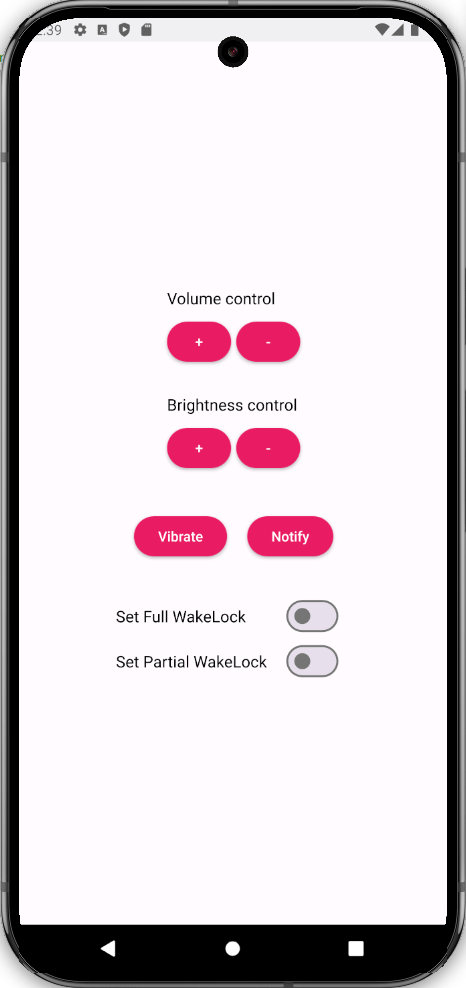
This demo showcases the use of QtJenny and uses it to generate C++ proxy classes to access Android APIs from C++ code. The generated C++ classes are used in the demo to perform actions such as adjusting the volume and brightness, activating and deactivating wake locks , sending notifications and triggering vibrations. These actions are part of Android APIs that Qt doesn't implement.
Generating C++ classes using QtJenny removes the need to write JNI code manually.
The demo contains two parts, a Qt project called
qtjenny_consumer
and an Android Studio project called
qtjenny_generator
。
qtjenny_consumer
contains the application UI and the code using the generated C++ headers. The
qtjenny_generator
contains the class annotations and
Gradle
configurations for QtJenny.
To launch the demo, you need to run the
qtjenny_consumer
project. During the
CMake
configuration of
qtjenny_consumer
the code generation is triggered automatically by a call to execute a
gradlew
task in the
qtjenny_generator
project directory.
if (ANDROID)
    if (CMAKE_HOST_SYSTEM_NAME STREQUAL "Windows")
        set (gradlew_cmd "gradlew.bat")
    else()
         set (gradlew_cmd "./gradlew")
    endif()
    set (gradlew_arg "--rerun-tasks")
    set (gradlew_task "kaptReleaseKotlin")
    execute_process(COMMAND ${gradlew_cmd} ${gradlew_arg} ${gradlew_task}
    WORKING_DIRECTORY "${PROJECT_SOURCE_DIR}/qtjenny_generator")
else()
    message(FATAL_ERROR "Example only works on Android")
endif()
Generation of the C++ headers starts when
qtjenny_generator
is built, this triggers an annotation processor that processes the annotations in
GenerateCppCode.kt
.
@NativeClass
@NativeProxy(allMethods = false, allFields = false)
@NativeProxyForClasses(namespace = "android::os", classes = [BatteryManager::class, VibratorManager::class, Vibrator::class, VibrationEffect::class, Context::class, PowerManager::class, PowerManager.WakeLock::class])
@NativeProxyForClasses(namespace = "android::view", classes = [Window::class, WindowManager.LayoutParams::class])
@NativeProxyForClasses(namespace = "android::media", classes = [AudioManager::class])
@NativeProxyForClasses(namespace = "android::drawable", classes = [android.R.drawable::class])
@NativeProxyForClasses(namespace = "android::app", classes = [Activity::class, Notification::class, Notification.Builder::class, NotificationChannel::class, NotificationManager::class])
@NativeProxyForClasses(namespace = "android::provider", classes = [Settings.Global::class, Settings.System::class, Settings::class])
@NativeProxyForClasses(namespace = "android::content", classes = [Intent::class])
The annotation processor then generates the C++ headers in the
qtjenny_output
directory. Those C++ headers contain the needed JNI boilerplate code to access the Android APIs used in this demo.
The app level
build.gradle
script in
qtjenny_generator
specifies the arguments for
kapt
which QtJenny implements. These arguments are parsed in the QtJenny compiler and used in the generation process.
kapt {
    arguments {
        // pass arguments to jenny
        arg("jenny.outputDirectory", project.file("../../qtjenny_output"))
        arg("jenny.templateDirectory", project.file("../templates"))
        arg("jenny.headerOnlyProxy", "true")
        arg("jenny.useJniHelper", "false")
        arg("jenny.useTemplates", "true")
    }
}
The
qtjenny_consumer
is the Qt Quick Application that uses the C++ headers generated by the
qtjenny_generator
. We include the generated headers in
backend.h
file and use them in
backend.cpp
to access various Android APIs.
The app's UI consists of one
Main.qml
file, which contain the following controls and actions.
You can activate and deactivate either full or partial wake locks, using
Switches
. When checked they invoke a function in
backend.cpp
which activates the wake lock and set the wake lock status text.
if (checked) {
    myBackEnd.setFullWakeLock()
    if (partialWakeLock.checked)
        partialWakeLock.click()
    mainWindow.wakeLockStatus = "Full WakeLock active"
Setting partial wake lock uses the
WakeLockProxy
class that connects to
PowerManager.WakeLock
Android API. Setting full wake lock is done by using
WindowProxy
that connects to
Window
Android API.
You can trigger a vibration using the
vibrate
函数在
backend.cpp
, that uses
VibrationEffectProxy
,
VibratorManagerProxy
and
VibratorProxy
classes to perform the vibration.
Sending a notification is handled in the
notify
函数在
backend.cpp
, with use of the
NotificationManagerProxy
类。
The notification is already created during the
Backend
class initialization in
createNotification
函数。
Adjsting brightness is handled in the
adjustBrightness
函数在
backend.cpp
, with the use of
IntentProxy
,
SettingsProxy
,
SystemProxy
,
ContextProxy
,
LayoutParamsProxy
and
WindowProxy
类。
Adjusting volume is handled in the
adjustVolume
函数在
backend.cpp
, with the use of
GlobalProxy
and
AudioManagerProxy
类。
