汽车模型范例演示使用 Qt Quick 3D cameras, extended scene environment and Qt Quick 3D.
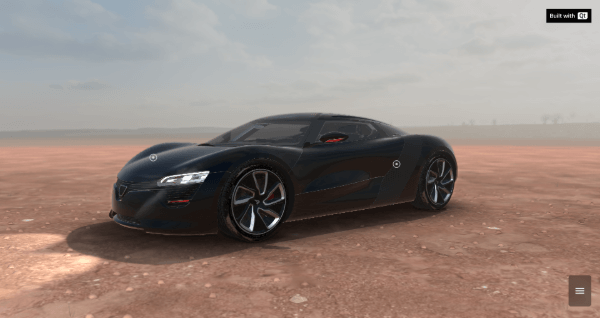
汽车配置器 shows a car in different scene environments and in different colors. It's implemented with QML and relies on a number of Qt modules, most prominently Qt Quick and Qt Quick 3D .
要运行范例从 Qt Creator ,打开 欢迎 模式,然后选择范例从 范例 。更多信息,见 Qt Creator:教程:构建并运行 .
This example does download some assets from an internet server at runtime. Therefore, you will need an internet connection when launching it for the first time.
You can interact with the car model in two modes:
The camera perspective moves along different paths and shows different views of the car.
Users can rotate around the car using a mouse or touch input.
The camera moves to its initial position.
There are four scene environments available for this example:
The garage environment serves as the default setting and provides a clean, industrial presentation space:
ExtendedSceneEnvironment {
    id: showhall
    glowBloom: 0
    glowStrength: 0
    glowEnabled: false
    depthOfFieldFocusDistance: 600
    depthOfFieldFocusRange: 627
    depthOfFieldBlurAmount: 19.97
    depthOfFieldEnabled: false
    exposure: 1.2
    lightProbe: _Hall
    backgroundMode: SceneEnvironment.SkyBox
    tonemapMode: SceneEnvironment.TonemapModeLinear
    probeExposure: 1
    depthPrePassEnabled: false
    depthTestEnabled: true
    antialiasingMode: SceneEnvironment.MSAA
    antialiasingQuality: perfMode ? SceneEnvironment.Medium : SceneEnvironment.VeryHigh
    clearColor: "#000000"
    probeHorizon: 0.5
    Texture {
        id: _Hall
        source: rootWindow.downloadBase + "/content/images/HDR/_Hall.ktx"
        mipFilter: Texture.Linear
        scaleV: 2
    }
    temporalAAEnabled: false
}
The desert environment features HDR sky dome lighting, atmospheric fog effects, and specialized ground geometry:
ExtendedSceneEnvironment {
    id: desert
    lightProbe: _Desert
    glowStrength: 2
    glowBloom: 0.11191
    glowEnabled: true
    depthPrePassEnabled: false
    probeExposure: 1.5
    tonemapMode: SceneEnvironment.TonemapModeLinear
    backgroundMode: SceneEnvironment.SkyBox
    depthTestEnabled: true
    antialiasingMode: SceneEnvironment.MSAA
    antialiasingQuality: perfMode ? SceneEnvironment.Medium : SceneEnvironment.VeryHigh
    clearColor: "#000000"
    probeHorizon: 0.5
    temporalAAEnabled: false
    fog: Fog {}
}
The animated environment showcases dynamic content with video wall effects:
ExtendedSceneEnvironment {
    id: videoRoom
    aoSoftness: 0
    aoDistance: 0
    probeExposure: 1
    tonemapMode: SceneEnvironment.TonemapModeLinear
    antialiasingMode: SceneEnvironment.MSAA
    antialiasingQuality: perfMode ? SceneEnvironment.Medium : SceneEnvironment.VeryHigh
    clearColor: "#000000"
    depthPrePassEnabled: false
    backgroundMode: SceneEnvironment.Color
    depthTestEnabled: true
    probeHorizon: 0
    Vignette {
        id: vignette
        vignetteStrength: 15
        vignetteColor: Qt.vector3d(0, 0, 0)
    }
    temporalAAEnabled: false
}
The studio environment provides a clean, professional presentation setting with controlled lighting:
ExtendedSceneEnvironment {
    id: studio
    aoEnabled: false
    antialiasingQuality: SceneEnvironment.VeryHigh
    antialiasingMode: SceneEnvironment.MSAA
    tonemapMode: SceneEnvironment.TonemapModeLinear
    probeExposure: 1
    probeHorizon: 1
    clearColor: "#000000"
    temporalAAEnabled: false
    depthTestEnabled: true
    backgroundMode: SceneEnvironment.Color
    depthPrePassEnabled: false
}
There are four colors available for the car:
You can turn the lights of the car on and off.
另请参阅 All Qt examples .
